Night Market: MiniMart Experience Expansion
Official rulebook: Talon Strikes Studios LLC · PDF
Night Market: MiniMart Experience Expansion Rulebook
Table of Contents
Table of Contents
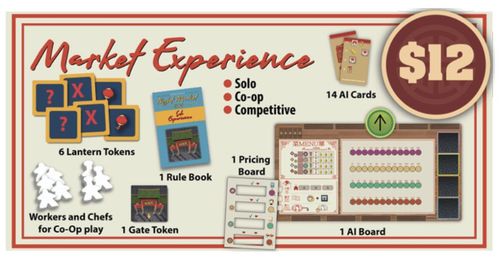
Additional Components
- 1 AI Board
- 1 Pricing Board
- 14 AI Action Cards (5 Starting, 4 High Demand, 5 Advanced)
- 1 AI Lantern Action Aid
- 1 Gate Tile
- 6 Lantern Action Tokens (3 'X' tokens, 3 Lantern tokens)
- 4 Top Seller Tokens (1 Bubble Tea, 1 Stinky Tofu, 1 Sausage, 1 Chicken-Steak)
Setup
1. Play Area Setup
Setup the City Board in the same manner as a 2-player game, and then place the Gate Tile in the upper-left corner of the City Board.
Setup your Player Board in the same manner as a regular game, randomly choosing 1 Customer Card. Place your Turn Marker in the left-most position, indicating that you will go first in Spring. Place the AI's turn marker after yours.
Customers: Remove one of each Customer card type in each season (for a total of 4 cards per season).
Stalls: Remove one of each 2-slot Stall and 3-slot Stall. Only use four 4-slot Stalls.
Season Goals: Remove Most Money Earned, Most Items Sold, and Most Popularity goals from both sets. Then randomly select the goals for each season from the remainder. Setup the Seasonal Attractions as usual.
2. AI Board Setup
Refer to the diagram for the AI Board Setup. Steps indicated by the diamond have additional details below.
- A: 1 AI Board
- B: 1 Starting Customer Card (chosen randomly)
- C: 4 Signature Markers (AI color)
- D: 1 Lantern Action Marker
- E: 5 Worker Meeples (AI color)
- F: 3 Chef Meeples (AI color)
- G: 1 AI Lantern Action Aid
- Place the Pricing Board so it is showing the 5 cheapest prices in each row.
- Shuffle the 6 Starting AI Action Cards and place 5 randomly face down above the card slots on the AI Board. (Printed as "6 Starting AI Action Cards" here, while the Additional Components list gives 5 Starting AI Action Cards and the step places 5. Transcribed as printed.)
- Take 3 'X' Lantern Action Tokens and 2 Lantern Action Tokens and flip them face down (to their '?' side). Shuffle them, and place them randomly above each AI Action card.
- Place the remaining 1 Lantern Action Token (to be used in Fall/Winter), 4 Top Seller Tokens and 4 High Demand Action Cards beside the AI board.
AI Turn
On the AI's Turn
The AI resolves its turn as follows:
- Flip the left-most '?' Lantern Action Token:
- A. If it is an 'X', proceed to step 2.
- B. If it is a Lantern, place the AI's worker according to the AI Lantern Action Aid card.
- Flip the AI Action Card beneath the flipped Lantern Action Token and resolve the AI's worker placement.
AI Action Cards
The AI uses the AI Action Cards to search for a non-Lantern district to place its workers. The AI will follow the steps listed on the card in order until it finds a district that satisfies the condition. The AI will start its search from the Gate Token on the City Board, moving vertically to the opposite side of the city until it reaches the end of the column, and then moving to the next column until it finds a district.
Here is an example with a Sausage AI Action Card:
- The first district from which the AI will make a combo that earns the AI a Sausage.
- The first district from which the AI will make a combo (that earns any goods).
- The first Sausage District (if no combos are available).
Note: If the AI cannot find a Sausage District after following these 3 steps, the AI will place a worker on the first empty district starting from the Gate Token.
Example 1: The AI starts its search from the Gate Token in the top left corner until it reaches a Chicken Steak District, since it is able to combo with its other worker AND that combo is the first combo that earns the AI a Sausage.
Example 2: This is the AI's first worker placement this season and therefore cannot make any combos. The AI searches for the first non-Lantern Sausage District starting from the Gate Token in the upper left corner.
Note: The AI must skip the Sausage Lantern District in the bottom left corner.
AI Lantern Action
When a flipped Lantern Action Token reveals a Lantern icon, the AI searches for an available Lantern District following the AI Lantern Action Aid. This is the only time the AI can land on a Lantern District. The AI resolves its search in the following order:
- Move the Gate Token clockwise to the next corner of the City Board.
- The first Lantern District from which the AI can form a combo.
- The first Lantern District.
- If no Lantern Districts are available (they are all occupied), conduct the AI's turn following the AI Action Card beneath the recently flipped Lantern Action Token.
Example 1: First, the player moves the Gate Token clockwise to the next corner of the City Board. Then, the AI starts its normal search pattern until it reaches the first Lantern District from which it forms a combo with its previously placed worker.
Example 2: The player first moves the Gate Token clockwise and begins the AI search pattern from that corner. Since the AI cannot form a combo from any unoccupied Lantern Districts, the AI places its worker on the first Lantern District it passes.
Performing AI Lantern Actions
When the AI lands on a Lantern District, it performs the action at the current location of its Lantern Action Marker (the AI starts with the marker on the Attract Customers location). After it performs the action, it moves the marker up one space. After the AI has performed the Lantern Action of the top-most space (Hire Chef), the marker returns to the location beside the Attract Customers action to repeat the cycle.
The AI performs its Lantern Actions in the following manner:
Attract Customers: The AI will obtain the Customer whose primary Good/Signature Dish matches that of the current Season Goal. If that Customer has been taken, the AI simply obtains the left most Customer in the display. Like the player, the AI places the Customer in its left-most, empty Customer slot.
Build Stalls: The AI will obtain 1 Stall, with the fewest slots available, that matches the Good/Signature Dish of the current Round goal, and 1 Regular 4-slot Stall. If the given Stall(s) are no longer available, the AI will not obtain the Stall.
Hire Chefs: The AI hires a Chef, placing it in the first non-Lantern district where the AI achieves a combo starting from the Gate Token.
AI Night Phase
1. Selling Goods
When the AI obtains goods, it immediately places the good(s) on the left-most available slot of the good's row on the Pricing Board. The AI does not sell goods individually. Rather, the AI sells all its goods for the total price indicated above its right-most good in each row.
Example: The AI would earn a total of $8 for the 3 Bubble Teas sold. It would also satisfy 1 of its Customer for passing the checkmark icon.
The AI can also unlock additional bonuses the further it has progressed down each row:
- Satisfy Customer (checkmark): The AI automatically satisfies its right-most customer for each checkmark earned.
- Increase Popularity (heart): The AI gains 1 Signature Dish Popularity on the track for the respective dish.
Additionally, the AI can earn extra bonuses if it has progressed to the further spot on each row:
- Sell each Bubble Tea in this slot for $10 (any number of times).
- Place a Stinky Tofu in the row with the fewest goods and sell as if it was that good (any number of times).
- Immediately gain $20 (only once).
- Gain 2 popularity on the Signature Popularity track that matches the current round goal Good/Signature Dish (only once).
2. Gain Signature Popularity
The AI does not sell Signature Dishes and thus does not earn any money for Signature Dishes. Consequently, the AI gains different bonuses than the player when advancing on the Signature Popularity tracks:
- Top Seller: Affix token so it is covering the left-most goods slot of the respective row. The AI cannot sell this good for money, but all goods in this row start at a higher price. The token remains in that slot for the rest of the game.
- High Demand Cards: Take the corresponding High Demand card and shuffle it into the AI Action Card deck. These cards will remain a part of the AI Action Card deck for the remainder of the game.
- Increase Pricing: Slide the Pricing Board one additional space to the right at the end of the season.
3. Cleanup
Season Goal: The AI evaluates the seasonal in the same manner as the player. However, the AI will always take the points tile or the upgrade tile, prioritizing which one earns the AI more Points. The AI cannot use Upgrades but instead gains points for each Upgrade icon earned.
Increase Prices: After selling and discarding goods, the AI must move the Pricing Board one space to the right. The AI moves additional spaces for any Increase Pricing bonuses earned from its Signature Dish track.
Move Chefs: Like the player, the AI will move its Chefs at the end of the Season. The AI swaps the Chef meeple with the first worker(s) encountered on a non-Lantern District following the normal search pattern from the current location of the Gate Token. The AI will conduct this search until all its Chefs have moved. If the first worker encountered is a Chef, then the AI does not move that Chef for that Season.
Shuffle and Deal 5 AI Action Cards: Clear the played AI Action Cards, shuffle them and deal them face down into the 5 slots above the AI Board (be sure to shuffle in any High Demand Cards earned).
Shuffle and Deal 5 Lantern Action Tokens: Clear the flipped Lantern Action Tokens, shuffle them, and place them face down above each AI Action Card.
Starting in Fall: Shuffle in the last remaining Lantern Action Token so there are a total of 6 (you still only place a total of 5 above the AI Action Cards). This will allow the AI to perform up to 3 Lantern Actions in a single season.