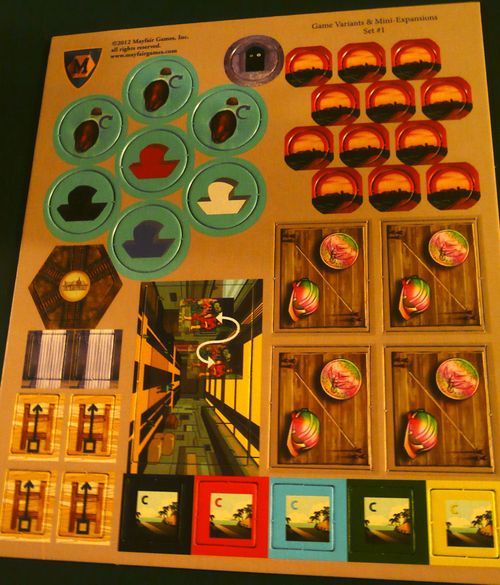
Mayfair Game Variants & Mini-Expansions Set #1
Mayfair Game Variants & Mini-Expansions Set #1 Rulebook
Table of Contents
Table of Contents
Urbania: Subsidy Contracts
By Morgan Dontanville.
Set Up
Take a subsidy contract tile.
Renew
You may use your subsidy contract to add one worker to the total number of workers committed to renewing a building. This is a rainbow colored worker and can be used as a worker of any color. If used for a worker then you must discard this tile.
Hire
You may use your subsidy contract to add one coin to the total number of coins needed to hire a specialist. This is a rainbow colored coin and can be used as a coin of any color. If used for a coin then you must discard this tile.
Italian Politics Variant
By Leo Colovini.
The subsidy contract tile has two sides, active and inactive. It begins the game with its active side up. When you use it flip it over to its inactive side. For the rest of the game, if you lose control of a specialist (someone buys it from you), flip the subsidy contract back to its active side.
Atlantis: Boats
By Leo Colovini / Fedinand de Cassan.
Setup
At the start of the game take a ship of your color.
At any time during your turn you may place either your bridge or your ship (not both) in a gap in the path. Just like the bridge, the ship remains in that gap till the end of the game.
If you cross a gap containing your own ship, you cross free of charge. If you want to cross a gap containing another player's ship, you can either pay the normal price to cross the gap to the bank, or you can pay half (rounded down, minimum 1 point) to the owner of the ship. You may pay with either tiles or cards as in the base game.
Example: Using Example 2 in the rule book, Blue plays a blue Ring-card and moves his figure A to the Ring-tile. To cross the 1st gap he pays 1 point to the bank. The 2nd gap has a white boat, so Blue pays 2 points (half of 4) to White, and the 3rd gap has a red boat, so Blue pays 1 point (half of 3 rounded down) to Red. The bridge is crossed free of charge.
It is possible that a player can choose between ships when crossing a gap - either because multiple ships have been placed in a single gap, or because multiple gaps with ships have grown together during the game. In that case the player can choose to use any one of the ships or pay the bank. If a bridge is present, crossing a gap is always free.
Rocket Jockey: Space Port
By Morgan Dontanville.
Setup
After you create the face up cargo draft pile, place the Space Port tile next to the maneuver deck on the opposite side and turn over the top maneuver card in the deck and place it on the Space Port tile.
Fueling
Whenever you draw a card, you may exchange one card from your hand with the maneuver card in the Space Port. You may have a maximum hand size of 6.
Mid-Game Scoring Variant
Place a marker in front of the first player. When the mid-game scoring is triggered, each player is given the opportunity of an equal number of turns. New cards are not replenished in the planetary display, but each player is allowed to continue to make any available deliveries until the player to the left of the starting player finishes their turn. Now continue with the mid-game scoring as normal.
Steam: Five Way Town
A rules option for any number of players. Reused from the Steam expansions booklet already catalogued in this repository (steam-five-way-town-rulebook.md); the wording matches the photographed sheet.
Components
1 Five Way Town tile
Initial Setup
This tile is added to the general supply of tiles at the start of the game.
Phase 2 - Build Track
Unlike most tile forms this tile is intended to be limited. If this tile is Urbanized it is returned to the general supply and may be used again.
Settlers of Catan: Catan VP Markers
These markers are intended for use with the Catan Geographies maps or any scenario that requires additional victory points or victory point markers.
This sheet gives a usage note only; it contains no additional rules.
Giza: The Great Pyramid - Fast Sleds
By Morgan Dontanville.
Setup
Take a Fast Sled token and place it behind your screen.
Nominate an Additional Sled to Push
On your turn, after a sled is pushed or pyramid stone is lifted, you may use and discard your fast sled token to nominate and push an additional sled. This token may only be used to push a sled, it may not be used to lift. If another player has used his/her fast sled token this turn, then you may not use your fast sled token until next turn.
Game End
If the game ends without the completion of the pyramid and you still have your fast sled token, you are eliminated from the game.
Nuns on the Run: The Anchorite
By Morgan Dontanville.
Set Up
2-3 players: Place the Anchorite token in one of the following spaces: 18, 19, 59, 61, 98, or 103.
4 players: Place the Anchorite token in any of the previously listed spaces or space 7, 8, 87, or 89.
Movement
The Anchorite does not move. Neither the Novices nor the Guards may move into or through the Anchorite token. The Anchorite blocks line of sight.
Lords of Vegas: Skybridge & Building Boom
By Morgan Dontanville. Reused from the Lords of Vegas Set #2 rules sheet already catalogued in this repository (lords-of-vegas-skybridge-building-boom-card-sharp-rulebook.md); the wording matches the photographed sheet.
Skybridge
Before dealing out 2 starting cards to each player, roll the dice and place the Skybridge on the street between two of the back lots based on the die results:
- 1: A4-C1
- 2: A5-C2
- 3: B5-D2
- 4: B6-D3
- 5: C10-E1
- 6: D9-F3 for 3+ players, or C11-E2 in a 2 player game
Two lots connected by a Skybridge are treated as if they are adjacent during the game.
Building Boom
Place 2 Skybridges next to the board. You may play with up to 4 Skybridges. A new action is added to the game.
Action - Skybridge
When you take the Skybridge action, you construct a bridge across a side street between two like-colored casinos where you are the boss.
- Choose two lots that are not on the strip where you are the boss, that are the same color, and that are adjacent to each other across a side street.
- Pay $5 for each lot in both casinos.
- Take one of the available Skybridges (if all are in use you may not take this action) and place it on the side street.
Printed note: the three bullet points above are each marked with a small square symbol in the print. The symbols are not numbered on the sheet, so they are rendered here as a plain list in printed order.
Whitewater: Cranky Beavers
Gap: the rules for this variant (Sudden Death Ending and Rough Rapids) are not included in this set's photographed rule sheets, and no printed text was found in the sources checked. The only item in the set for this game is a beaver chit, shown in the component photo. The rules are therefore not reproduced here, and nothing has been written in their place.
Aeroplanes: Charters
By Morgan Dontanville.
Components
5 Charter tiles
Setting Up
Each player gets one charter tile of their color.
How to Play
Rather than placing an airport tile according to the standard rules in the base game, you may place your charter tile as a substitute into any destination that isn't a starting city.
Place your charter tile on the board next to the destination, outside of the allotted spaces. A charter tile may only be placed by a destination that currently has an opponent's airport tile at that destination. Discard an airport tile from your available supply.
You may never replace a charter tile. Treat the charter tile as if it were a standard airport tile for passenger movement and direct connections.
You may not score any victory points from your charter tile.