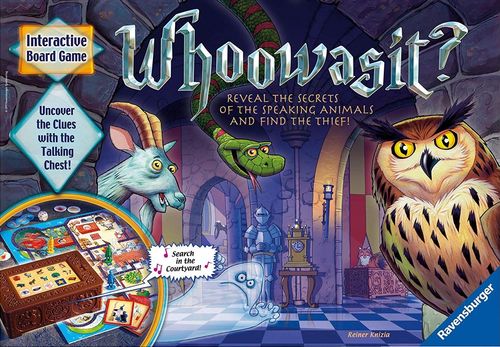
Whoowasit?
Whoowasit? Rulebook
Table of Contents
Table of Contents
- Contents
- Preparation before the first game
- Game Set-Up
- How to Play
- The Five Actions
- Notes on Play
- Additional Rules
- Choose the Difficulty Level
- Can more than one playing piece occupy a room?
- What happens when the ghost encounters a player in the nursery?
- What happens once the ghost declares that it is moving through 1/2/3/4 rooms?
- How do I find a key located at the anvil in the Blacksmith's Workshop?
- How does the time run out? What happens if we want to take a break while we're in the middle of playing a game?
- I did not understand what was just said. What do I do?
- I accidentally pressed the wrong room button. What can I do?
- We did not manage to find the thief before our time ran out. How do we find out who it was?
- Information about the use of the electronic game device
Contents
- 1 Game Board
- 4 Doors (to place on the board)
- 1 Electronic Chest
- 4 Playing Pieces (red, yellow, green, blue)
- 1 Ghost
- 1 Cat (game board)
- 9 Food Tokens
- 4 Key Tokens
- 10 Suspect Cards
- 1 Die
- 1 Ring
- 1 Ring Base
The 4 doors are placed on their matching rooms: 1 Dungeon Door, 2 Tower Door, 3 and 4 Great Hall Doors.
The rooms of the castle are: Dungeon, Kitchen (with the Pantry), Nursery, Tower, Knight's Armory, Great Dining Hall, Chapel, Blacksmith's Workshop, Courtyard and Stable. The ghost's path around the board is marked by ghostly arrows.
The electronic chest has 10 Room Buttons, 5 Action Buttons, a round Repeat Button and an On/Off Switch.
Preparation before the first game
Carefully press out all the cardboard pieces.
Insert 3 AA batteries in the compartment on the underside of the chest lid. This should be done by an adult only. Use a Phillips screwdriver to open the battery compartment. See the special instructions in "Information about the use of the electronic game device".
Game Set-Up
Put the game board on the table where all players can access it in cooperative play.
Each player chooses a playing piece and places it in the nursery.
Note: in the easy game the doors to the tower and dungeon remain closed. They are used in the medium and hard game versions only.
Place the ghost in the courtyard and the 4 doors on their matching rooms.
The cat, 9 food tokens, 4 key tokens, die and 10 suspect cards are placed face up beside the game board.
Insert the ring base into the circular compartment of the chest with the ring on top. Close the lid and switch on the chest.
Playing pieces start in the nursery. The ghost starts each game in the courtyard.
How to Play
The youngest player starts and play continues clockwise. On your turn, do the following:
1. Roll the Die
If you roll a number, you can move through that many rooms. Each room counts for one space. You may also move less spaces than the number rolled or even choose to stand still.
You may move your playing piece in either direction, but only through open doorways.
You cannot enter or pass through a room where the ghost is located. Once you have moved your playing piece, continue by pressing a room button.
If you roll the ghost, advance it one room along its path indicated by ghostly arrows. If the ghost enters an occupied room, that playing piece goes immediately back to the nursery.
Roll again if you rolled the ghost, continuing to advance it one room until you roll a number. Then move your playing piece and press a corresponding room button.
Example: The green player rolled the ghost: the ghost is moved forward by one room from the courtyard into the blacksmith's workshop. The yellow playing piece in that room is sent back to the nursery. Then the green player rolls again.
2. Press a Room Button
After moving your playing piece, press the button on the chest of the room you are in. Each room is represented by the animal located in it. You'll hear a short beep after which you continue with pressing an action button.
Example: The green player moved their playing piece to the chapel where the snake is located and pressed the room button with the snake on it.
3. Press an Action Button
You can choose from one of five possible actions by pressing its corresponding button. Then one of the animals or a character will speak to you. Think carefully about exactly which action you would like to do. Decide together which action makes most sense for the situation.
(Hint: to use your time wisely, be sure to first search the room (eye), speak with the animal (mouth), then feed the animal (hand). For younger players, write down the clues that are given to avoid repeated actions. Each action button pressed shortens the time on the clock.)
The Five Actions
Search: Search the Room
If you find food there, then take that food token and place it onto an empty space on the cat game board (Example 1). Only two food tokens can be placed on the cat at one time. After that, place any additional food tokens in the kitchen pantry (Example 2). (For younger children, this rule can be eliminated to allow all food tokens to be placed on the cat.)
If you find a key, place it on the key space located on the cat game board. Any number of keys can be placed there.
- Example 1: "You've found the pear" — the token is placed on a free space of the cat.
- Example 2: No empty space left on the cat — "You've found the apple", so the token goes to the pantry.
Speak: Talk with an Animal
The animals give you information or ask you for food. Remember what they want and which clues they gave you. When they provide clues to the thief's identity, turn over the suspect cards that you can rule out. You're getting closer to discovering the thief!
Feed: Give the Animal its Food
You only feed an animal when it asks to be fed and when its food is located on the cat. Take the token from the cat and place it face down beside the game board. The animal has now been fed.
(Hint: the Feed button (hand) can only be pressed on the same turn in which you pressed the Speak button (mouth). Don't press the room button again.)
Important: Any player can use the tokens on the cat at any time. A player must be in the kitchen to use a token in the pantry. If you're in the kitchen and there is a free space on the cat, tokens can be taken from the pantry and placed there either before or after your turn. You can also exchange tokens in the pantry for those on the cat.
Magic: Use the Magical Object
In some rooms there are magical objects you can use by pressing the "Magic" button. Identify them by the stars surrounding them. This could turn out to be good or bad. Test your luck!
Chest: Try to Open a Chest with a Key
Each one of the 10 suspects has a chest with their valued possessions in it. If you think you know who the thief is, try to open their chest. You must be in the correct room and the cat must have a key.
Notes on Play
Note: always press a room button first on your turn and then an action button. The cat, other animals, the evil wizard, the ghost and a fairy will speak to you from the chest. Always follow their instructions!
Now you can begin the game. Maybe you have some questions like "How do I open the doors?" or "What do I need the keys for?", but these will be answered over the course of the game by the animals and people who speak to you from the chest. If you still have questions, read the section entitled "Further Rules".
Good luck with your adventure in locating the ring to save the kingdom!
Additional Rules
Choose the Difficulty Level
The game can be played at three difficulty levels:
- Easy
- Medium
- Hard
After turning on the game, you can select the level of difficulty. If you don't do anything, it will automatically be set to the easy level. For the medium game version, press the "Nursery" button (rocking horse) once and then the "Magic" button (star). For the advanced version, press the "Magic" button once again. If you repeat the sequence, you will get the easy version again.
In the easy version, the doors to the dungeon and tower remain closed, as you will not need these rooms. In the medium and hard game versions, the tower and dungeon can be accessed. In the hard version, the ghost and wizard become more dangerous and the fairy cannot help you as much.
Can more than one playing piece occupy a room?
Yes.
What happens when the ghost encounters a player in the nursery?
Nothing. The player remains in the nursery. If your playing piece starts its turn together with the ghost in the nursery, you may move your piece forward from that space, but the nursery may not be entered or passed through as long as the ghost is there.
What happens once the ghost declares that it is moving through 1/2/3/4 rooms?
Move the ghost along its course per the rooms it says. All the playing pieces it meets along its path are placed back into the nursery. The same holds true when it says, "I'll float to the room you're in."
How do I find a key located at the anvil in the Blacksmith's Workshop?
You find the key at the anvil by using magic. Press the blacksmith's workshop button (donkey) and then press the "Magic" button (star). You may not find the key until after you have used magic a few times.
How does the time run out? What happens if we want to take a break while we're in the middle of playing a game?
The time clock moves forward a few minutes when each player takes a turn and presses a room button and action button. As long as you don't take a turn, the time stands still. You can pause a game for as long as you like if you leave the chest "on".
If the fairy gives you another turn, the time stops ticking for that turn.
I did not understand what was just said. What do I do?
To the left of the room buttons and action buttons there is a round "Repeat" button. It repeats the very last statement.
You can also use this button to move past the introduction when starting a game.
I accidentally pressed the wrong room button. What can I do?
As long as you have not pressed an action button as well it's no problem. Simply press the correct room button and then an action button. You can press as many room buttons as you like. Only the last one pressed counts.
Note: as soon as you have pressed an action button, you must also complete the action and cannot change it.
We did not manage to find the thief before our time ran out. How do we find out who it was?
Press the "Chest" button to discover who the thief was.
To find out at what time the game ended, press the "Magic" button.
Information about the use of the electronic game device
Batteries should always be inserted by an adult. Remove the lid from the chest to locate the battery compartment on the underside. Be sure the switch on top of the lid is on "off". Open the battery compartment with a Phillips screwdriver. Insert 3 AA 1.5 Volt batteries so that the plus and minus signs match up with the markings in the compartment. Screw the compartment lid shut again.
Care Instructions
- If no button is pressed after a period of 5 minutes, the electronic device in the chest will go to standby mode in order to save power, but with time the batteries will die even in this mode. In order to resume play, press any button.
- Switch off the chest after the game.
- Never attempt to disassemble the chest.
- Do not place the chest in direct sunlight or near any heat source.
- Be sure that the chest does not get wet.
- Clean the surface with a soft, dry or slightly damp cloth. Do not use any cleaning agents.
Safety Instructions
- Non-rechargeable batteries may not be recharged!
- Rechargeable batteries are only to be charged under adult supervision!
- Rechargeable batteries are to be removed from the toy before being charged!
- Different types of batteries or new and used batteries are not to be mixed!
- Insert the batteries in the correct "+" and "-" positions.
- Remove the batteries when they are empty or if the unit is not going to be used for a long period of time.
- The supply terminals are not to be short-circuited!
- We recommend the use of alkaline batteries.
- Only use batteries of the same or similar type.
- Always replace all the batteries at the same time, not just individually.