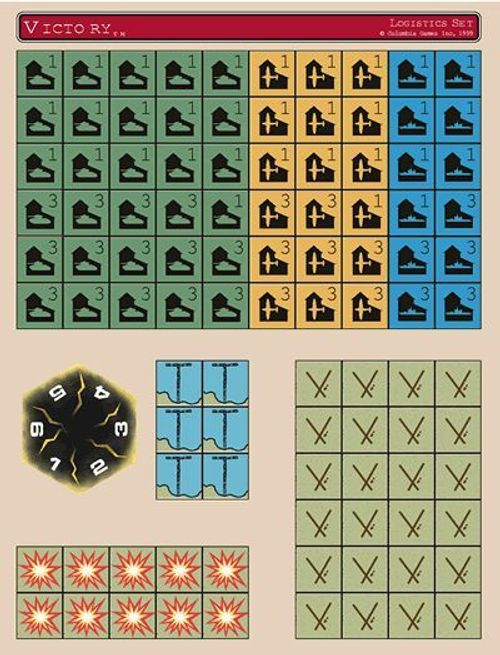
Victory: The Blocks of War – Logistics Set
Victory: The Blocks of War – Logistics Set Rulebook
Table of Contents
Table of Contents
Airfields
Engineer units can construct Airfields in the Production Phase. Reduce an Engineer by 1CV and place a Minor Airfield marker in the same hex. Optionally, an Engineer may convert an existing Minor Airfield into a Major Airfield. Reduce the Engineer by 1CV and turn over the marker. One (1) Air unit can operate from a Minor Airfield, and two (2) Air units from a Major Airfield (same as a City or Town).
Airfields may be built in any type of terrain (including Mountain, Marsh and Forest), but not in City or Town hexes. They do not count towards the stacking limit.
Major Airfields may be targeted as Logistics units. Two (2) hits in the same battle reduces them to Minor Airfields, but they cannot be entirely destroyed.
An airfield is captured instantly if alone with an enemy Army unit, but may not operate with the captors air units until the following turn.
Airfields are not sources of Supply. Units occupying an Airfield must still trace a Supply Line to a City. The Airfield itself does not require Supply.
Mulberries
A mulberry is a temporary port established by a Marine unit during a Production Turn. Reduce the Marine by 1CV and place a Mulberry marker in the hex. Mulberries are equivalent to Ports (port capacity is 2). Supply may be traced to an adjacent hex and hence by road normally. Unlike Beachheads, the Marine may vacate the hex and the Mulberry will still exist.
Mulberries are ground Logistics units and can be attacked. Two (2) hits in the same battle destroys a Mulberry. They are captured if alone with an enemy Army/Navy unit, but may not function as a port for the captor until the next turn.
A Mulberry may be destroyed by a Storm. If the storm lands directly on a Mulberry it is destroyed. If the storm is adjacent to a Mulberry, there is a 50% chance of it being destroyed.
Storms
The Storm counter represents weather conditions serious enough to disrupt local military activities.
The Storm area is the hex it occupies plus all adjacent hexes (7 hexes total). Units within the storm area cannot move and should be turned face down while they are affected. Units outside the area cannot move into or through the storm area, except units may retreat into a storm subject to an automatic 1CV loss.
Production in a city within a storm area continues as normal.
The storm moves randomly. It starts in the center of the game map (unless a scenario defines otherwise). After each Initiative die roll, the loser rolls 2 dice separately. The first number is the direction the storm moves. The second number indicates distance in hexes the storm travels. If a Storm moves off-map restart it at the center of the map.
Destruction Markers
Bridges and Canals (but not roads) are Logistics targets. Two (2) hits are required to destroy a Bridge or Canal and a Destruction marker is placed in the hex to indicate this status. Destroyed Bridges and Canals cannot be used for movement or supply. Engineer units in the same hex may rebuild destroyed Bridges/Canals during the Production Phase. Reduce the Engineer unit by 1CV and remove the Destruction marker.
A Bridge (hexside terrain) can be rebuilt from either adjacent hex but only if both hexes are Friendly. Canals may be rebuilt by an Engineer in the same hex.
Factories
Specific Air, Navy and Army Factories replace City Production Points.
Factories may only be placed in Cities. The City size is the maximum total value of Factories that may be placed there. That is a 3PP City could have a 3PP Air Factory, or a 2PP Air Factory and a 1PP Army Factory, and so on. Naval Factories must be located in coastal cities.
Factories can only produce like units. That is, an Air Factory can only produce Air units. However, if no production is done, players can exchange any factory with a 0PP factory of a different type. That is, a 1PP Naval Factory can be exchanged for a 0PP Air Factory.
Factories have intrinsic defense forces (1-1-1 firepower) and fire last in a combat round. Factories cannot move.
Factories are Logistic units. They take hits in combat normally when targeted, except their zero (0) PP step cannot be eliminated. Factories are captured instantly at their current strength if alone with enemy Army units.
At the end of the Production Phase, every City which currently has less than its maximum Factories receives an automatic 1PP increase.
Example: a 2PP city can support a 2PP Factory. If the Factory is reduced to 1PP, it rebuilds to 2PP on the next Production.
NOTE: Resources may be converted to PPs in Factories normally, but apply to the factory type(s).
Example: given 2PP Air and 1PP Naval in a 3PP City, a Resource 2PP converts to an additional 4PP Air and 1PP Naval.
☐ Engineer building (optional) Engineer Units may be built in any type of Factory.
☐ Airborne building (optional) Airborne units may be built in Air Factories.
☐ Marine building (optional) Marine units may be built in Naval Factories.
Transcriber notes: the printed sheet reads "Mulberrry" in the Storms paragraph; corrected here to "Mulberry". The printed "Ø" zero-PP symbol is written as "0PP". The Destruction Markers paragraph prints "1CV AND"; written as "1CV and".