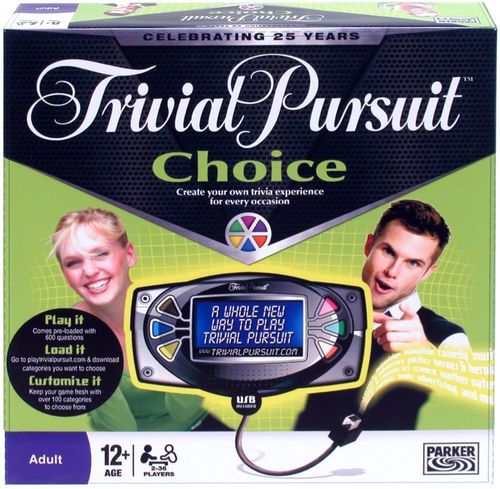
Trivial Pursuit: Digital Choice
Trivial Pursuit: Digital Choice Rulebook
Table of Contents
Table of Contents
Contents
Digital device with 600 questions, USB cable, 36 cheeses, 6 wheels, 1 game board and 1 die.
Battery Information
Important: battery information. Keep this information for future reference. The batteries should be replaced by an adult.
Warning:
- Always follow the instructions carefully. Use only batteries of the specified type, and make sure the polarities (+ and –) are placed correctly.
- Never mix new and old batteries, or standard and alkaline batteries.
- Always remove "flat" or used batteries from the product.
- Remove the batteries if the product will not be used for a long period.
- Make sure not to short-circuit the leads.
- Move the product to another location if it causes local electrical interference or is affected by it. Reset if necessary (by switching it off and on again, or by removing the batteries and reinserting them).
- NEVER USE RECHARGEABLE BATTERIES. NEVER TRY TO RECHARGE OTHER TYPES OF BATTERIES.
- As with all small parts, these batteries should be kept out of the reach of children. Seek medical help immediately if a battery is swallowed.
When you see this image on the screen, the batteries are running low.
This product and its batteries must be disposed of separately at your local waste and recycling station. They must not be thrown out with ordinary household waste.
Introduction
Now you can play Trivial Pursuit, where the questions are stored on a digital device instead of on cards. The questions are divided into mini-categories, each containing 50 questions. The device comes with 12 mini-categories already loaded — you can download more from mytpchoice.dk.
The device tells you when you have used all the questions in a mini-category. You then have the choice of playing the same questions again or choosing a different mini-category.
There are two ways to play with the device: Play Now or Choose & Play. You can only use Choose & Play after you have downloaded mini-categories from mytpchoice.dk (see the Choose & Play section).
Play Now
Important: get to know the digital device before you begin playing (see the Glossary).
Preparation
The digital device automatically selects six mini-categories.
-
Turn on the digital device. Press the orange or pink category button to play now.
-
Six mini-categories will be shown on the screen.
Note: If you do not want to play with the six categories, just press the back button and start again. This only works once you have downloaded more mini-categories.
-
Follow the flashing arrow by pressing the answer button. If you want to play with a clock, see Playing with a Clock below.
Playing with a Clock
Playing with a clock?
- When a question appears, you will hear the sound of a ticking clock.
- If you want to see the answer, press the answer button. The clock keeps ticking.
- If you want to see how much time a player has left, press the time button.
- When the time is up, you will hear a sound. The player must now give an answer.
Play with a clock if you want to set a time limit on how long a player may take to answer. Press the purple or yellow category button to play with a clock.
- Easy (45 seconds to answer): Press the orange, blue or yellow category button.
- Hard (25 seconds to answer): Press the pink, green or purple category button.
Ready to Play
- Press the answer button to start the game. The mini-categories will be shown on the screen.
- To see a question, press the button for the chosen category.
- Read the question aloud to the player who must answer.
- To see the answer, press the answer button and hold it down. When you release the button, the question will be shown again.
- Press a category button to return to the six mini-categories.
You are now ready to play (see the Game Rules, on the facing page of the printed manual).
Choose & Play
Preparation
When you have downloaded mini-categories from mytpchoice.dk, you choose which ones you want to play with.
-
Press the yellow or purple category button to "Choose & Play."
-
Six main categories will be shown on the screen.
-
Press the button for the category you want.
-
The subcategories you have downloaded will be shown on the screen. If you have more than six, use the scroll button to see them.
- To choose a subcategory, press the button for that subcategory.
-
The mini-categories you have downloaded will be shown on the screen. If you have more than six, use the scroll button to see them.
- To choose a mini-category, press the button for it. The title of the mini-category becomes blurred to show that it is chosen. The number under the answer button counts up by one.
Note: If you do not want to choose any of these mini-categories, press the back button to return to the subcategories or main categories. You can freely choose six mini-categories.
-
When you have chosen six mini-categories, you are ready to play. Your six mini-categories will be shown with blurred text.
- If you want to change one of your mini-categories, press that category's button again. The blurred text turns black again, and the number under the answer button counts down by one.
- You return to the screen where you made your first choice. Choose another mini-category, or press the back button to choose again.
-
Follow the flashing arrow by pressing the answer button.
-
If you want to play with a clock, see Playing with a Clock under Play Now.
Glossary
Answer button: Press the black button at the top to see the answer to a question.
Back button: Press the silver button on the left to go back to the previous screen.
The triangle: The triangle shows that you can go back to the previous screen by pressing the back button. The more triangles there are, the more steps you can go back.
Category buttons: Press one of these to choose a category.
Scroll button: Press the silver button on the right to scroll through the categories.
The arrow: The arrow shows that you can press the scroll button to scroll up and down to see more categories.
The number: This number shows how many mini-categories you have chosen. You must choose six.
Time button: If you are playing with a clock, press the black button at the bottom to see how much time a player has left to answer a question.
Screen light and sleep mode: The screen light turns off when the digital device has not been used for a few seconds. Press any category button to turn it on again and continue the game. To save power, the digital device goes into sleep mode when it has not been used for about 10 minutes. Press any category button to turn it on again.
Stand, on/off switch and USB port: The device has a stand on its back. The on/off switch and the USB port are on the device. Go to mytpchoice.dk to read more about how to download mini-categories and how to use the USB cable.
Game Rules
Object of the Game
Be the first player to fill all six spaces of your wheel with differently coloured cheeses by answering questions correctly. Return to the middle space first, and answer the last question correctly to win!
Preparation
- Give each player or team an empty wheel, and set it on the middle space of the board.
- Set up the digital device (see Play Now and Choose & Play), and place it beside the board in its stand.
- Roll the die to decide who starts. The player who rolls the highest number starts.
On Your Turn
- Roll the die.
- Move. You must always move exactly the number of spaces shown on the die.
- When you land on a space, answer a question! See "Ready to Play" under Play Now.
Moving Around the Board
At the start of the game, move away from the middle along one of the spokes. When you reach the circular track, you can move in any direction. Plan your moves carefully so that you land on the space that suits you best.
You must never move back in the direction you came from during the same dice roll. For example, you cannot roll a 5 and move three spaces clockwise and then two spaces counterclockwise. But the next time you roll the die, you can decide to change direction, so that you go in the opposite direction to your last move.
You can get to the other side of the board by going across the middle along the spokes.
You can land on the same spaces as another player.
Correct Answers
If you answer the question correctly, you must roll the die again, and you get another attempt. You can keep rolling the die and moving for as long as you answer correctly — there is no limit to how many turns you can take in a row.
Wrong Answers
Unfortunately. If you answer incorrectly, your turn ends. The player to your left must now roll the die.
If you answer incorrectly, you must move away from the space and along the track the next time it is your turn, before you can return and try to win a cheese of that colour. You do not need to try the same category straight away. You can move anywhere on the board and come back to it later.
Roll-Again Spaces
When you land on a "roll again" space, you must roll the die again. You can then move to another "roll again" space and keep rolling and moving until you land on a question space or a cheese space.
Cheese Spaces
If you answer a question correctly after landing on one of these cheese spaces, you may place a matching coloured cheese in your wheel! Roll the die and try again.
If you land on the same cheese space later in the game, and you already have a cheese of that colour, the space works as an ordinary space, and you must answer a question from the corresponding category.
How to Win
As soon as you have won a cheese in each of the different colours, go back to the middle space and try to land there with the exact number of spaces. If you roll too many, continue playing and answering questions until you land on the middle space.
When you land on the middle space, you must answer one last, decisive question. The other players decide which category you get the question from.
If you answer incorrectly, you must leave the middle space the next time it is your turn, and return later (by rolling exactly the right number) to try again.
If you answer the decisive question correctly, you win the game!
Custom Rules
Agree on how precise the answers must be. For example, you can agree that it is enough to give a last name to get a correct answer. But you can, for example, decide that both first and last name must be given for the winning answer. You can also decide to have different rules for younger and older players.
Quick Play
In this version of the game, all spaces are cheese spaces. You get a cheese for each correct answer. You must still have a cheese of every colour.
Winning in a Row
Since you always must roll again when you answer correctly, it is possible to get all six cheeses on the first turn! If this happens, players who have not yet had their turn can try to repeat this feat and make the game end in a tie.