TRAILS: Searching Promo Cards
TRAILS: Searching Promo Cards Rulebook
Table of Contents
Table of Contents
Searching Badges
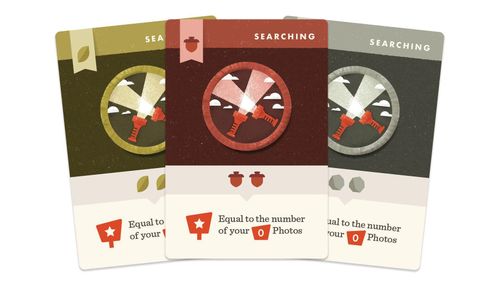
The pack contains three Searching badges. Each card shows the title SEARCHING, a badge type in the top-left corner, a cost of two resources, and a Points value tied to the number of Photos.
Searching (Leaf)
- Badge type: Leaf (top-left corner)
- Cost: two Leaf resources (the second Leaf icon is partly hidden on the scan)
- Points: Equal to the number of your Photos (the Photo-points icon is printed with the number 0)
Searching (Acorn)
- Badge type: Acorn (top-left corner)
- Cost: two Acorn resources
- Points: Equal to the number of your Photos (the Photo-points icon is printed with the number 0)
Searching (Rock)
- Badge type: Rock (top-left corner)
- Cost: two Rock resources
- Points: Equal to the number of your Photos (the Photo-points icon is printed with the number 0)
Notes
- The Points line on each card is printed as a Photo-points icon, with the number 0 in it, followed by the word Photos. The printed text does not spell out any further rule for how Photos are counted; the base TRAILS rulebook governs Photos and Points.
- The resource costs and badge-type icons are printed as icons. Each card's banner, badge emblem and cost icons match its resource type.