The Great Wall: The Endless Tide Scenario
The Great Wall: The Endless Tide Scenario Rulebook
Table of Contents
Table of Contents
Setup
Standard game for 2-5 players.
Setup the game as normal, except for the following changes:
-
The Time token should be placed with its +1 side up. Remember that, during Spring, when placing Horde cards, place 1 more card than the number indicated on the Time track.
-
Each player, in Tea order, places 1 of their [Clerk icon] in any Rest Zone.
-
Shuffle all Rampage cards to create the Rampage deck and place it next to Horde deck (face down).
-
You are now ready to start the game. The first Year of the game begins with Fall (skip Spring and Summer). Place this card next to the game board. Flip this card.
Gap: the setup card lists only the steps that change. Steps 1-2 and 4-17 are not printed on the card and are covered by the base The Great Wall rulebook.
Gap: the icon shown as [Clerk icon] in step 18 is a small figure icon. It is read as the Clerk token because step 18 places it in a Rest Zone and the scenario text refers to Clerks. Confirm against the base game components if needed.
Scenario Rules
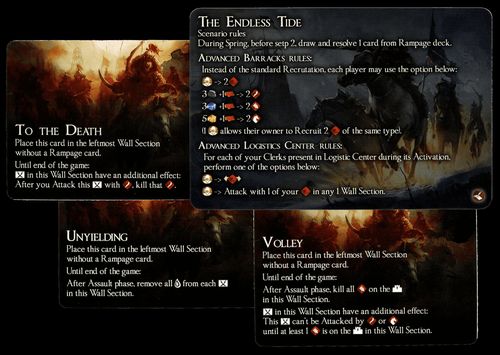
The Endless Tide – Scenario rules.
During Spring, before step 2, draw and resolve 1 card from Rampage deck.
Advanced Barracks Rules
Instead of the standard Recrutation, each player may use the option below:
The card prints "Recrutation" (sic); transcribed as printed.
- [Clerk icon] -> 2 [red unit icon]
- 3 [grey resource icon] + 1 [weapon icon] -> 2 [red unit icon]
- 3 [blue resource icon] + 1 [weapon icon] -> 2 [red-capped unit icon]
- 5 [yellow resource icon] + 1 [weapon icon] -> 2 [white unit icon]
(1 [Clerk icon] allows their owner to Recruit 2 [red unit icon] of the same type.)
Gap: the resource, weapon and unit icons in the Advanced Barracks rows could not be identified with confidence from the card photos. They are shown in brackets. Check the base The Great Wall component icons before publishing. The Recruit wording in the final line is transcribed as printed.
Advanced Logistics Center Rules
For each of your Clerks present in Logistic Center during its Activation, perform one of the options below:
- [Clerk icon] -> [red unit icon]
- [Clerk icon] -> Attack with 1 of your [red unit icon] in any 1 Wall Section.
Gap: the first Advanced Logistics Center option shows only icons: a Clerk icon, an arrow, and a red unit icon. The card prints no words for that option, so its effect is not transcribed. The second option is transcribed as printed.
Rampage Cards
Three Rampage cards. Each is placed in the leftmost Wall Section without a Rampage card, and each has an ongoing effect until the end of the game. The face of each card is legible on the clean scan. The card backs show only the RAMPAGE artwork and carry no rules text.
To the Death
Place this card in the leftmost Wall Section without a Rampage card.
Until end of the game:
[Wall Section icon] in this Wall Section have an additional effect: After you Attack this [Wall Section icon] with [red unit icon], kill that [red unit icon].
Volley
Place this card in the leftmost Wall Section without a Rampage card.
Until end of the game:
After Assault phase, kill all [red unit icon] on the [tower icon] in this Wall Section.
[Wall Section icon] in this Wall Section have an additional effect: This [Wall Section icon] can't be Attacked by [red unit icon] or [red unit icon] until at least 1 [red unit icon] is on the [tower icon] in this Wall Section.
Unyielding
Place this card in the leftmost Wall Section without a Rampage card.
Until end of the game:
After Assault phase, remove all [blue drop icon] from each [Wall Section icon] in this Wall Section.
Gap: the Wall Section, unit, tower and drop icons in the Rampage text are shown in brackets because their exact identities could not be confirmed from the photos. Check them against the base game icon key before publishing. The wording around them is transcribed as printed.