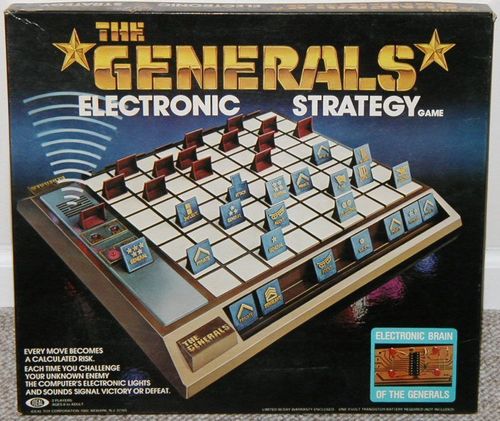
The Generals
The Generals Rulebook
Table of Contents
Table of Contents
Object
To capture your opponents Flag or maneuver your own Flag to your opponents back row.
Materials
Battlefield Playing Surface with Computerized Electronic Arbiter; 21 Red and 21 Blue Playing Pieces; 2 Attack Pieces (1 Red and 1 Blue); 4 Bumpers; Storage Compartment; Warranty.
Preparing the Game
- Place one "9 Volt" Transistor Battery inside the Battery Compartment as shown. An Alkaline battery is recommended for best performance and longer life.
- Place bumpers on underside of Game.
- Remove playing pieces from the runners. Remove any burrs which may remain on playing pieces. This may be done with an ordinary emery board.
Preparing for Battle
- Place the Battlefield Playing Surface between the players with the Wells facing the players.
- Arrange ALL 21 pieces of your army on the first 3 rows of your side of the Battlefield before play begins. You will have 6 empty squares for greater mobility. Note: See Strategy Tips before setting army in position.
- Position each piece with the insignia facing toward you and not your opponent. In doing this be very careful not to reveal the rank of your piece.
- Put your "attack" piece aside as this is only used when an attack is actually made.
Know Your Army
Each player has a 21 piece "army" of the same color, ranging in rank from 5 Star General to Private, including two powerful Agents. Victory or defeat for each attack is dependent on the rank or power of the piece. Each army is composed of the following, listed by rank:
| The Army | Insignia | No. of Pieces | Power |
|---|---|---|---|
| 5 Star General | 5 stars | 1 | THESE PIECES ELIMINATE ANY LOWER RANKING PIECE. THEY CANNOT ELIMINATE THE AGENTS. |
| 4 Star General | 4 stars | 1 | (same as above) |
| 3 Star General | 3 stars | 1 | (same as above) |
| 2 Star General | 2 stars | 1 | (same as above) |
| 1 Star General | 1 star | 1 | (same as above) |
| Colonel | eagle | 1 | (same as above) |
Transcriber note: on the printed sheet the power text for the General ranks, Colonel, Lt. Colonel, Major, Captain, Lieutenants and Sergeant is one merged cell spanning those rows; it is repeated in each row here for readability. The insignia column is described in words from the printed artwork.
NOTE: When pieces of equal rank are involved in an attack both pieces are eliminated from play. In the case of one Flag attacking the other, the attacking Flag is the winner.
Playing the Game
Movement
- Blue has the first turn. Players take turns alternately.
- A player is allowed to move only ONE PIECE — ONE SQUARE — on a turn.
- A turn consists of moving a piece to an adjacent square — either forward, backward or sidewards. DIAGONAL MOVES OR MOVES OF MORE THAN 1 SQUARE ARE NOT ALLOWED. All pieces move exactly the same and no piece can jump another.
(Diagram labels on the printed sheet: CORRECT, WRONG, DIAGONAL MOVES, JUMPING, ADJACENT SQUARES.)
How to Attack
- A player moves his piece to the square occupied by the piece he wishes to attack. An attack may be made from any direction except diagonally.
- Both pieces are removed from that square.
- The attacking player marks the square with his attack piece which had previously been set aside thereby marking the location at which the attack has taken place.
- Both players then consult the Electronic Arbiter to find out the results of the attack. They do this by inserting the pieces — SQUARELY and FIRMLY as shown — in the Electronic Arbiter. The piece must be facing toward the owner of the piece in order for the Arbiter to work properly.
(Diagram labels on the printed sheet: ATTACK PIECE, WINNER, LOSER, PLACE LOSING PLAYING PIECE IN WELL.)
The Electronic Arbiter Goes Into Action
The winner of an attack is determined by the rank or power of the opposing piece. The Electronic Arbiter will reveal the victor of each attack — or the winner of the game — in the following way:
- A lively sequence of sounds and flashing lights will be heard and seen while the computer decides the outcome of the attack.
- In seconds the sounds become a steady tone — the flashing lights stop and one player's "Battle Winner" LED light goes on indicating he has won the attack.
- The losing piece is out of the game. Place it in the well on the side of the game as shown. BE CAREFUL NOT TO REVEAL ITS RANK IN DOING SO.
- If the pieces are equal rank both Battle Winner lights go on and both pieces are retired from play to their respective sides of the Battlefield. In the case of one Flag attacking the other — the attacking Flag is the winner, even though both LED's light up.
- The player removes the attack piece from square and replaces it with his winning piece.
- The player whose army was attacked makes the next move.
- If a player has captured the enemy Flag "Taps" is sounded — the VICTORY light goes on — the game is over.
NOTE: There is no On and Off switch to the Electronic Arbiter — it goes on when the playing pieces are inserted in the Arbiter and switches off when the pieces are removed.
How the Game Ends
The game ends when:
a. When a Flag is captured. b. When a Flag reaches the opponent's back row.
Strategy Tips
The initial set up of your army can be a determining factor in winning or loosing a game. It is important to understand the power of each of the playing pieces. For example, a private while being the lowest ranking piece, is the only piece that can eliminate agents.
The initial tendency might be to surround your Flag with high ranking pieces as a barrier of protection. But this could lead to the opponent infiltrating with his flag at a weaker point in your line.
Don't be afraid to try and move your Flag to your opponent's back row as a capture can be very difficult to achieve at times.
Do not assume that your enemy's Flag is in that cluster of pieces he hesitates to move in his back row. This could be a tactic to divert your attention while he moves his Flag.
The key to the Generals is thinking like a General would while you carefully evaluate your opponent's strategy and plan your own.
Care and Maintenance
- If the game will not be in use for an extended period of time remove the battery. This will prevent any possible damage from battery leakage.
- To maintain the appearance of your Generals game use a soft damp cloth with a mild soap or detergent. Wipe off with a clean soft damp cloth. Do not use chemicals or abrasive cleaners as this may harm the finish. Do not immerse in water or rinse under running water.
- Should any problems occur with the computer refer to your warranty. DO NOT ATTEMPT TO OPEN THE GAME.