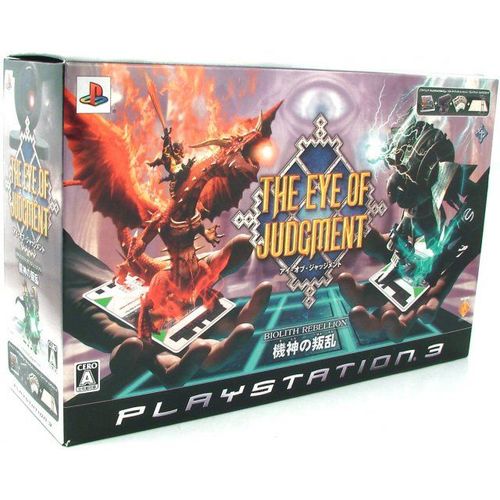
The Eye of Judgment
The Eye of Judgment Rulebook
Table of Contents
Table of Contents
- Checking the Pack Contents
- Preparing the Play Mat and PLAYSTATION Eye Camera
- Preparing the Game Cards
- Setting Up
- The Game Screen
- Using Menu Screens
- Getting Started
- Game Card Recognition Test
- Main Menu
- Playing The Eye of Judgment
- Types of Card
- Fields
- Summoning a Creature
- Rules of Battle
- Judgment Time
- Glossary of Terms
- Setting Up the Camera Stand
- Installing the PLAYSTATION Eye Camera
Checking the Pack Contents
Before commencing play, ensure you have the following items:
- PLAYSTATION Eye Camera
- Camera Stand
- Play Mat
- Starter Deck (30 Game Cards)
- 4 Function Cards
- Booster Deck (8 Game Cards)
Preparing the Play Mat and PLAYSTATION Eye Camera
- Place the Play Mat on a flat surface such as a table or a desk.
- Assemble the Camera Stand and place it alongside any edge of the Play Mat.
- Securely attach the PLAYSTATION Eye camera to the top of the Camera Stand and ensure that the camera overlooks the Play Mat.
- Insert the camera's USB connector into one of the USB connectors on the front of the PLAYSTATION 3 system.
- Turn the camera's lens angle selector to the right so that the lens angle marker is in line with the blue lens angle indicator for "wide angle view".
- Ensure that the lighting in the room is neither too dark nor too bright, and that the Play Mat is not cast in shadows or flickering lights.
Preparing the Game Cards
Choose a total of 30 cards to be your "deck" during battle and place the Function Cards to one side. Your deck can consist of Creature Cards and Spell Cards.
There are limitations to the number of the same Creature Card or Spell Card that may be included in a deck. If you own more than 30 Creature Cards and Spell Cards, choose 30 of your favourite cards.
Look out for The Eye of Judgment Collectable Card Game 8-Card Booster Packs, available from all good retailers.
NOTE: Function Cards are outlined later in this manual.
Setting Up
Set up the PLAYSTATION 3 system according to the instructions in its Quick Reference manual. At start-up, the power indicator light will glow red to indicate that the PLAYSTATION 3 system is in Standby Mode. Press the power/reset button and the power indicator light will turn green.
Insert THE EYE OF JUDGMENT disc into the disc slot with the label side facing upwards. Select the disc icon from the Home Menu. A thumbnail image of the software will be displayed. Press the enter button to commence loading. Do not insert or remove accessories once the power is turned on. Please refer to the PLAYSTATION 3 system's Quick Reference manual for further details about setting up and recharging a Wireless Controller. Make sure there is enough free space on the Hard Disk Drive (HDD) before commencing play.
The Game Screen
The main gameplay screen displays:
- Board
- Field
- Mana
- Lock
- Remaining Time
NOTE: the remaining time will be displayed when the Time Limit setting is turned on in the Options Menu.
Using Menu Screens
Press the directional buttons to highlight an option, then press the confirm button to confirm. To return to the previous menu screen, press the back button.
Getting Started
At start-up, follow the on-screen instructions to configure your television and the PLAYSTATION Eye camera. All configuration settings will be saved automatically. Press the confirm button to access the Game Card Recognition Test screen.
Game Card Recognition Test
Place a Creature Card in the central field of the Play Mat. If the camera recognises the card successfully, then the card recognition icon will be displayed on-screen. Press the confirm button to continue.
A short, cinematic introductory sequence will be displayed. Press the confirm button to skip the cinematic sequence and access the Title Screen. Press the menu button to access the Main Menu.
Main Menu
The options on the Main Menu are as follows: Battle Arena, Card Profiles, Deck Builder, Judgment, Guidance, Online and Options.
Battle Arena
Challenge a friend or a computer-controlled opponent to a battle, or view a battle between two computer-controlled opponents, by first setting the skill levels and deck types to be used.
Card Profiles
Select Card Profiles to view creature or spell data for cards in your possession. Place a card in view of the camera to access some additional on-screen info for that card.
Deck Builder
Construct personalised decks by adding cards from your card file. Choose either Edit a Deck or Edit a Deck with Camera, then highlight a Game Card to edit and the Card Information screen will be displayed. Press the buttons to cycle backwards or forwards through the Game Cards.
Judgment
Play a mini-battle using Creature Cards to battle against opponents.
Guidance
View movies to grasp the basics of THE EYE OF JUDGMENT.
Online
To play THE EYE OF JUDGMENT online against real life opponents:
- Register an online deck using the Deck Builder option.
- Accept the terms of the User Agreement displayed on-screen.
- Edit the Player config.
- Select a kingdom to duel in.
- Choose either Ranked Match using official rules, or Custom Match using customised rules.
- Search for a room that matches your criteria or create a room and wait for a challenger.
Press the appropriate button to access the on-screen keyboard and send messages to other competitors. Press the appropriate button to turn the on-screen chat log text box on or off.
Options
View and adjust a range of settings and options, including audio options and screen settings.
Playing The Eye of Judgment
Preparing Your Hand
Shuffle the 30 card deck and place them facing down near the Play Mat. Pick the first five cards from the top of the deck. These five cards will be your "hand". Hold the hand so that the picture side of each Game Card faces you, and ensure when playing against an opponent that they do not see your hand.
Quick Start Guide - Let Battle Commence!
The objective of the battle is to occupy five fields to win. During a battle, both players take turns alternatively. A flow of a turn is as follows:
Step 1
Pick a card from the deck when prompted and add it to your hand. An icon will be displayed in either the top left or top right corner of the screen, depending on whether you are player one or player two - this indicates the amount of cards you should have in your hand. Each turn, you gain two mana points. You can only cast a card that has less than or equal the amount of mana points that you currently have - check your mana points total, indicated on-screen.
Step 2
Before casting a Creature Card, you can use a Spell Card or activate a creature that is already present on a field using the Wireless Controller or a Function Card (these actions will use up mana points as displayed on the card). A battle may automatically begin as a result of any action taken. Discard any used Spell Cards or dead Creature Cards to the graveyard. Alternatively, take no action at all and move on to the next step.
Step 3
Cast a Creature Card. Place the card in the direction you want to attack or take action, for example, face your card towards an enemy card to attack the enemy, noting that the enemy may counterattack. Check the attack, defence and counterattack icons on the card to place it correctly. Only one creature can be summoned per turn. When there is an enemy present on the board that the summoned creature can attack, the battle will begin automatically. If you cannot use a card or choose not to summon a creature, use the End Turn Card or press the appropriate button and select End Turn. Any unspent mana points will be kept if you end your turn. Dispose of dead Creature Cards in the graveyard.
Step 4
If you have more than eight Game Cards in your hand at the end of a turn, you will be prompted to discard Game Cards into the graveyard until you are left with eight cards.
Types of Card
Function Card
Function Cards are non-gameplay cards which can be used to carry out specific actions, thus limiting the need to use a Wireless Controller:
- Turn End Card - Ends a turn without summoning a creature.
- Action Card - Specifies the target of an action, attack or spell when placed on a creature or field.
- Status Card - When held up to the PLAYSTATION Eye camera, the status of the whole board will be displayed. When placed on a field, the status of the creature summoned on that particular field will be displayed.
- Cancel Card - Cancels the current event or closes the status display. Visual effects such as battle animations cannot be cancelled.
NOTE: use a Wireless Controller to check the cards in your hand, library or graveyard, or to change the camera angle.
Creature Card
A Creature Card is a card that has the power to summon a creature to a field. To summon a creature, your mana reserves must be equal to or greater than the Summoning Cost of the Creature Card. If a Creature Card displays the Summoning Lock around the Summoning Cost, then that creature cannot be placed on a field belonging to a different element until the Summoning Lock becomes unlocked.
A Creature Card displays: the Creature's Name, Summoning Cost, Activation Cost, Hit Points, Attack Value, Attack Zones and Defence Zones.
A summoned creature can only attack enemy creatures situated in the directions indicated by the Attack zones icon on the Game Card. The style of attack will be determined by the Attack zones icon, the amount of attack points currently held, and the creature's natural abilities.
The attacked creature will counterattack according to the Defence zones icon on the Game Card. When a creature is attacked, Hit Points (HP) will be deducted and when the HP level reaches zero, the creature will be removed from the field.
To activate a creature, the amount of mana reserves must be equal to or greater than the Activation Cost indicated on the Game Card.
Spell Card
A Spell Card is a card that has the power to cast many different magic spells with wondrous effects and awesome results. During Step 2 of a turn (outlined earlier in this manual), hold a Spell Card up to the PLAYSTATION Eye camera, and choose a target if necessary. The "Summoning Cost" will be deducted from your mana reserves and the spell will be cast.
The four major types of spell are Ritual, Conjuration, Dominion and Sorcery.
Fields
Every field is founded upon a core element of Fire, Water, Earth, Wood or Biolith. A field's element affects the HP of a creature that is summoned on to it, for example an Earth Creature will gain two HP when placed on an Earth field, but a Wood Creature will lose 2 HP when placed on an Earth field, because Wood is the direct opposite of Earth.
A field can be "fieldquaked" by a spell and this major event can cause the field's element to change, as the field is flipped over. When the field's element changes, it will usually have an effect on the creature currently occupying it.
Depending on the field's element type, a creature will be affected when summoned to it, as indicated in the following table (rows are the creature's element, columns are the field's element):
| Creature's Element | Fire Field | Water Field | Wood Field | Earth Field | Biolith Field |
|---|---|---|---|---|---|
| Fire | +2 | -2 | - | - | - |
| Water | -2 | +2 | - | - | - |
| Wood | - | - | +2 | -2 | - |
| Earth | - | - | -2 | +2 | - |
| Biolith | - | - | - | - | - |
When summoning a creature, it is highly recommended to summon it onto a field of the same element type - when a creature other than a Biolith is summoned to a corresponding field, 2 HP will be added. However, if a creature is summoned to a field of the opposite element, 2 HP will be subtracted. The bottom right-hand corner of each field displays the element type that the field will become if fieldquaked.
There are five Elements in The Eye of Judgment: Earth, Fire, Water, Wood, and Biolith. The first four are sometimes called the Prime Elements because they are components of the natural world. The Biolith "element" was created by the sorcerer-scientist Scion.
Earth - One of the Prime Elements. Earth traits include: caution, patience, industry, stability, stubbornness and ambition. It is associated with the color yellow. Its opposite is Wood.
Fire - One of the Prime Elements. Fire traits include: determination, restlessness, passion, courage and desire. It is associated with the color red. Its opposite is Water.
Water - One of the Prime Elements. Water traits include: procrastination, deception, passivity and creativity. It is associated with the color blue. Its opposite is Fire.
Wood - One of the Prime Elements. Wood traits include: independence, idealism, rage and sociability. Its opposite is Earth.
Biolith - Not a natural prime element, the Bioliths are mechanical beings created by the sorcerer-scientist Scion. Unlike machines, Bioliths can think and take independent action.
Summoning a Creature
Place a Creature Card on an empty field within the Play Mat, and a creature will be summoned as long as the following criteria are met:
Check the Summoning Cost
To summon a creature, your mana should be the same or more than the Summoning Cost displayed on the Creature Card. You cannot summon when the Summoning Cost is greater than the mana in your possession. Depending on the Creature Card, there may be a Summoning Lock or particular conditions that must be met in order to summon.
Check that Summoning is Possible in the Field
A creature can only be summoned to an empty field adjacent to the four sides of a field already occupied by an enemy or allied creature. Empty fields will pulse with a white outline.
NOTE: when playing against a computer-controlled opponent, only your own cards will be placed on the Play Mat, so check the TV screen to see which fields are empty.
Check the Card's Direction
Creatures face in a particular direction, so you need to carefully place cards in the direction that you wish to summon them. Depending on which way a creature faces, you may or may not be able to attack or counterattack. A creature's ability to attack or defend against corresponding fields is indicated on each card by an "Attack Zones Icon" and a "Defence Zones Icon", so be sure to check these and choose the most appropriate direction before summoning your creature.
NOTE: cards can not be placed onto a field diagonally.
After Summoning a Creature
Once the Creature Card on the field has been recognised, the applicable Summoning Cost will be paid from your mana reserves and the creature will be summoned. When there is an enemy creature within the attacking range of your summoned creature, a battle begins automatically.
Rules of Battle
A battle begins automatically when there is an enemy within the attacking range of an activated creature, or when a spell that initiates a battle is cast.
Type and Range of Attacks
There are two types of attack; a "Physical Attack" and a "Magic Attack". The range of a particular creature's attack is indicated on the card's "Attack Zones Icon" - remember that the range is not always limited to the adjacent square in front.
Physical Attacks
These attacks use that most tried and tested of tactics: brute force. Depending on the direction of your opponent's defending creature, certain attack adjustments might be made, which may work for or against your creature.
When attacking from your opponent's side, they will not be able to counterattack. When you attack from your opponent's blindside (designated by the letter "B" on their Defence Zones Icon), 1 attack point is added and the enemy will not counterattack.
- Dodge Attempts - Sometimes assaulted creatures will automatically attempt to dodge an attack.
- Reduction Checks - Sometimes an ability to "reduce the damage" of an attack is applied automatically.
Magic Attacks
An attack using the power of magic. No attack adjustments, dodge attempts, or reduction checks will be applied during magic attacks.
Types and Direction of Defence
The direction and the type of defence used to counterattack enemy assaults can be ascertained from the "Defence Zones Icon" on a card.
NOTE: some creatures possess the ability to attack in several directions at the same time - take care though, as allied creatures within the target range can also be damaged by these attacks!
During the course of a game, battles may vary according to the abilities and positions of both attacking and defending creatures. The battle rules are administered automatically, so the more you play, the clearer different battle circumstances will become. Here's a quick example of how a battle may pan out:
1. A Creature is Summoned Onto the Field
If there is only one opponent in immediate play and therefore no need to select an opponent, the battle begins immediately. When a creature that can only attack one enemy at a time has several possible enemies to attack, you need to choose one target.
2. The Battle Begins
Depending on the "Attack Zones" and "Defence Zones" of the attacking and defending creatures, the direction of attack and the possibility of a counterattack are determined.
3. The Offending Creature Attacks
After any attack adjustment has been made, attack points are subtracted from the HP of the defending creature. When the HP of the defending creature becomes zero, that creature is removed from the field and its owner gains 1 mana.
4. The Defending Creature Counterattacks
If possible, the defending creature will attempt a counterattack. If its target is not within the attack zone, the direction of the defending creature will be temporarily adjusted so it faces the target. Once the counterattack is completed, it will revert to its original direction. If a counterattack reduces the HP of the offending creature to zero, the offending creature will be removed from the field and its owner gains 1 mana.
NOTE: when the HP of your creature becomes zero, remove the corresponding creature card from the field and place it in the graveyard.
Judgment Time
Winning
Occupy five fields at the end of a turn to win the game. When you only need to acquire one more field to win, a "Check" icon will be displayed on-screen.
If your opponent achieves a "Check", aim to defeat an enemy creature, reducing their HP to zero. If you cannot decrease your opponent's territory during your turn, then they may summon a creature during their turn and the possibility of defeat will increase.
Losing
The game will be lost, when you can no longer draw a card.
Glossary of Terms
Board - The board is the area of the Play Mat that consists of nine fields and is where battles take place.
Cast - The act of summoning a creature or using a spell.
Creature - A character that is summoned when a Creature Card is placed on a field. Creatures fall into one of the following element categories: Fire, Water, Earth, Wood and Biolith.
Deck - The 30 cards to be used during battle. A deck can consist of Creature Cards and Spell Cards and can be assembled according to strategy or preference.
Draw - The act of taking a card from the deck.
Element - An element is one of five attributes that categorise either a creature or a field. The five elements are Fire, Water, Earth, Wood and Biolith. A field's element affects the Hit Points of a creature that is summoned onto it, for example an Earth field will naturally favour an Earth creature.
Field - There are nine fields on the board and each field is essentially a square of land. When a creature is summoned onto a field, the field becomes the casting player's own territory.
Graveyard - The graveyard is where trashed Creature Cards and used Spell Cards are discarded.
Hand - A set of Game Cards in a player's possession at any one time.
Lock - When four or more creatures have been summoned onto the board, the summoning lock will be unlocked and the summoning restriction will be lifted.
Mana - Mana is a form of energy that is required to place a summoning card onto the board. Mana is gained at the start of a turn, as well as through some spells and when creatures perish. Mana reserves must first be built up so that more powerful Game Cards can be placed.
Mulligan - The act of redrawing the cards you have drawn at the beginning of the battle when you are not content with your hand. A mulligan can only be carried out once per game.
Owner - The owner of the card stays the same throughout the battle.
Phase - A set of action steps within a turn. During the same turn, a player cannot go back a phase.
Spell - The effect of magic that appears with the use of a Spell Card. The four major types of spell are Ritual, Conjuration, Dominion and Sorcery.
Trash - The act of discarding a Creature Card or a Spell Card to the graveyard. A Creature Card is trashed when the HP falls to zero in battle or when it is sacrificed. A Spell Card is trashed when it is used. The owner of a Creature Card whose HP falls to zero during battle gains one point of mana. If you have more than eight cards at the end of a turn, trash cards until left with eight.
Turn - A turn is a set of actions taken by a player, such as casting a spell or summoning a creature. Battles are fought between two players taking alternate turns.
Setting Up the Camera Stand
The Camera Stand consists of Camera Holder-A, Camera Holder-B, two Poles, a Joint and a Stand Base.
- Insert the poles into the stand base.
- Connect the poles to the joint.
- Attach camera holder-B to the poles.
- Attach camera holder-A to camera holder-B.
NOTE: when dismantling the camera stand, do not pull out the poles forcibly; rotate them carefully to remove.
Installing the PLAYSTATION Eye Camera
- Insert the PLAYSTATION Eye camera into the camera holder.
- Push down until the camera base is fixed by the stopper.
- Secure the camera cable using the cable holder.
Caution:
- Do not place the Camera Stand on an unstable surface.
- Keep out of reach of young children.
- Be careful not to catch your finger when assembling the Camera Stand or installing the camera.
- Do not carry around or twirl the Camera Stand in its assembled condition.
- Do not use the Camera Stand for any purposes other than as a stand for the PLAYSTATION Eye camera.
- Do not use or keep the Camera Stand in direct sunlight or near to thermal appliances.
- Remove the camera from the Camera Stand when not in use.
- Wipe the Camera Stand with a dry cloth for maintenance. Do not use chemicals or wipe with a chemical cloth.