The Breach: Ashes Special 11 – Breacher PL.AI promo
The Breach: Ashes Special 11 – Breacher PL.AI promo Rulebook
Table of Contents
Table of Contents
Components
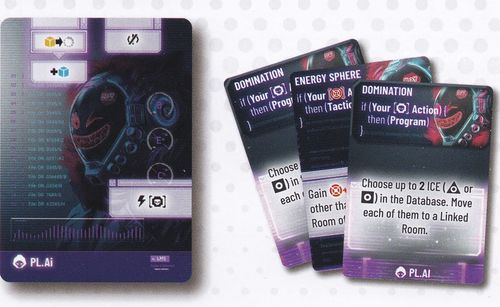
- 1 Breacher Card: PL.AI
- 3 Malware Cards for PL.AI: Energy Sphere (x2), Domination
No Avatar miniature is included. Use an unused Breacher miniature.
Breacher Card: PL.AI
The PL.AI Breacher card follows the same layout as the base Breacher cards and is placed in the Breacher slot of the Player Interface during setup (see The Breach rulebook, Setup, Step 11).
- Front: the card shows the PL.AI name and logo at the bottom. Three dials labelled B, E and Ch are printed on the left side, next to a column of numbered code lines. Two icon panels appear at the top, one icon panel sits mid-left below them, and one ability panel appears near the bottom. The panels carry icons only and no written text.
- Back: the card back shows the PL.AI artwork.
Note: the Breacher card's panel icons and dial values could not be read reliably from the photos, and no written rules text appears on the card. Their meanings are not transcribed here. Refer to the printed card and the Breacher card rules in The Breach rulebook. This is a disclosed gap, not a rule.
Malware Cards
PL.AI has three Malware cards. Each player shuffles them into their Malware deck with the rest of their Breacher's Malware (see The Breach rulebook, Malware Cards). Their printed text is reproduced below.
Energy Sphere
Card type: Tactics. Assigned Breacher: PL.AI. There are two copies.
Timing: if (Your [red target icon] Action) { then (Tactics) }
Effect: Gain [red target icon] +1 for each ICE, other than the target, in the Room of your [PL.AI icon].
Domination
Card type: Program. Assigned Breacher: PL.AI.
Timing: if (Your [square-in-square icon] Action) { then (Program) }
Effect: Choose up to 2 ICE ([triangle icon] or [square icon]) in the Database. Move each of them to a Linked Room.