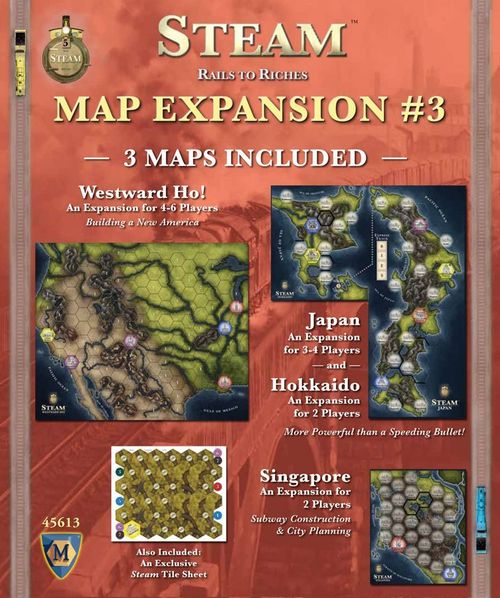
Steam: Map Expansion #3
Steam: Map Expansion #3 Rulebook
Table of Contents
Table of Contents
Westward Ho! (4-6 Players)
Initial Set Up
Remove the City Growth tile from the game. Then, randomly draw and place 1 or 2 Goods cubes on each of the numbered terrain hexes as shown on the board. Continue to place the number of Goods cubes as shown in each of the cities. For a 6-player game, place 1 extra cube on each of the starting cities (but no extras on the numbered terrain hexes).
Place 2 random Goods cubes in 8 of the Goods Supply spaces (leaving 4 of them empty). After placing the Goods cubes, keep the remaining Goods cubes in the bag.
Place 5 City Growth markers in Chicago (A), and 1 City Growth Marker on the turn 3 space of the Board (B).
Place the San Francisco tile on 1 of the empty supply spaces. Then place 3 random Goods cubes on the San Francisco tile.
Phase 1 - Select Action Tiles
There is no City Growth action available.
Phase 2 - Build Track
If there are any City Growth markers on the Chicago hex, no player may have more than 1 link (complete or incomplete) leaving Chicago. If Chicago has zero City Growth markers, all players may have as many links as they wish.
Towns: You are only allowed to place a town track tile on an empty terrain hex with no other track tile present (including redirecting track). You may build over the terrain hexes containing Goods cubes. If you build over a cube with a town track tile, place the cube onto the town tile. If you build over a cube with regular track, remove the cube from the board and place it in the Goods bag.
When you build a town track tile you must pay $3 for initial town placement rather than the usual $1, plus any additional terrain costs. However, when improving an existing town tile, the town cost is only $1 (as usual).
When you pay for mountain terrain, you need not pay for any river costs in that hex.
City Growth: You trigger City Growth as soon as you build track that causes any named non-Urbanized city without a City Growth marker to trace a contiguous path through any player's track to Chicago. Now draw 3 random cubes from the bag and place 2 of them on that city hex along with 1 of the 5 City Growth markers from Chicago, then place the remaining cube in Chicago. If not enough cubes remain in the bag, you decide where to place the remaining cubes between these 2 cities.
Example: If you build a track to St. Louis from Chicago, there is a City Growth action in St. Louis. If someone builds from Santa Fe to St. Louis, Santa Fe is now connected through their track and your track from Chicago to St. Louis, so Santa Fe is granted the City Growth action.
Urbanization: You may only use the Urbanization action on a built town track tile. You may not Urbanize a town adjacent to another city. Urbanized cities are given 2 Goods cubes from a single Goods Supply space. Goods cubes on town tiles are placed onto the new city tile.
Phase 3 - Move Goods
The Goods cubes that started in terrain hexes may be shipped once a town hex tile has been built on a hex containing the starting Goods cube.
All shipped Goods cubes are returned to the Goods bag.
Phase 6 - Set Up New Turn
At the end of turn two, place the San Francisco city tile and its associated Goods cubes on top of the Yerba Buena city hex. Move any Goods cubes or City Growth markers on top of this tile that may have come from a contiguous route to Chicago (or from the 6 player set-up). The City Growth marker on turn 3 is simply a marker to remind you to place the San Francisco tile before the turn begins (this City Growth marker is returned to the box).
Recommendation for First Time Players
When placing Goods cubes onto the cities, place no blue cubes on the red city, and no red cubes on the blue city (if these colors are drawn, redraw them).
Printed in the right-hand column of page 11, beside the Singapore rules. It refers to the cities placed in the Westward Ho! set up, so it is transcribed here under Westward Ho!.
4 Player Game
Phase 2 - Build Track
All players must complete a link from either Chicago or St. Louis before they may build elsewhere on the map.
Singapore (2 Players)
This scenario takes place on a portion of the island of Singapore. There is only the following rule-set and no distinction between the Basic and Standard game.
Initial Set Up
Line up the First Move, Engineer, City Growth, Locomotive and Urbanization tiles as a reminder of available actions. Place all these markers Standard sides up except for the Urbanization tile, which is kept Basic side up (see below). Note: You will not be taking these tiles.
Do not place a turn marker on the turn track.
Randomly choose the start player. The first player gets $5, the second player gets $8. Both players begin on the zero space on the Income Track.
Place 3 random Goods cubes on each of 5 Goods Supply spaces. Place 2 random Goods cubes on each of the remaining 7 Goods Supply spaces.
There are no phases in this expansion. Players take their entire turn as follows: Build Track, Additional Actions, Pay Expenses.
Loans
The loans follow the rules in the Basic Game.
Build Track
On your turn, you may build 1 track tile (if possible).
No player may control more than 1 link (complete or incomplete) connected to Changi Airport.
No player may control more than 2 links (complete or incomplete) connected to any 1 town.
If you do not extend track from a controlled incomplete link, place an additional token on that link. Once that link is extended remove the extra token.
Additional Actions
On your turn you may take 1 of the following additional actions:
Move 1 Goods cube: You may move 1 Goods cube up to twice the distance of your Locomotive level, but you may only score the number of track points up to your Locomotive level. You must score all track points that you move over your opponent's track.
Engineer: This provides you 1 extra track build for a maximum of 2 track tiles on your turn.
City Growth: There is no cost for this action.
Locomotive: Cost is the face value of the Locomotive level that you are moving into.
Urbanization: When you take this action you may only Urbanize a previously built town station that is not adjacent to another City for the basic scenario cost of 6.
Pay Expenses
If you have taken an additional action, you must pay expenses. Your expenses are based entirely on how much money you owe on the Income Track. You do not pay for your Locomotive level. You only earn ½ as much money rounded down from the Income Track.
If you have any marked incomplete links, pay $1 for each stack of 2, rounded up.
Game End
The game ends if you any 1 of the following 3 conditions:
-
First: If you move a Good, causing either player to have 15 or more VPs and be at 0-10 on the Income Track after upkeep, Game End is triggered. From this point on, if you have the highest VPs and have 0-10 income at the beginning of your turn, you win. Disregard track link points.
Note: If you trigger this end game condition, and your opponent already meets the VP/Income requirements, he will immediately win at the beginning of his turn.
-
Second: If you go bankrupt, your opponent wins.
-
Third: If you and your opponent pass sequentially without building or taking any additional actions, the player with the most points wins. Ties broken by track link points.
Japan (3-4 Players)
Initial Set Up
With 4 players, use the entire 3-panel Japan board. For 3 players, do not use the Hokkaido panel (see below).
Place 3 Goods cubes in each of the Goods Supply spaces (3 or 4 player).
You and each other player take a token of your color and place it on the zero space of the Express Track. This number represents the capabilities of your Express Trains.
Base Game only: Use the 4 disks marked "Japan" on the back (see note on page 13). Place these new numbers on the corresponding action tiles to change the turn order for these actions as follows:
- Turn Order (from Steam)
- First Move (from Steam)
- City Growth (from Steam + disc)
- First Build (from Steam)
- Engineer (from Steam + disc)
- Urbanization (from Steam + disc)
- Locomotive (from Steam + disc)
The four numbered "Japan" disks (3, 5, 6, 7) are shown beside this list in the booklet.
Phase 1 - Select Action Tiles
Urbanization: You must immediately place your city when you select this action.
Base Game only: Urbanization is free.
Locomotive: Immediately increase either your Locomotive Level or your Express Train Level by 1 (move your token to the next highest Locomotive box or your token to the next Express Track box).
Base Game only: You must pay the bank the $4 as shown on the Locomotive action tile plus an amount equal to the Locomotive Level or Express Track Level to which you are moving, plus the current level on your unmoved track.
Example: Dave performs the Locomotive action. His Locomotive Level is 3 and his Express Track level is 1. He moves his JR token on the Express Track to level 2. He now must pay $9 ($4 for the action+$3 for his locomotive level+$2 for his new Express Track level).
Phase 2 - Build Track
You may only build 2 track tiles on your turn.
Engineer: You may build 3 track tiles.
Urbanization: You may not Urbanize a town adjacent to another city in Hokkaido.
Editorial note: this sentence is printed in the Japan section as "in Hokkaido"; it is transcribed as printed.
You may only build a link on the Seikan Tunnel if either Aomori (A) has been Urbanized, or if you are building from Aomori (A) or from the hex below Hakodate (B). The tunnel costs $5 to build. Place your token on the tunnel hex (C) instead of track. The gray dots represent the tunnel. This tunnel is a rail line that cannot be redirected or upgraded. This counts as 1 of your track builds and is not considered a complete link until it connects to a city or a town tile. If this incomplete link is abandoned, remove your marker from the tunnel hex; The tunnel must now be built again. You may extend from the tunnel line and create a town tile in Aomori from your tunnel link. Track must be built into the town from the hex side that the tunnel enters.
You are allowed to build on The Uchiura Bay hex. It is considered to be a river for its build cost (+$1).
Phase 3 - Move Goods (or Improve Locomotive)
You may choose to improve your Express level rather than choosing to improve your Locomotive. You start the game with an Express level of 0. When you move to Express level 1, this allows you to deliver a Goods cube along a route with 1 more than the maximum length of your locomotive level. In doing so, you may ignore 1 link along the route (yours or otherwise) which results in negating that track point. You may only choose to improve your Express level once per turn. You may not choose to improve your Express level and your Locomotive in the same phase.
Example: If you have a level 4 train with 1 express train, and you want to deliver a cube that is 5 links away, you may move it over 5 rails and get 4 points.
You must pay $1 from your coffers to the owner of the link you ignored.
Phase 6 - Income/Expenses
Standard Game only: During the Income & Expenses Phase you do not pay maintenance cost based on your Express Track Level.
End of Game
The game ends after 8 turns for both 3 and 4 players.
Hokkaido (2 Players)
Initial Set Up
Place the Honshu tile on the Seikan Tunnel hex (A). You can now build track from Hakodate directly to this hex.
Place the Goods cubes on the board as usual. However, no Goods cubes may start in a city that matches the cube's color during setup (i.e., no blue cubes in a blue city). If this occurs, replace any Goods cubes that match the city with new Goods cubes randomly drawn from the bag.
Place random Goods cubes on 8 of the 12 supply spaces as follows: 4 supply spaces get 3 Goods cubes each, the other 4 spaces get 2 Goods cubes each. Leave the remaining 2 supply spaces empty.
Each player places a link token of their color on each of the action spaces on the base map.
Whenever bidding takes place, the losing player must pay half of his bid rounded up.
Base Game: Use the 4 disks marked "Hokkaido" on the back (see note below). Place these new numbers on the corresponding action tiles to change the turn order for these actions as follows:
- Turn Order (from Steam)
- First Move (from Steam)
- First Build (from Steam + disc)
- Engineer (from Steam + disc)
- City Growth (from Steam)
- Urbanization (from Steam + disc)
- Locomotive (from Steam + disc)
Phase 1 - Select Action Tiles
You only have access to an action tile that currently has 1 of your link tokens on the matching space on the board. You cannot select an action previously chosen this phase. When you select the action, remove your link token from the corresponding space on the board.
Turn Order: Immediately put 1 of your tokens on any Action Space, previously used or otherwise.
Phase 2 - Build Track
You may only build 2 track tiles on your turn.
Engineer: You may build up to 3 track tiles.
Urbanization: You may not Urbanize a town adjacent to another city. Urbanized cities are only granted up to 2 Goods cubes from 1 Goods Supply space. You are allowed to build on the Uchiura Bay hex. It is considered to be a river for its build cost (+$1).
End of Game
The game ends after 6 turns.
Notes
Since the original printing of Steam Expansion #3 we have produced renumbered Action Tiles for this expansion. They can be found in the Steam Expansion #4 (MFG45614).