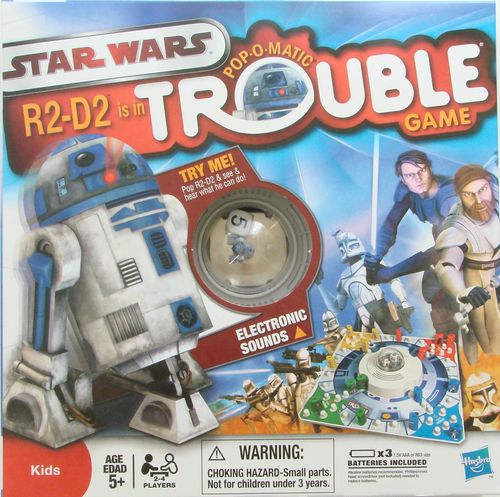
Star Wars R2-D2 is in Trouble
Star Wars R2-D2 is in Trouble Rulebook
Table of Contents
Table of Contents
Object of the Game
Be the first player to move all four of your colored pawns around the gameboard and into your FINISH area. During the game, try to send your opponents' pawns back to HOME.
For 2 to 4 players. Ages 5+.
Contents
- 1 plastic game unit with POP-O-MATIC die roller and R2-D2 character
- Gameboard
- 16 Plastic playing pawns
- Label sheet
Assembly
- Turn the plastic game unit right side up. Slide the gameboard over the electronic module and tuck the tabs into place as shown in Figures 1 and 2.
- Apply the corresponding colored labels to the matching colored pawns.
You're going to hear a variety of R2-D2 sounds every time you pop the popper because R2-D2 loves to "chatter"! The sounds are just for fun, and do not help or hurt you during gameplay. If you'd like a quieter game, you can turn the sound off by moving the switch on the underside of the game unit to the OFF position.
Game Setup
- Slide the TRY ME ON/OFF switch on the underside of the game unit to the ON position.
- Each player selects 4 pawns of one color and places them in the matching color HOME. If only two people are playing, each can play with two sets of pawns if desired.
- Who Starts the Game: Each player rolls the die by pressing the POP-O-MATIC once, then letting go. The player who pops the highest number goes first. Play then continues to the left of the starting player.
How to Play – Classic Trouble Game
To add in the special Star Wars rules right away, read the basic rules and then add in the special Star Wars themed rules explained on page 4. If you're only playing by the classic game rules, R2-D2 does not help you out, he's just watching!
A turn consists of one pop and a move (if possible). Important: If a number 6 is popped, the player gets an additional pop and move.
- On your first turn, you must pop a number 6 to move one of your pawns out of HOME and onto START on the playing track. You pop only once. If you do not pop a 6 on your first turn you cannot move any of your pawns and must wait until your next turn to try again.
- Once you pop a 6, move one of your pawns onto START. Pop again (remember, you have a free turn for popping a 6) and move the pawn in START on the playing track the number of spaces shown on the die.
- Always move your pawns clockwise around the playing track. Count each space whether it is empty or full (See Figure 3.)
- Pop and move all of your pawns as shown. When you pop a 6, you can either move a new pawn out to START or move a pawn already in the playing track. Then pop again. If you pop any other number, move one of your pawns already in the playing track.
- If your pawn lands on a space (by exact count) that already has an opponent's pawn in it, the opponent's pawn returns to its HOME and must start all over again. (See Figure 4.) Your pawn now occupies that space.
- If another player's pawn is in your START space when you roll a 6 and you want to move a pawn out of HOME, that player's pawn is sent back to HOME and you move your pawn into START. If your own pawn is in your START space when you pop a 6, you cannot bring a new pawn out. You must use the 6 to move a pawn already in the playing track. You cannot land on your own pawns.
- The FINISH Area: When a pawn has moved once around the gameboard, it enters its matching colored FINISH area. A pawn cannot go around the gameboard more than once.
A pawn can only enter FINISH if the exact number required to get into one of the FINISH spaces is popped. Pawns in FINISH are safe from other players' pawns because no player can move into another player's FINISH area. Pawns can move within a FINISH area only in the direction of the arrows and by exact count of the die.
Be a Winner!
The first player to move all 4 pawns of his/her color once around the gameboard and into the FINISH area is the winner. The game continues to see who comes in second or third.
Special Rules for Classic Trouble with a Star Wars Twist
This game plays by the same rules as the original Trouble® game with a few special rules.
Anytime you pop the popper and R2-D2 stands up straight, that counts the same as rolling a 6! This means you can:
- Move a new pawn out to START –or–
- Move a pawn already in the playing track 6 spaces then move that pawn or another pawn the number you rolled on the die –and–
- Pop again.
Note: If you get lucky enough to roll a 6 AND get R2-D2 to stand up on the same pop, you only get to go again once.
Figure 5 shows you popped a 4 and R2-D2 is standing up! Now you can do one of three things.
- Use R2-D2 standing to get a pawn out of START, then move that pawn or any other pawn in play 4 spaces.
- Use R2-D2 standing to move a pawn 6 spaces, and then move a different pawn 4 spaces.
- Use R2-D2 standing to move a pawn 6 spaces, and then move that same pawn an additional 4 spaces for a total of 10 spaces.
And don't forget... you also get to pop again!
Figure 6 shows you popped a 4 but R2-D2 is not standing up! This means you get to move 4 and do not get to pop again.
Restorage
Slide the game unit backwards, into the box, to cover the hole. This will prevent the pawns from falling out during restorage.
Batteries
The game unit uses 3 × 1.5V AAA (R03 size) batteries. Alkaline batteries are recommended. A Phillips/cross head screwdriver (not included) is needed to replace batteries.
To replace batteries: make sure the TRY ME switch on the underside of the electronic console is in the OFF position. Then loosen the screw on the battery compartment, located on the underside of the console, and remove the door. Insert 3 AAA-size batteries (we recommend alkaline), making sure to align the + and – symbols with the markings in the plastic. Replace the door and tighten the screw.
Batteries should be replaced by an adult. Do not mix old and new batteries or standard (carbon-zinc) with alkaline batteries. Remove exhausted or dead batteries from the product, and remove batteries if the product is not to be played with for a long time. Do not short-circuit the supply terminals.
Editor's note: the printed sheet's battery labels are inconsistent (one panel reads "Batteries Included", another reads "Batteries Required – Not Included" for the same three AAA cells). The battery specification above is the one given in both panels.