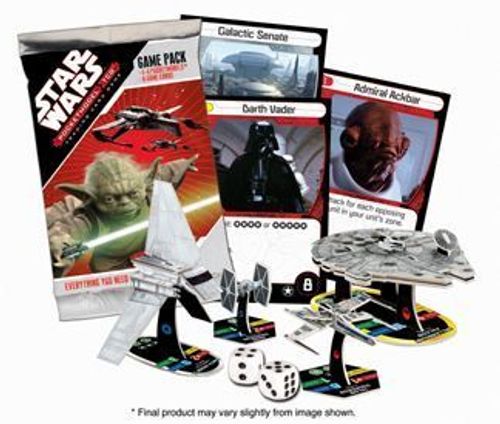
Star Wars PocketModel TCG
Star Wars PocketModel TCG Rulebook
Table of Contents
Table of Contents
Object of the Game
Win by destroying all of your opponent's PocketModel units or card objectives.
Prepare to Play
Each player brings a deck of at least 30 cards and a force composed of up to 30 build stars of units.
No deck can contain more than three copies of any single card.
You can have one copy of each unit for each 10 build stars you play with; for example, in a game of 30 build stars you can have up to three copies of each unit.
See "Playing with Two Game Packs" below if you have fewer than 30 build stars or 30 cards (footnote on the printed sheet).
Setting Up the Game
Players shuffle their decks and place the top three cards of their decks (without looking at them) face down into their home zones; these cards become their objectives.
Players determine the first player (the player who will take the first turn).
Players then select 20 build stars of units and place them in front of their objectives into their home zones. If a player can't place exactly 20 build stars using any combination of units, that player must place fewer than 20.
Players then each draw a hand of three cards from their decks. You can look at your own hand.
Playing the Game
Players alternate turns, starting with the first player. If there are more than two players, the turn order proceeds clockwise around the play area, starting with the first player.
A player can do these two things on his or her turn, in order:
- Play one objective.
- Take one of these actions:
- Move action. Choose up to 5 build stars of your units and move them into adjacent zones. When a unit moves, it may move only one zone.
- Combat action. Choose up to 5 build stars of your units to attack an opponent's units (see Combat).
- Strike action. Attack one of an opponent's face-up or face-down objectives using up to 5 build stars of your units that are in that opponent's home zone (see Strikes).
Playing Objectives
You can choose to replace one objective with an objective card from your hand. If you replace a face-down objective, put the replaced card into your hand. If you replace a face-up objective, discard it and draw a card from your deck into your hand.
Place the new objective revealed (face up).
Objective Abilities
Most objectives have abilities printed on them, which apply only while the objective is face up. Some abilities apply only when those objectives are initially revealed, and some abilities apply continuously while the objective is face up in the play area, per the rules on those cards.
Units (PocketModels)
Each unit has a value represented by build stars. The number of build stars a unit has tells you what the unit costs to add to your fleet. Build stars are also often referred to by combat cards, objective cards, and these rules. Each unit also has four values (attack, damage, defense, and shields) that are discussed later in these rules.
Units that you control in the game are called friendly units. Units that your opponent controls in the game are called opposing units.
Your out-of-play units are your reserves and are placed to the side of the play area. When your units are destroyed during the game, they become reserve units.
If a player at any time has no units in play, he or she is eliminated from the game. (Units in a player's reserves do not count as units in play.)
Cards
There are two types of cards in this set: combat cards and objective cards.
- Combat cards can be played only during a combat action (see Combat), and they have special effects on the game.
- Objective cards can be played only into your home zone (see Play Areas). They represent essential resources that your opponents will seek to destroy, and they also have special effects on the game.
Unit and Card Icons
A unit or card with an icon printed on it is a unit or card of that icon type. For example, a card printed with the Droid icon is a Droid card. Many combat cards and objective cards reference units of specific icon types. See "Quick Reference" on the back panel of these rules for the icons that appear in this set.
Play Areas
These are the areas into which units and cards are placed.
- Home Zone. Your home zone is where your units begin the game, and where you play your objectives. When one of your objectives is destroyed, reserve units brought into play begin the game in your home zone (see Strikes).
- Contested Zone. This is the center zone between the players. It touches all players' home zones.
- Reserves. Your out-of-play units are your reserves and are placed to the side of the play area. When your units are destroyed during the game, they become reserve units.
- Deck and Discard Pile. Your deck is your face-down pile of combat cards and objective cards. At the end of any battle, you can refill your hand from your deck. Combat cards played during battles, discarded cards, and destroyed objectives go face up into your discard pile. If your deck runs out of cards and you need to draw a card, shuffle your discard pile to create a new face-down deck and continue drawing as needed. You are not allowed to look at your deck or your opponent's deck during the game.
- Hand. These are the cards you have available to play during your turn. Your starting hand size is three cards.
Combat
Each of the units you choose during your combat action can attack only one opposing unit, or defender. To attack a defender, an attacker must be in the same zone as the defender. Your chosen units can attack the same defender or different defenders. You choose all defenders before resolving any battles.
During a battle, both the attacker and the defender try to hit each other (see Battling).
Playing Combat Cards
Combat cards can be played from hand only during a battle. A combat card has up to two types of effects: combat bonuses and abilities. Effects from a combat card last only until the battle ends, unless specified otherwise by the card.
Combat Bonus
When you play a combat card, your unit gets the combat bonus of the card for that battle. If the bonus is red, it adds to attack value; if yellow, it adds to damage value; if blue, it adds to defense value.
Abilities
Some combat cards also grant your unit a special ability. An ability is printed next to one of three types of icons, described below. The type of icon tells you which units can benefit from the ability. (A unit always benefits from a combat card's combat bonus, but it won't always be able to benefit from the card's special ability.)
- Green match icon. Your unit gains the ability only if it has the same match icon printed on its base.
- Silver power match icon. Your unit gains the ability only if it has the same power match icon printed on its base.
Additionally, units with power match icons printed on their bases have abilities that don't appear on combat cards (see Quick Reference). Some power match icon abilities apply when your unit is in a battle. Other power match abilities can be used outside of a combat action. You may choose to use only one of these power match abilities per turn.
- Gold wild icon. Wild icons appear only on combat cards, never units. Next to the icon will be text indicating which units are eligible to gain the ability. "Unit: Any" means that any unit you play the card on gains the ability. Others have build star restrictions. For example, "Unit: 1, 2, or 3 build stars" (shown with build star icons on the printed sheet) means that your unit gains that ability only if it has 1, 2, or 3 build stars.
Whenever a card contradicts the basic rules of the game, follow the card text. If one card states that something can't be done, and another card effect states that something can be done, follow the "can't" text.
Battling
After choosing attackers and defenders, the attacking player determines the order in which the battles occur. Resolve each battle using the following steps:
- Attacking player: Plays a combat card from hand or passes.
- Defending player: Plays a combat card from hand or passes.
- Attacking player: If the defending player played a combat card, but you chose to pass in step 1, you can play a combat card.
- Find your unit's attack result: a. Roll two six-sided dice and add them up; this is your base roll. If your base roll result is a 12, a hit is automatically scored; skip to step 7. b. Add the result to the unit's attack value. c. Modify this result using combat cards played or revealed objectives in play that affect this result. d. The total result is your attack result.
- Find your unit's defense result by modifying its defense value using combat cards played or revealed objectives in play that affect the defense value. The total result is the defense result.
- If a unit's attack result beats or ties the opposing unit's defense result, a hit is scored. (Both players check for a hit at the same time.)
- When a unit is hit, assign a number of damage counters to it equal to the damage value of the unit that hit it (remembering to include any bonuses from combat cards or revealed objectives that modify the damage value of the unit that scored the hit). When the number of damage counters on one of your units equals or exceeds its shields value, it is destroyed and moved into your reserve zone; remove all damage counters from destroyed units.
- If you played any combat cards in the battle, discard them and then draw cards from your deck until you reach your maximum hand size.
- Repeat steps 1–8 for each other battle declared this turn.
Strikes
The attacking player determines the order in which the strikes occur. If you choose to strike a player's face-down objective, that player reveals the objective (turns it face up). If the card is an objective card, stop and apply its ability before continuing. Combat cards can't be played during a strike. Resolve each strike using the following steps:
-
Find the unit's strike result: a. Roll two six-sided dice and add them up; this is your base roll. b. Add to this the unit's attack value. c. Modify the result using revealed objectives in play that affect this result. d. The total result is your strike result.
-
Find the objective's defense result by modifying its defense value (printed in the objective's lower right corner) using any revealed objectives in play that affect the defense value.
-
If the strike result beats or ties the objective's defense value, the objective is destroyed; discard the objective.
If a player's destroyed objective is not that player's last objective in play, he or she can immediately move units from his or her reserves into his or her home zone. These moved units can have total build stars up to the number of build stars of the destroyed objective.
-
If the strike fails and the objective attacked is a combat card, its player discards it and replaces it (face down) with the card from the top of his or her deck.
-
Repeat steps 1–4 for each other unit you have chosen to strike the objective until either all of them have failed a strike or the objective is destroyed.
If a player at any time has no objectives in play, he or she is eliminated from the game.
Quick Reference
During Your Turn
- Play ONE objective.
- Take ONE action:
- MOVE: Choose up to 5 build stars of your units and move them into adjacent zones.
- COMBAT: Choose up to 5 build stars of your units to attack an opponent's units.
- STRIKE: Choose up to 5 build stars of your units in your opponent's home zone to attack one of his or her objectives.
Icons
The Quick Reference groups the icons as follows (icon names as printed on the sheet):
- Match icons (Droid, Lasers, Leader, Torpedo, Trooper): "Ability works on units with matching icons on their bases."
- Power match icons (Carrier, Turbolaser): "Ability works on units with matching icons on their bases, but also grants a persistent special ability."
- Carrier: "You may use this ability instead of taking an action this turn. If this unit occupies your opponent's home zone, put up to [build star icons] of units from your reserves into your opponent's home zone." - Turbolaser: "+1 damage against [build star icons] or [build star icons] units." (The build star values are shown as icons on the printed sheet.)
- Wild icons (Force, Luck): "Ability works on any unit—the card will tell you which ones."
Transcriber note: the Quick Reference's icon-to-ability lines are laid out graphically on the printed sheet, and the exact build star values for the Carrier and Turbolaser entries are shown only as icons. They are described here without the numeric values; the individual cards state the values.
Playing with Two Game Packs
If you and your opponent have only a Game Pack each, you can still play the game. In this case, play with all the units you get from your Pack, but you each put into play only one objective (instead of three). Use the remaining cards for your starting hand of three cards and your deck.