SILOS: Crop Circles Expansion
SILOS: Crop Circles Expansion Rulebook
Table of Contents
Table of Contents
Overview
This expansion features two new modules. The Crop Circles Module introduces another element of long-term strategy. The Permanent Skill Tiles Module features diverging asymmetry. You may decide to include one or both modules in your plays of SILOS, but we recommend the Permanent Skill Tiles Module only for experienced players — it increases the complexity and playing time of the game.
Components
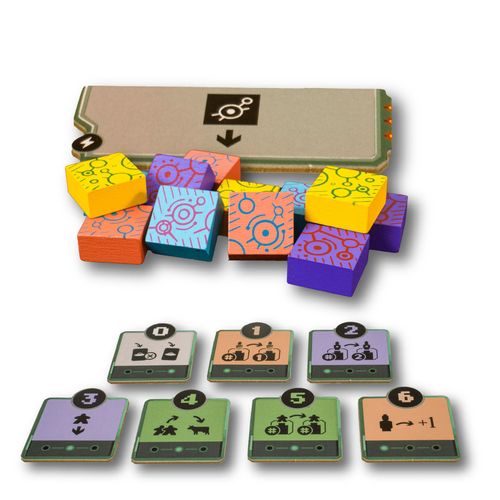
- 1 Crop Circles Power Tile
- 4× 3 Crop Circle Tokens
- 7 Permanent Skill Tiles
- 4 Player Aid Tiles
Crop Circles Module
Setup
- While setting up the game board, place the crop circles power tile on any of the locations 1 to 6 (this replaces the Power Event in that location). For your first play of this module, we recommend you place this tile on location 6 (Bus Station).
- Give each player the three crop circle tokens of their faction color.
Gameplay
When a player exerts the crop circles power tile, the player may position one of their crop circle tokens in any one location which does not yet have a crop circle token. Note: There is a dark space next to each location where a crop circle token can be placed.
If the player has already positioned all three of their crop circle tokens, then the power allows the player to reposition one of their tokens — or to replace one opponent's token if all locations already have a token.
If all the locations already have a crop circle token, then the power allows the player to return one opponent's crop circle token and to replace it with one of their own tokens.
The crop circle token increases the player's influence in a location by 1.
Permanent Skill Tiles Module
Setup
- While setting up the game board, place each permanent skill tile next to its corresponding location.
- Give each player a player aid tile.
Gameplay
When a player exerts the Power Event of a location with their leader figure present, the player additionally receives that location's permanent skill tile and displays it face up in front of them. This tile can be claimed from the board or from another player who had claimed it previously.
When this module is included, a player's turn now consists of three phases:
- Move your alien figures (as before).
- Use your skill tiles (in the order outlined below). Each skill tile can only be used once per turn.
- Activate one card (as before).
After concluding phase 1 (movement), when you progress to phase 2 (skill tiles), you must use your skill tiles in this order:
- Alien figure movement tiles (1, 2, 6).
- Human tiles (3, 4, 5).
- Town Hall tile (0). This tile is used after revealing a Common Card in phase 3.
The effects of each permanent skill tile are explained below:
- 0 — Town Hall: On your turn, you may reject the first Common Card you reveal. Discard it to the board and reveal a second card.
- 1 — Sheriff's Office: On your turn, you may move any one alien figure of any player from any location to the Sheriff's Office. This is done in addition to your regular alien figure movements.
- 2 — University: On your turn, you may move any one of your alien figures from any location to the University. This is done in addition to your regular alien figure movements.
- 3 — Shopping Mall: On your turn, you may draw one human from the bag and place it on any corresponding focus group.
- 4 — News Station: On your turn, you may return any two of your humans to the bag. Then, take one cow from the supply.
- 5 — Church: On your turn, you may reposition one human from any one focus group to another corresponding focus group.
- 6 — Bus Station: You now have one additional alien figure movement, for a total of three regular movements per turn.