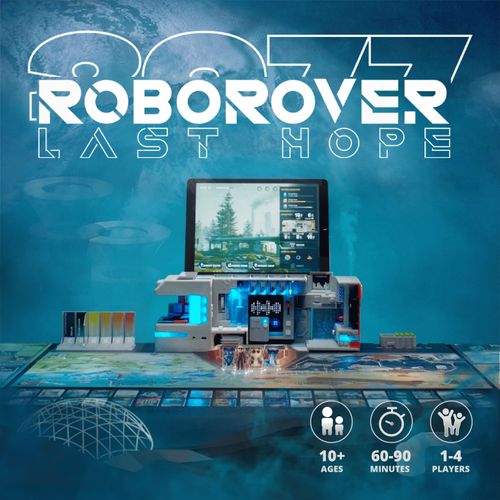
Roborover 2077: Last Hope
Roborover 2077: Last Hope Rulebook
Table of Contents
Table of Contents
Game Components
- 1 Fortress
- 1 Walkie-Talkie
- 1 Repair Base
- 1 Dice
- 1 Base Tray
- 4 Arylic Pieces (as printed; Sylvan Ranger, Ocean Seeker, Sky Glider, Volcano Explorer)
- 104 H2 Tokens (hydrogen tokens)
- 10 Reputation Tokens
- 1 Game Board
- 4 Player Boards
- 108 Resource Cards
- 40 Tech-Gear Cards
- 10 Repair Cards
- 18 Bonus Cards
- 12 Survival Token Cards
Game Board Setup
- Game Board: Place the game board in the middle of the table, making sure to leave enough space for each player's board and discard pile.
- Fortress: Place the Fortress at the designated position on the game board and turn on the switch.
- Base Tray: Place the Base Tray at the designated position on the game board and place the cards and tokens in the tray.
- Game Piece: Give each player the chosen Piece. Place them on the Base area.
- Resource Cards: Draw 1 card at a time from the Base Tray. Resource cards have three categories, with each category containing 9 cards, each printed with numbers from 1 to 9.
- Tech-Gear Cards: Draw 1 card at a time from the Base Tray, which is used to resolve special events. The card has an RFID tag on the back for automatic recognition by the Fortress.
- Repair Cards: When the shop is open, players can purchase repair cards by spending hydrogen tokens when the pieces land on the repair cards points. The cards are placed on the summit of the Fortress, and there is no limit to the number of cards that can be purchased at one time.
- Bonus Cards: When the bonus time is activated, players can draw 1 bonus card from the Base Tray, which will bring you an additional surprise.
- Survival Token Cards: The way to obtain the survival token card is by traveling through a wormhole to another player's zone, which requires strategic planning of your route, because in other zones your movement steps will be reduced to one.
Player Setup
Each player takes a player board and a character piece. The player board has five zones:
- Survival Token Cards Zone: All obtained survival token cards need to be placed in this zone, face down, maximum 3 cards.
- Hydrogen Token Zone: No maximum token limit.
- Repair Cards Zone: Maximum 3 cards.
- Reputation Token Zone: Maximum 3 tokens.
- Resources Collections Zone: Try to arrange 3 cards of the same type with consecutive numbers together.
Characters and their movement areas:
- Sylvan Ranger: Move up to 3 spaces in the forest area.
- Ocean Seeker: Move up to 3 spaces in the ocean area.
- Sky Glider: Move up to 3 spaces in the desert area.
- Volcano Explorer: Move up to 3 spaces in the volcano area.
App Setup
- Choose mode: Select Solo or Multiplayer on the app's start screen.
- Connect the Fortress with pad: Connect the Fortress with the pad. When the app shows "Successfully Connected", click Next.
- Choose characters: Determine the order of selecting game characters based on the dice roll. Assign characters in turn based on the dice roll, and tick the selected characters. After all players have checked the selected characters, click Next.
- Start: You can officially start the game.
Player Turns
Exploration: Movement
Players start with the Sylvan Ranger character and take turns in a clockwise direction. Each player can decide to move 1 to 3 spaces and move to different points on the board according to their strategy.
- Movement Restrictions: Within their own area, players can move up to 3 steps; in another player's area, the limit is 1 step.
- Direction Selection: Once a player has chosen a direction, they cannot change direction or move backward in the same turn.
- Crossing Areas: Players can reach other players' areas through the base or wormhole, which provides more strategic options for the game.
Explore Points
Upon reaching the corresponding point, players can collect or purchase, which may include collecting resource cards, tech-gear cards, survival token cards and bonus cards, or buying repair cards.
Resources Cards: When reaching a resource point, draw 1 resource card, which is divided into three categories: Energy Water, Energy Food, and Energy Cubes. These are the basic resources needed for fortress production. The resource cards obtained by players have two main uses:
- Supply the fortress for production (explained in the Base section below).
- Try to arrange 3 cards of the same type with consecutive numbers together, which can increase the final score of the player.
Tech-Gear Cards: When reaching a tech-gear point, draw 1 tech-gear card. Tech-gear cards are used to resolve unexpected events triggered by the app. The more tech-gear cards accumulated, the higher the probability of resolving events. Correct answers will be rewarded with hydrogen tokens, while incorrect answers will result in a deduction of hydrogen tokens. The detailed process is explained in the Events section.
Bonus Cards and Repair Cards: When reaching a bonus or shop point, you can draw 1 bonus or shop card, but note that these points are time-limited and controlled by the app. This means that when they are not active, if you land on these points, you cannot draw cards. The detailed process is explained in the Events section.
Example card faces printed in this section of the draft: "Take 1 Hydrogen from another player." and "+1 Move 1 extra space."
Base
In the game, players need to go back to base at certain times, because they can only perform the following actions upon returning to the base:
- Produce
- Use walkie-talkie (during the recall event)
- Repair
- Verify survival token cards
Produce
When players return to the base, they can use specific combinations of resource cards to produce the resources needed for the fortress, such as Energy Water, Energy Food, and Vitality Soup.
When players produce, they will be rewarded with 1 Hydrogen Token. If the fortress's resource level drops below 20%, players can additionally earn 1 Reputation Token when producing the corresponding resource.
Procedure to produce:
- Select two basic resources for production and place them into the discard pile.
- Click the corresponding production button on the software interface. Follow the illustrated operation for the fortress, and you will see the corresponding values on the pad interface changing.
- The production process will last for 5 seconds, and then end the production by following the instructions to operate the fortress.
- Get 1 Hydrogen Token or 1 Hydrogen Token and 1 Reputation Token according to the on-screen prompt.
Produce (Example)
Here's an example to show how to produce Energy Water. During production, there is no need to pay attention to the numbers on the cards.
Procedure to produce:
- Select 1 Water card and 1 Energy Cube card for production and place them into the discard pile.
- Click the Energy Water production button on the software interface. Switch the knob clockwise as illustrated. You can see the Energy Water value on the pad interface increasing.
- The production process will last for 5 seconds, and then switch the knob anti-clockwise to end the production.
- Get 1 Hydrogen Token or 1 Hydrogen Token and 1 Reputation Token according to the on-screen prompt.
Events
In the game, random events are a key dynamic element that drives the progress of the game, presented to players through the app. They may involve various types of events such as natural disasters, emergencies, recall events, and the activation of shops and bonuses. The way players handle these events also varies.
The draft describes each event under four headings: Happening (1. the character on display has priority in solving events; 2. the type of cards will be used; 3. actions need to be done, all players; 4. negative or positive effects).
Natural Disaster: Sandstorm
Happening: Sandstorm (see the four headings above).
Impact: At this stage, players can use tech-gear cards to solve the events.
- Earn 1 hydrogen token if you insert the right card.
- Lose 1 hydrogen token if you insert the wrong card.
The stages of the event are: Pre-insertion, Insertion, Reading.
Repair Shop Event
The event features a time-limited activation and deactivation mechanism. When activated, players can move to the shop point, refer to the repair card prices on the software side, choose to purchase, and the cost is the marked number of hydrogen tokens.
Bonus Event
The event features a time-limited activation and deactivation mechanism. When activated, players can move to the bonus point and draw 1 bonus card.
Emergency Recall Event
When this event occurs, a player is randomly selected and asked to return to the base. The rights the player gains are:
- 1 use of a walkie-talkie
- 2 production rights
- Unlimited repair rights
The usage of the walkie-talkie is as follows: Players can ask one question about the clue of the survival token by holding down the button, and then releasing their finger signifies the end of the inquiry. When the fortress receives the question, it will respond, and the walkie-talkie's light will turn on again. The walkie-talkie will broadcast a clue about the survival token. Of course, this only happens if you're lucky enough to ask the right question; many times, you might not be so fortunate.
Discover more thrilling events in the game!
Two Winning Strategies
Repair
The first strategy is achieved by repairing the fortress. When players use the repair cards in their possession to fix all the damaged parts of the fortress, the game ends, and the outcome is undisclosed (to be discovered by the players themselves).
Procedure:
- Ensure that the player returns to the base.
- Insert the repair card into the corresponding slot.
- Click the repair button on the software interface.
- The red light will turn to green, signifying a successful repair.
Survival Token
The second method for players to end the game is by finding the correct survival token card; similarly, the outcome remains confidential and is to be discovered by players during the game. The steps are as follows:
- Draw the survival token card: The token card is located in the corner of each sector. Players can only draw 1 survival token card from the sector they traveled from when they pass through a wormhole and arrive at the exit point.
- Place the token card face down on the player board, with a maximum of 3 cards.
- Verify: Players can only verify the survival token card when the software indicates that the token card verification is open, and they return to the base.
- Insert the card: Click the verification button, insert the survival token card into the card slot. If it is correct, congratulations, you can pass the level with your partners. If it is wrong, you will need to wait until you return to the base again or another player attempts it, until the correct survival token card is verified.
Scoring
One advantage of having the software is that there is no need for manual calculation of the final score. Simply input the number of hydrogen tokens, reputation tokens, and adjacent resource pairs each player has acquired, and the final game leaderboard will be directly obtained.
Calculate Victory Points
Players increase their multiplier by collecting resource cards, with the following calculation methods:
- Matching 1 sequence: the sequence multiplier is 2.
- Matching 2 sequences: the sequence multiplier is 3.
- Matching 3 sequences: the sequence multiplier is 4.
Players obtain prestige points through actions, with the following calculation methods:
- 1 reputation point = 1.5 reputation multiplier.
- 2 reputation points = 2 reputation multiplier.
- 3 reputation points = 2.5 reputation multiplier.
For each additional reputation point, the multiplier increases by 0.5.
After the game ends, the final score of the player is calculated as:
Number of hydrogen tokens x sequence multiplier x reputation multiplier.
Solo Mode
In solo mode, players will take on the role of a commander, and the four exploration team roles in multiplayer mode will be unified under the commander's control. Players will explore different locations, and upon successful completion, they can unlock the next location. Unlike multiplayer mode, in solo mode, each round is fixed at 60 minutes. In the story, each location faces a disaster at the end of 60 minutes. Only by successfully finding the survival token and accumulating enough hydrogen tokens and coins can the disaster be averted at the final moment, and players can proceed to the next location.
Commander
In solo mode, two new data metrics have been added: HP and temperature. Of particular concern is the HP metric, as the game will end and the player will have to start over once the HP drops to zero.
Events (Solo)
Like multiplayer mode, in solo mode players also need to face different events and use tech-gear cards to resolve them. The difference is that in solo mode, the tech-gear cards are all in the player's possession from the start.
Team
In solo mode, the team plays a crucial role because the most important item for passing the level, the survival token, can only be obtained through team exploration. Additionally, during the exploration process, the team will also discover useful resources that can be brought back to the base for resupply.
Other things to know about the team:
- The player can control the team. The team has the following status: Standby, Dispatch, Exploring, Recall, Casualty.
- The player needs to decide when to dispatch and recall the team, and when to spend hydrogen tokens to speed up the returning of the team.
- During the exploration outside, the team will send a message back to the base every 30 seconds, informing the commander of their location, what they have seen, and what they have found. All exploration records can be viewed on the software end.
- The team has health points (HP), and unexpected events may reduce the team's HP. If the team's HP is reduced to zero, the team will be casualties. Of course, you can spend hydrogen to revive them.
Walkie-Talkie (Solo)
The walkie-talkie is frequently used in solo mode. First, players can communicate with the team via the walkie-talkie to inquire about the team's status and even predict whether the team might be in danger. Second, the walkie-talkie can read out the team's exploration information that is sent every 30 seconds, so when players are busy with other operations, they don't need to specifically check the team's exploration details page.
Produce (Solo)
Just like in multiplayer mode, resources need to be produced in solo mode as well. However, the scarcity of resources in solo mode can be more lethal, as it first leads to a decrease in health points, and then, if not remedied in time, will ultimately result in the end of the game.