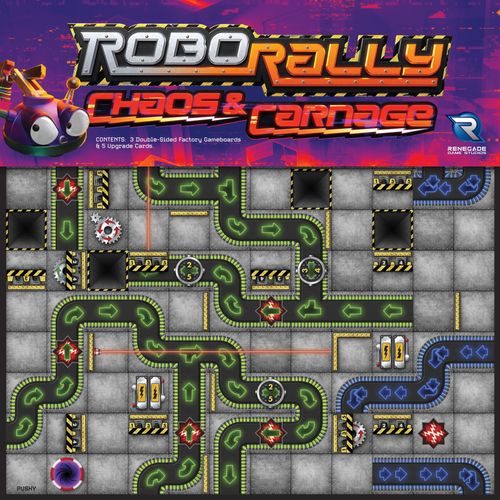
Robo Rally: Chaos & Carnage
Robo Rally: Chaos & Carnage Rulebook
Table of Contents
Table of Contents
Factory Floor Guide
This expansion features board elements not seen in the Robo Rally core game. Place this reference sheet next to the core game guide and you will have quick references for all of the different elements found on the boards in the game.
These board elements are active when it's time for you to reveal a programming card in one of your registers
Randomizers
A randomizer changes a robot's programming card if the robot is on a randomizer when it would reveal a programming card.
Rules: If your robot is on a randomizer when you would reveal a programming card, discard all cards in the current register and replace them with the top card of your programming deck. Even if your register has multiple cards in it, replace them with only 1 card. Discard a replaced SPAM or Haywire damage card to the damage discard pile.
Teleporters
Teleporters modify robot movement during Programming Card Activation. If a robot is on a teleporter when they reveal a Move Card (Move 1-3 and Back Up, but never a Haywire), the robot disappears and then reappears further away, ignoring all intervening board elements and robots. If another robot is in the square the robot would arrive in, then the teleporter does not operate and the robot executes its Move card(s) normally.
Rules: Add 2 FORWARD movement to the movement granted by the Move Card, and ignore all other text on the card. A teleporting robot also ignores all intervening board elements and intervening robots. However, if another robot is on the destination space of the teleport, the robot does not teleport (as a "safety feature"). Instead, they resolve their Move Card normally. Movement upgrades will not function on a teleporter.
Move cards on a teleporter teleport the robot as follows:
- Move Back: Teleport forward 2 spaces. Don't move backwards at all.
- Move 1: Teleport forward 3 spaces.
- Move 2: Teleport forward 4 spaces.
- Move 3: Teleport forward 5 spaces.
Only the above Move cards are affected. All other programming cards are unaffected.
This board element is constantly active
Deep Pits
Deep pits act like pits in every way, and are considered pits when pits are referenced on upgrade cards.
This board element has special timing
Crusher
A crusher activates during Board Element Activation (after gears but before board lasers fire), but only during the registers shown on the crusher. Some activate in only 1 register each round; others during 2 registers. In the example image on the sheet, this crusher would only activate at the end of Register 3.
Rules: If a robot is on a crusher space when the crusher is activated, the robot is crushed. Being crushed causes your robot to be removed from play. Follow the rules on Rebooting in the Core Game rulebook. Crushers activate after Gears, but before Board Lasers.
Upgrade Cards
Each card shows a number inside a gear at the top left, its name in the title bar, a PERMANENT or TEMPORARY tag on the lower edge of the illustration, and the card's rules text in the panel below. A small icon appears at the bottom right of each text panel. The sheet and cards do not explain the gear number; it is transcribed as printed.
Indirect Fire
Number: 3 · Type: PERMANENT
Instead of firing your robot's main laser, you may pay 1 Energy to fire Indirect Fire. If you do, hit any robot within 3 spaces of your robot in any direction (orthogonally, ignoring board elements).
Controlled Chaos
Number: 3 · Type: PERMANENT
When you draw Haywire damage, you may place it face down under any card in your registers where there is not already a face-down Haywire card.
Mirror
Number: 3 · Type: PERMANENT
The first time your robot takes damage from another robot each round, that robot also takes the same amount of damage.
Stun
Number: 1 · Type: TEMPORARY
Instead of firing your robot's main laser, the target discards all face-down cards in their next register. Cannot be used during Register 5.
Leaching
Number: 3 · Type: PERMANENT
When you fire your robot's main laser, steal 1 Energy from the target if they have 3 or more Energy. If they have 0 Energy, deal 1 additional damage to the target.