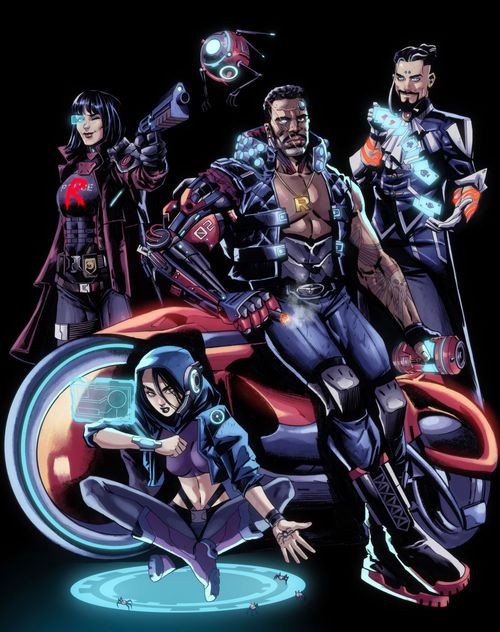
Resolvers: Time to Shift
Resolvers: Time to Shift Rulebook
Table of Contents
Table of Contents
How to Read These Rules
By default, the text in these rules refers to the tabletop part of the game.
Text next to the app icon covers interaction with the app. (The icon itself does not survive in the text layer of the source; the passages it marks are identified by the wording of the rules.)
Rules marked as relating to the campaign storyline can be skipped in your first game.
Components
- District boards – 4
- Location tiles
- Resolver boards
- Resolver miniatures – 4
- Character miniatures
- Augmentation tokens
- Check tokens
- Focus tokens
- Equipment / consumable cards
- Investigation tokens
- Interest markers
- Stat markers
- Energy dice
Setup
Place the district boards in the centre of the table, side A face up. Next to them, place the location tiles and the consumables deck.
Choose a Scenario
Start the app and choose the scenario you want to play.
Form the Resolver Team
Each player chooses a resolver in the app, takes its resolver board, miniature and bag, and places them in front of themselves. Return unused resolver boards, miniatures and bags to the box; you will not need them in this game.
If you are playing solo, choose two resolvers. You will control both of them.
Set the stat markers and the energy-limit marker to their starting values. The starting values for the first scenario are shown on the board.
If your resolver has augmentations installed during the campaign, set the markers according to the icons on those augmentation tokens. You can always check that the markers are in the correct positions on the character tab in the app.
Fill the energy track with energy dice from left to right, up to the limiter.
Receive the Starting Equipment
Take the augmentations listed in the app and insert them into the matching slots on the resolver board. Take the equipment and consumable cards and place them at the bottom of the resolver boards.
Assemble the Bags
Put the following set of tokens into each player's bag:
- Success – 2
- Critical success – 2
- Half-success – 2
- Energy charge – 1
- Failure – 3
Some of the augmentations you install may require adding and/or removing tokens from the bag. You can always check the contents of your bag on the character tab in the app.
Start the Investigation
Place the starting locations on the districts, and place the resolver and character miniatures on locations as indicated in the app. You are ready to investigate. Press the "Start Game" button and follow the instructions on screen.
Playing the Game
Players take turns. On your turn you normally perform several actions, after which the turn passes to another player. The turn order and the moment the turn is passed are determined by the app.
Each scenario has a limit on in-game time (hereafter simply "time"). Player actions spend time, and each player spends it independently of the others (except when the players have joined into a group; see Joining / Splitting).
During the investigation, the players talk with characters, explore new locations, find clues and gain knowledge about the key event.
When all players have used up the time allotted for the investigation (or earlier, if the players wish), they travel to the past and try to prevent the crime using the knowledge they have gathered.
Player Turn
The player interacts with the game world through dialogue options in the app. There are three kinds of option:
- movement between top-level locations;
- a simple action;
- an action with a check.
Movement Between Locations
Choose a new location in the dialogue or on the "Map" screen, then choose a way of moving. Movement is divided into long (between districts) and short (within a single district). The cost of both kinds of movement is given in the table.
| Short (within a district) | Long (between districts) | |
|---|---|---|
| On foot | 30 minutes | 60 minutes |
| Running | 15 minutes, −1 energy | 30 minutes, −1 energy |
| Taxi | 5 minutes, −100 credits | 10 minutes, −100 credits |
When you choose "Running", spend 1 energy die. You cannot choose this way of moving if your resolver has no energy left. The "Taxi" way of moving is available only if the players have enough money in their account (see Money).
The relative positions of districts and of locations within a district do not affect the cost of movement.
Road Events
A player who is travelling may encounter a road event. This is usually a small adventure with an immediate result – a reward or a penalty, depending on how it is resolved. Road events do not spend time in themselves, unless the app says otherwise.
Simple Action
Simple actions – actions or lines of dialogue of characters that do not require a check of characters' stats. By default a simple action takes 5 minutes (the value may differ for some actions). Some actions may also require spending energy or money, modifying the contents of the bag, or discarding items from inventory.
The consequences of a simple action are always certain and take effect immediately after it is chosen in the app.
Action with a Check
These actions require a check of one or more resolver stats using the bag of tokens.
Each resolver has 4 stats:
- Physique – governs physical interactions with objects and characters around you.
- Attentiveness – governs how much the characters of the players notice around them; it affects finding clues and the speed of the characters' reactions.
- Intellect – reflects the development of the characters' intellect; it affects the ability to make sense of complex technology and decipher secret messages.
- Charisma – shows the charm of the characters and their ability to communicate with the people around them.
Unlike a simple action, the consequences of an action with a check depend on the result of that check. This process is described in detail under Resolving Checks.
Resolving Checks
To resolve a check, the player draws tokens from the bag and counts the number of successes.
The starting tokens in the bag are as follows:
- Success – works in regular checks.
- Critical success – counts as one success both in regular and in composite checks.
- Half-success – does not count as a success. If energy is spent during the check, this result becomes a critical success.
- Energy charge – when the check result is accepted, each such token gives the resolver 1 energy.
- Failure.
During one game, and during a campaign, the contents of the bags may change.
The number of tokens drawn and the criteria for what counts as a success depend on the type of check. The type and difficulty of the check are reported to the player by the app.
Regular Check
Tests one character stat. It is written as: check Stat, difficulty XX. To pass the check, the player must draw from the bag as many tokens as the value of the tested stat. The check has a Difficulty parameter, which shows how many successes (regular or critical) must be drawn from the bag during the check for it to be passed.
Important! In a regular check, a critical success counts as one success.
Example: a biker must pass a Physique check with difficulty 2. His Physique is 3, so the player draws 3 tokens from the bag and gets a failure, a success and a half-success. In total – one success, which is below the declared difficulty of the check, so the check is failed. However, if the player has an energy die in reserve, they can spend it to charge the half-success up to a critical success, bringing the number of successes to 2. In that case they pass the check.
The result of interacting with the bag is entered by the player in the app.
Composite Check
Tests two character stats. It is written as: check Stat 1 and Stat 2, difficulty XX. To pass the check, the player must draw from the bag as many tokens as the sum of the values of the tested stats. Only critical successes count as successes in a composite check.
Joint Check
Tests one chosen stat of a group of characters. It is written as: joint check Stat, difficulty XX. To pass the check, each player in the group must draw from the bag as many tokens as the value of their tested stat. This check has a Difficulty parameter, which shows how many successes (both regular and critical) in total the players must draw from the bag during the check to pass it.
Partner Check
Tests a pair of stats of two players taking part in the check. It is written as: partner check Stat 1 + Stat 2, difficulty XX. To pass the check, one player must draw from the bag as many tokens as their Stat 1 value, and the second player as many as their Stat 2 value. If the sum of the drawn successes (both regular and critical) is greater than or equal to the difficulty of the check, the check counts as passed.
Accumulating Check
Such a check usually relates to some item in the inventory, or to a place on the map. Any player may interact with this item or place to attempt the check. This check tests one chosen stat. It is written as: accumulating check Stat, difficulty XX. To pass the check, the player must draw from the bag as many tokens as the value of the tested stat. They then tell the app how many successes they obtained. The app remembers the number entered. The next time, this or another player may attempt the check again to add more successes. When the total of all successes across all attempts is greater than or equal to the difficulty of the check, the check counts as passed.
Open Checks
Some checks in the game have no difficulty declared in advance. When passing such a check, the player simply tells the app how many successes they obtained (according to the normal rules for the type of check). Depending on that number, the app tells them the result. This check has more possible outcomes than a check with a declared difficulty.
Redrawing Tokens
If a player is dissatisfied with the result of a check, they may discard one or more energy dice from their board in order to draw the same number of tokens from the bag. After this they must put back into the bag exactly the same number of tokens. This process may be repeated for as long as the player has energy dice on the board.
Example: a hacker must pass an Intellect check with difficulty 2. His Intellect is 3, so the player draws 3 tokens from the bag and gets two failures and an energy charge. If this result is accepted, the check is failed. The hacker has 3 energy in reserve. He decides to spend 2 of them: he discards them and draws two more tokens – these turn out to be a success and a failure – and then returns 2 tokens to the bag: the hacker chooses to return two failures. Now on the table there is a success, a failure and an energy charge. This is still not enough to pass a check with difficulty 2, so the hacker discards his last energy and draws one more token – it turns out to be a critical success – and puts back the remaining failure. Having accepted the result, the hacker gets 2 successes and restores 1 unit of energy. The check is passed.
Helping with Checks
Help at a Distance
When the players are not joined into a group and one of them is making a check, all the others may (but need not) help them by drawing one token from their own bag. The number of critical successes drawn by the helpers is added to the result of the active player's check.
Help in a Group
If the players are joined into a group and make a check, one of them makes the check as if they were the only player, and the others may help them. There are two options for help:
- Without spending energy – each helper draws 1 token, as for help at a distance.
- For one unit of energy – each helper draws a number of tokens according to the rules for the type of check, as if they were making it alone, but only critical successes count as successes, regardless of the type of check.
When helping with checks, tokens cannot be redrawn, but half-successes can be charged up to critical successes with energy.
If a helper draws an energy charge token, they receive one unit of energy.
Tokens drawn by helpers that are one-time tokens are discarded by the usual rules.
Fatigue
Some augmentations, and the choice of the "Sleep" action, give players access to fatigue tokens. Available fatigue tokens lie on the players' boards. When making a check, a player may discard one or more fatigue tokens in order to draw one additional token from the bag for each of them. After the check result is accepted, the fatigue tokens spent this way are put into the bag.
If a player draws fatigue tokens from the bag during subsequent checks, each of them counts as a failure. Fatigue tokens return to the board for later use if the player accepts the check result in which they took part.
Money
Together with time and energy, money is an important resource in the game. It is used to bribe characters, buy equipment, augmentations, energy drinks, pay for the services of experts, and so on.
The resolvers have access to a shared account; the sum in it is one for the whole team.
During the investigation the resolvers may both spend and receive money.
Energy
Energy dice can be used in one of the following ways:
- to redraw tokens in checks;
- to turn half-successes into critical successes;
- for accelerated movement between top-level locations;
- for certain actions in the app;
- to activate inventory.
Joining / Splitting
Characters may join up within a single location if the desynchronisation between them is no more than one hour. In this case:
- the common time is set by the player whose time is greater;
- for the lost time, the players receive 1 unit of energy for every half hour, rounded down. The players distribute this energy among themselves.
To join or split, press the corresponding button in the app. When joining, the app will warn you how much time you will lose and remind you to take the required number of energy dice.
After joining, the players:
- spend time on actions simultaneously;
- may choose the player best suited to the chosen check, while the other players may help (see Help in a Group);
- gain dialogue options and checks that were previously unavailable, for example, "Distract the guard and sneak past him".
App Instructions
In development.
Opening New Locations / Characters
Each district, location and character miniature has a code, with the help of which the required component can easily be found.
App
Live
Map
Resolvers
Info
Ending the Scenario
If you know how to prevent the crime and you have one or more time-jump points open, you may use the time machine and try to prevent the crime. The investigation also ends when the time allotted to it runs out.
After the jump to the past, all players win or lose at the same time. The players win if they managed to prevent the key event of the scenario.
In case of failure, the players may replay the current scenario or move on to the next scenario in the campaign, accepting the failure.