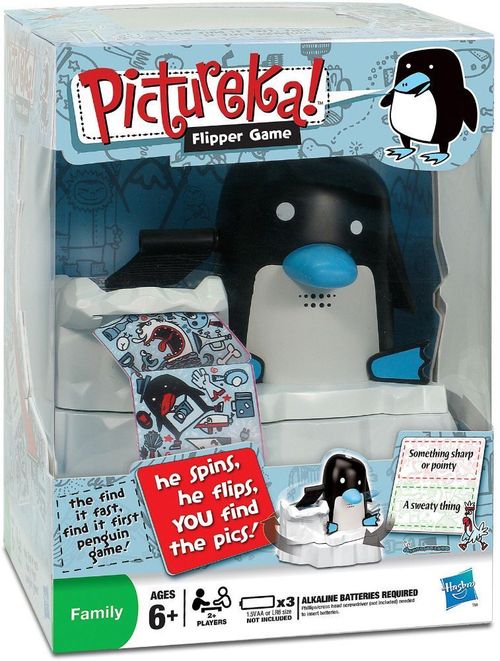
Pictureka! Flipper
Pictureka! Flipper Rulebook
Table of Contents
Table of Contents
Components
1 spinning penguin, 1 iceberg top, 1 iceberg base, 16 double-sided mission tiles and 64 double-sided picture tiles.
Setup
The penguin needs 3 x 1.5V AA or LR6 alkaline batteries (not included). A Phillips/cross-head screwdriver (not included) is needed to insert them. Insert the 3 batteries as shown.
The Penguin – Get ready to play!
- Remove the rules and tiles from inside the iceberg before you put the game together.
- Sit the penguin on top of the nobble on the iceberg.
- Put the iceberg top on top of the base.
- Load 48 picture tiles from the back (put 16 picture tiles to one side).
- Look for green missions when the light is green and red ones when it's red.
- When you're all ready to play, squeeze the penguin's beak. He'll say "Uh-oh!", then he'll flip some tiles.
Important: Never overload this penguin! If the tiles get sticky, greasy or damaged, the penguin may have trouble flipping them. Wipe them down with a cloth if they get dirty and avoid bending or folding them. Read the rules before you switch the penguin on!
The Tiles
Picture Tiles. These funky double-sided tiles are packed with pics. When you win a mission, keep the picture tile you found it on.
Mission Tiles. Each mission tile has two missions on it, one green and one red. What color is the light on the penguin's head flashing? That's the color mission you must find.
Watch out! When the color changes, so does the mission. The penguin warns you when he's changing color by saying "Wat, wat!"
Playing
There are no turns in this part of the game so anyone can turn over mission tiles.
- Load the flipper tray with 48 picture tiles (count 16 tiles from the full deck and put them aside). Load the tiles by pressing down the tray and dropping the cards in on top.
- Shuffle the mission tiles and put them next to the iceberg.
- Everybody ready? Squeeze the penguin's beak. He'll say "Uh-oh", then the flipping frenzy starts! As he spins, he flips tiles onto the table – it's a tile tornado! Look at the tiles, but don't pick them up!
- When the penguin stops, flip over the top mission tile, look at the flashing light on the penguin's head and read the mission that matches its color.
- The penguin's light is flashing red, so look for the red mission.
- The penguin says "Wat, wat!" every time his light changes.
- If you spot a pic that matches a mission that's the same color as the light, shout Pictureka!, point at the pic and say what you saw.
- If the other players disagree, keep playing. Remember to check what color the light is flashing. If the light changes before you call Pictureka!, sorry, you're too slow!
- If nobody disagrees, take the picture tile and keep it in front of you. Make sure you keep the tiles you've won separate from the ones in the game.
- Now keep looking for other pictures that match that mission!
- When the light changes, read that color mission and start hunting for pics again.
- Once you've used both the missions on one side of the tile, flip it over and use the other side. Take a new mission tile when you've used up both sides.
- When the penguin starts flipping again, stop playing and take a break while he churns out some new picture tiles.
- As soon as he stops, flip over a new mission tile and read the mission that matches the color of the penguin's flashing light.
Ending the Game
- Keep playing until the penguin blows a raspberry (or you run out of picture tiles). The player with the most picture tiles wins the game!
Mission-Masher Top-up Game
Once you're Flipper experts, you can add this extra mission game on the end.
Aim of the Game
To win the most mission tiles by searching the picture tiles you won.
- When the game is over, put the penguin to one side and clear away any unclaimed picture tiles.
- Count the picture tiles you've won, then spread out your own tiles in front of you.
- Note: If any player has less than 2 picture tiles, all players take 2 extra picture tiles each from the ones you cleared away.
- Shuffle the mission tiles and put them in a pile in the center and agree what color missions to play.
- The player with the most picture tiles turns over the top tile and reads that color mission.
- Quick as you can, search your own tiles for a picture that matches that mission. As soon as you find one, shout Pictureka!, point at it and be ready to say why it matches.
- If everyone agrees, you keep the mission tile you found the pic on.
Rules for Mission-Mashing
- If you shouted and others disagree, keep looking.
- If you shouted and you weren't even close to having a pic to point out, you're a sneaky cheat. Lose a picture tile.
- Note: If you're down to 1 picture tile, you can keep it!
- The player to the left of the last reader now reads the next mission of the agreed color.
- Keep playing until you run out of mission tiles.
- Note: If everyone is stuck on a mission, flip the tile.
Ending the Game
- The player with the most mission tiles is the winner.
Tile Tornado Tips
- He's a fickle bird, so don't worry if he doesn't flip them all, or if there are stragglers left when the game is over. Each time he spins, the penguin flings out up to 12 tiles.
- If you've used up all the picture tiles before the penguin finished his break, just squeeze his beak to nudge him back into action.
- Even when the penguin has finished flipping, the game's over till he blows a raspberry (or you run out of picture tiles).
- The penguin goes to sleep as soon as he's finished flipping. Squeeze his beak to wake him up. Shuffle the picture tiles and load a new set of 48 tiles.
Team Play
Feel free to split into teams to help younger players.
Storage
Fold the rules carefully and slide them underneath the tile trays in the iceberg. Now drop half the tiles into each tray. Put the iceberg and penguin back together and leave him out where he can keep an eye on things.
Remember: Always switch off your penguin!