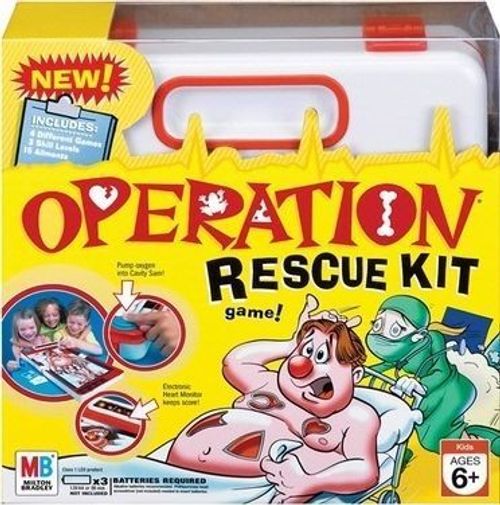
Operation Rescue Kit
Operation Rescue Kit Rulebook
Table of Contents
Table of Contents
The Rescue Kit
The illustration in the booklet shows the funatomy parts inside their cavities, and calls out the other game features you will need to know about as you set up and play the game.
- Rescue Kit with Cavity Sam "patient" and tweezers
- 15 funatomy parts
- 4 sliders
- 15 Doctor cards
- 4 turn markers
Features called out on the illustration:
- Oxygen pump
- Storage bin for funatomy parts
- Tray with Sliders
- Doctor Cards
- Reset
- Skill Level Switch
- Monitor
- Tweezers slot
Ailments
Modern life is taking its toll, and Cavity Sam has more more ailments than ever! The 15 funatomy parts are:
- Wishbone
- Texting Thumb
- Belly Button Fluff
- Tennis Elbow
- Wooden Leg
- Daydreamer
- Twisted Ankle
- Joystick Wrist
- Cheesy Feet
- Spare Tire
- Funny Bone
- Broken Heart
- Spare Ribs
- Frog In Throat
- Soccer Knee
Squeeze the tweezers together to remove Cavity Sam's ailments.
The Set Up
-
Insert 3 "AA" batteries (see the Batteries section below).
-
Make sure the tweezers are in their slot. Leave the tweezers in the slot until the first player takes a turn.
-
Place each funatomy part flat inside its cavity.
-
Shuffle the Doctor cards and place the deck facedown in the card tray.
-
In turn, each player chooses a skill level and "logs on" as described below.
- Slide the Skill Level switch to 1 (Easy), 2 (Normal) or 3 (Hard). The game will adjust time limits and sensitivity depending on your chosen skill level.
- Press the oxygen pump once. Your player number will light up on the monitor.
- Take the matching number turn marker to remind you of your player number.
If you make a mistake while logging on, keep pressing the pump until all of the lights go out; then start over.
If you change games, the Rescue Kit will "remember" the players and skill levels from the previous game.
-
CHOOSE A GAME TO PLAY: 1, 2, 3 or 4. Game 1 is the easiest and Game 4 is the hardest.
The Games
Game 1 — Speed It Up!
Insert slider 1 into the monitor until you hear a couple of beeps.
Object: This game is all about speed! To win, be the fastest player to remove the funatomy parts.
On your turn, draw the top Doctor card, then use the tweezers to remove that funatomy part. The timer will start counting down as soon as you remove the tweezers. The faster you go, the higher you'll score!
If you touch the metal edge, you'll "get buzzed" and Sam's nose will light up. This will lower your score, but not end your turn. Keep operating!
- Success! If you remove the part before time runs out, quickly place the tweezers in their slot to stop the timer. Your score will light up after you do this. Place the Doctor card and funatomy part in the tray by Sam's feet. Your turn is over.
- Sorry! If time runs out before you remove the part (and place the tweezers in the slot), your turn is over. Place the tweezers in their slot and the Doctor cards on the bottom of the card pile.
After your turn, the next player's light will flash. Keep taking turns until all of the funatomy parts have been removed.
The Winner: Remove the slider from the monitor and the winner's number will light up!
Game 2 — More Oxygen Please!
Insert slider 2 into the monitor until you hear a couple of beeps.
Object: To win, successfully remove funatomy parts while keeping Sam's heartbeat steady.
On your turn, draw the top Doctor card and use the tweezers to remove that funatomy part.
Sam starts with a normal heartbeat. If it speeds up, calm him down by quickly pressing the oxygen pump once, before the flashing dots reach the end of the monitor. After Sam's heartbeat slows down, continue operating.
- Success! If you remove the part before time runs out, quickly place the tweezers in their slot to stop the timer. Place the Doctor card and funatomy part in the tray by Sam's feet. This ends your turn.
- Sorry! If you touch the metal sides and get buzzed; or if time runs out before you remove the part and replace the tweezers; or if you don't press the oxygen pump in time, your turn is over. Place the tweezers in their slot and the Doctor card on the bottom of the card pile.
After your turn, the next player's light will flash. Keep playing until all of the funatomy parts have been removed.
The Winner: Remove the slider from the monitor and the winner's number will light up!
Game 3 — Rush Job!
Insert slider 3 into the monitor until you hear a couple of beeps.
Object: You have more time in this game, but you must remove all 15 funatomy parts as fast as you can!
Ignore the Doctor cards — you don't need them in this game.
On your turn, use the tweezers to quickly remove all 15 parts, in any order and as fast as you can! The timer will start counting down as soon as you remove the tweezers. The faster you go, the higher you'll score!
If you touch the metal sides and get buzzed, you'll lose time. Keep operating!
- Success! If you remove all 15 parts before the arrows on the monitor reach the end, quickly place the tweezers in their slot to stop the timer. Your turn is over.
- Sorry! If the arrows on the monitor reach the end, you'll get buzzed, which means you're out of time. Stop operating and place the tweezers back in their slot. Your turn is over.
After your turn, place all of the funatomy parts that you removed back into their cavities for the next player, whose light will be flashing on the monitor.
The Winner: The game is over when everyone has taken a turn. Remove the slider from the monitor and the winner's number will light up!
Game 4 — Specialist Help!
Insert slider 4 into the monitor until you hear a couple of beeps.
As in classic Operation, there is a Doctor and a Specialist in this game.
Object: On your turn, draw the top Doctor card and use the tweezers to quickly remove that funatomy part.
- Success! If you remove the part, quickly place the tweezers in their slot and the Doctor card and funatomy part in the tray. Your turn is over.
- Sorry! If you touch Sam's sides and get buzzed, an alarm will sound and another player's number will flash on the monitor. Quickly give the tweezers to that player, who is the Specialist. Your turn is over.
The Specialist must now quickly perform your operation in a limited time.
- Success! If the Specialist removes the part, that player must quickly place the tweezers in their slot and the Doctor card and funatomy part in the tray. The Specialist's turn is over.
- Sorry! If the Specialist touches the metal sides and gets buzzed, that ends the Specialist's turn. That player places the tweezers in their storage slot and the Doctor card on the bottom of the card pile.
When the tweezers have been placed in their slot, the next player's light will flash.
Keep taking turns until all of the funatomy parts have been removed.
The Winner: Remove the slider from the monitor and the winner's number will light up!
General Information
- If you want to end any game before all of the parts have been removed, just remove the slider. The winning player's number will light up.
- If the game "freezes" during play, press the Reset button next to the Skill Level switch, then start over.
- Automatic Shutoff: The game will automatically shut off if it is idle for one minute after a slider has been removed. If the slider is left in, the game will shut off after five minutes.
Storing Your Game
Done playing for now? Place the tweezers in their slot, and the game parts in their storage compartments. Then close up the Rescue Kit.
Batteries
IMPORTANT: BATTERY INFORMATION. Please retain this information for future reference. Batteries should be replaced by an adult.
Batteries required: 3 x 1.5V AA or R6 size. Not included. Alkaline batteries recommended. A Phillips/cross head screwdriver (not included) is needed to insert batteries.
Insert the batteries: Loosen the screw on the battery compartment, located on the underside of the game, and remove the door. Insert 3 "AA" size batteries (we recommend alkaline), making sure to match the + and - symbols with the markings in the plastic. Then replace the door and tighten the screw.
Cautions
CAUTION: TO AVOID BATTERY LEAKAGE
- Be sure to insert the batteries correctly and always follow the game and battery manufacturers' instructions. 2) Do not mix old and new batteries, or alkaline, standard (carbon-zinc) or rechargeable (nickel-cadmium) batteries. 3) Always remove weak or dead batteries from the product.
CAUTION:
- Always follow the instructions carefully. Use only batteries specified and be sure to insert them correctly by matching the + and - polarity markings. 2. Do not mix old batteries and new batteries, or standard (carbon-zinc) with alkaline batteries. 3. Remove exhausted or dead batteries from the product. 4. Remove batteries if product is not to be played with for a long time. 5. Do not short-circuit the supply terminals. 6. Should this product cause, or be affected by, local electrical interference, move it away from other electrical equipment. Reset (switching off and back on again or removing and re-inserting batteries) if necessary. 7. RECHARGEABLE BATTERIES: Do not mix these with any other types of battery. Always remove from the product before recharging. Recharge batteries under adult supervision. DO NOT RECHARGE OTHER TYPES OF BATTERY.
Not suitable for children under 3 years because of small parts - choking hazard.