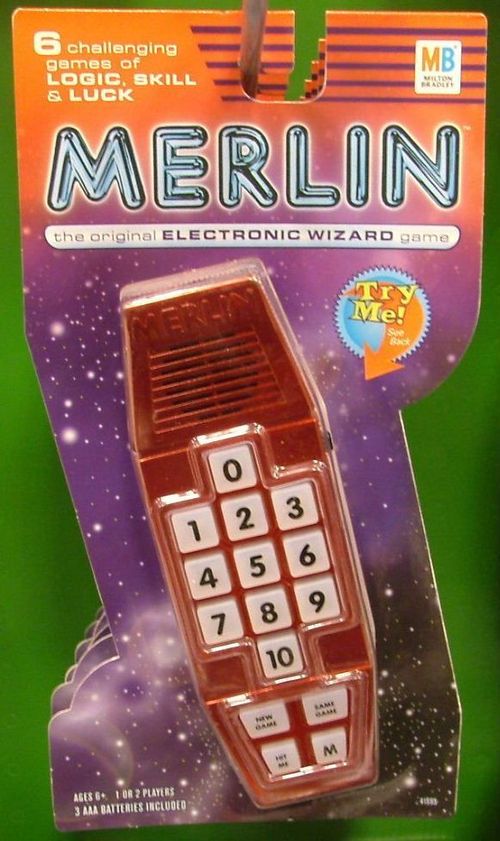
Merlin (1978)
Merlin (1978) Rulebook
Table of Contents
Table of Contents
Care, Batteries and Setup
Proper Care
MERLIN's computer brain is made of many delicate electronic parts. Therefore:
- Never take MERLIN apart.
- Don't drop or jolt MERLIN.
- Take care not to get MERLIN wet.
- When pressing one of MERLIN's buttons, touch it lightly. Pressing hard is unnecessary and can damage the game.
- Don't use a pen or pencil to press the buttons; use your fingers only.
Batteries
MERLIN can be made completely portable if you power him with batteries. To do this you'll need 6 AA-size batteries. We strongly recommend that you use only ALKALINE BATTERIES: they will last much longer than regular carbon batteries.
Battery Installation
a) The battery cover is the printed area on the bottom of the game.
b) To remove the cover, place both thumbs in the middle and, pressing down, slide the cover forward about 1/4 of an inch. Then lift the top of the cover toward you.
c) Be sure that each of the silver battery clips is pushed all the way down.
d) Install the batteries—alternating positive (+) and negative (-) posts—as shown on the floor of the compartment.
e) To replace the cover, do not try to slide it back in. First hold the game so the speaker section is pointing away from you. Then hold the battery cover—print side up—so the word MERLIN is at the top. Now lay the cover on the top of the compartment so that the six tabs fall into their slots. Then press your thumbs down on the middle of the cover and slide it back into place.
To turn the game on, slide the small black switch downward. After a slight delay, MERLIN will greet you with light and sound.
Signs of Weak Batteries
Batteries eventually have to be replaced. Therefore, if ever you find that MERLIN is not working properly, you probably need new batteries. Any one of the following signs will indicate the need for new batteries:
a) When you turn MERLIN on, no lights will flash.
b) When you turn MERLIN on, all of the lights will shine steady.
c) As you play, you'll hear a continuous sound.
d) As you play, the keyboard won't respond as it should.
If any of these problems occur with new batteries, check to make sure that you've installed them correctly.
AC Adaptor
With a 9-volt AC adaptor you can run MERLIN on house current instead of batteries. Not all 9-volt AC adaptors, however, will work properly with MERLIN. Parker Brothers offers an AC adaptor which is specifically designed to be used with MERLIN. The adaptor we offer is listed by Underwriters' Laboratories and meets all child-related safety standards.
You may order this AC adaptor by sending your name, address and a check or money order for $8.95 to: Parker Brothers, P.O. Box 609, Salem, Mass 01970. OR use the convenient order form provided.
Keyboard Numbers
As you can see, a number appears in the lower right-hand corner of each keyboard square.
Game 1: Tic-Tac-Toe
Object
To be the first to occupy three squares in a row—horizontally, vertically or diagonally.*
Preparation
Press NEW GAME. Then press #1. The #10 light will blink, indicating that the game is on.
Playing
You and MERLIN take turns occupying one square at a time. Either of you may make the first move.
a) To occupy a square yourself, press any unlighted square from 1 to 9. The square you choose will blink.
b) MERLIN will take his turn when you press COMPUTER TURN. The square he chooses will shine steady.
Winning
The winner is the first to occupy three squares in a row.
If you win—with three blinking lights in a row—MERLIN will make the WIN sound.
If MERLIN wins—with three steady lights in a row—he will make the LOSE sound.
If neither of you wins, MERLIN will make the TIE sound.
Notes on Tic-Tac-Toe (translated from the French manual)
Printed page 5 of the English manual is missing from the scan in hand. The following notes are an English translation of the French manual's Game 1 (Le Morpion) text, not the English printed text.
- Your moves are shown by a blinking light; MERLIN's moves by a steady light.
- When you play, you hear a clear sound; when MERLIN plays, you hear a low sound. These characteristics are found in most MERLIN games.
Continuing
To play Tic-Tac-Toe again, press SAME GAME.
In this classic strategy game your opponent is MERLIN, not another person.
Game 2: Music Machine
Object
To teach MERLIN a tune and then be entertained as he plays it back to you.
Preparation
Press NEW GAME. Then press #2.
Playing
Buttons 2-9 are the musical scale: do, re, mi, fa, sol, la, ti, do.
Button #1 is low "sol"—one octave lower.
Button #10 is high "re"—one octave higher.
Button 0 is a rest—each time you press it, MERLIN will pause 1 beat. Because it's a rest, this button makes no sound when you press it.
MERLIN can learn a tune of up to 48 notes and rests. While you're composing, however, don't worry if you can't remember how many buttons you've pressed. MERLIN will let you know—with the LOSE sound—when you've pressed a total of 48 buttons.
After you've finished composing a tune, press COMPUTER TURN and enjoy your music.
Continuing
a) To play the same tune again, press COMPUTER TURN.
b) To compose a different tune, press SAME GAME and start again.
c) After MERLIN stops playing your tune, you can then continue that tune yourself by pressing the appropriate buttons. The extra notes that you play will not become a part of the tune that you just taught MERLIN to play.
Here are some tunes that you can teach MERLIN to play. Press the buttons in the order in which they appear.
Tunes
Each tune is printed as a series of dash-separated button numbers, read left to right and row by row as printed (for example, 6-7-0 is the notes 6, 7 and 0). Press the buttons in that order; button 0 is a rest.
A Rovin'
6-7-0 5-7-6 0-4-6 5-4-3 2-4-2 1-1-2 3-4-5 6-9-7 5-4-0 3-0-2
Auld Lang Syne
1-2-0 0-2-2 0-4-0 3-0-0 2-3-0 4-0-2 0-0-2 4-0-6 0-7-0 0-0-0 0-7-0 6-0-0 4-4-0 2-0-3 0-0-2 3-0-4
Beethoven's 9th
4-4-5 6-6-5 4-3-2 2-3-4 4-3-3 0-4-4 5-6-6 5-4-3 2-2-3 4-3-2 2-0-3 3-4-2 3-5-4 2-3-5 4-3-2 3-1
Blow the Man Down
6-7-6 4-2-4 6-7-6 4-0-0 6-0-0 7-0-0 5-4-5 3-0-0 5-6-5 3-1-3 5-6-5 3-0-0 6-6-6 6-0-5 4-3-4 2
Clementine
2-2-2 0-1-0 4-4-4 0-2-0 2-4-6 0-0-6 5-4-3 0-0-0 3-4-5 0-5-0 4-3-4 0-2-0 2-4-3 0-0-1 2-3-2
Cockles and Mussels
1-2-2 2-2-4 2-3-3 3-3-5 3-6-4 2-6-4 2-2-3 4-3-0 1-2-2 2-2-4 2-3-3 3-3-5 3-6-4 2-6-4 2-3-2 3-2
Frère Jacques
2-3-4 2-2-3 4-2-4 5-6-0 4-5-6 0-6-7 6-5-4 0-2-0 6-7-6 5-4-0 2-0-2 0-1-0 2-0-0 0-2-0 1-0-2
It Came Upon the Midnight Clear
2-7-0 4-6-5 3-2-0 3-2-0 2-3-4 5-5-6 7-6-0 0-0-0 2-7-0 4-6-5 3-2-0 3-2-0 2-3-0 3-4-3 2-5
Jingle Bells
4-4-4 0-4-4 4-0-4 6-2-3 4-0-0 0-5-5 5-5-5 4-4-4 6-6-5 3-2
Knick Knack Paddywhack
6-4-6 0-6-4 6-0-7 6-5-4 3-4-5 4-6-2 2-2-2 4-6-0 6-3-3 5-4-3 2
London Bridge
6-7-6 5-4-5 6-0-3 4-5-0 4-5-6 0-6-7 6-5-4 5-6-0 3-0-6 0-4-2
Mary Had a Little Lamb
4-3-2 3-4-4 4-0-3 3-3-0 4-6-6 0-4-3 2-3-4 4-4-4 3-3-4 3-2
Old Folks at Home
4-0-3 2-4-3 2-0-9 0-7-9 0-0-6 0-0-4 0-2-0 3-0-0 0-4-0 3-2-4 3-2-0 9-0-7 9-0-0 6-0-4 2-3-0 3-0-2
On Top of Old Smokey
2-2-4 6-9-0 0-7-0 0-0-0 7-5-6 7-6-0 0-0-0 2-2-4 6-6-0 0-3-0 0-0-0 4-5-4 3-2
Red River Valley
1-2-4 0-4-4 4-0-3 4-3-2 0-0-0 0-1-2 4-0-2 4-6-0 5-4-3 0-0-0 0-0-6 5-4-0 4-3-2 0-3-4 6-5-0
Row Row Row Your Boat
2-0-2 0-2-3 4-0-4 3-4-5 6-0-0 0-9-9 6-6-4 4-2-2 6-5-4 3-2
Shenandoah
2-2-2 0-0-3 4-5-7 0-6-0 0-0-9 8-7-0 0-6-7 6-4-6 0-6-7 7-7-0 0-4-6 4-3-2 0-1-2 3-4-2 3-2
Silent Night
6-0-0 7-6-0 4-0-0 0-6-0 0-7-6 0-4-0 0-0-10 0-0-10 0-8-0 0-0-9 0-0-9 0-6-0 0-9-0 6-4-6 0-5-0 3-0-2
Twinkle Twinkle Little Star
2-2-6 6-7-7 6-0-5 5-4-4 3-3-2 0-6-6 5-5-4 4-3-0 2-2-6 6-7-7 6-0-5 5-4-4 3-3-2
We Three Kings
7-0-6 5-0-3 4-5-4 3-0-0 7-0-6 5-0-3 4-5-4 3-0-0 5-0-5 6-0-6 7-0-7 9-7-6 5-0-5 4-0-4 3
Game 3: Echo
Object
To repeat a tune of random notes that MERLIN plays to you.
Preparation
Press NEW GAME. Then press #3. Both the 0 and 10 lights will blink. This is MERLIN's way of asking you to select the number of notes in his tune. To do this, press one button from 1 to 9. The higher the number you select, the longer and more difficult the tune will be. Then press COMPUTER TURN and MERLIN will play you the tune.
EXAMPLE: To select a game of average difficulty, press #5. Then press COMPUTER TURN and MERLIN will play you a 5-note tune. To win, you must repeat MERLIN's tune exactly as he played it.
Playing
-
As MERLIN plays his tune, listen carefully to the notes and watch closely the lights that accompany them.
-
When MERLIN stops playing, try to repeat the exact order of notes and accompanying lights by pressing the appropriate buttons.
a) If you press a button in the correct order, it will light and sound its note.
b) If you press a button out of order, you'll hear a buzz. Even if MERLIN buzzes you, continue guessing—starting with the next note—until you've pressed the appropriate number of buttons.
Scoring
a) If all of your notes are in the correct order, MERLIN will make the WIN sound.
b) Otherwise MERLIN will make the LOSE sound and will show you—by lighting one numbered button—how many errors you've made.
Continuing
To play the same tune again, press COMPUTER TURN. To try a different tune—even one of equal difficulty—press SAME GAME, press the desired level of difficulty, then press COMPUTER TURN.
Competing Against Another Person
On your turn, keep the buttons hidden from view. When you've finished guessing and have seen your score, hand MERLIN to your opponent. Your opponent presses COMPUTER TURN and tries to repeat the very same tune. The winner is the one to repeat MERLIN's tune with the fewer errors.
Game 4: Blackjack 13
In this game, buttons 1 through 10 represent a deck of 10 cards.
Object
To acquire the higher hand of 13 or less.
Preparation
Press NEW GAME. Then press #4.
Playing
-
MERLIN is the dealer. Both of you start the game with a hand of one card. The blinking light shows your hand; the steady light shows MERLIN's hand. You (not MERLIN) also start the game with a stake of five chips.
-
On your turn you may either "hit" your hand or "stand."
a) If you want to "hit" your hand—to ask for another card—press HIT ME.
If your hand then totals less than 13, you may again either "hit" or "stand."
If your hand totals more than 13, you "bust" and immediately lose.
b) If you want to "stand"—to take no more cards—press COMPUTER TURN.
- MERLIN then plays his hand according to the following strategy:
a) If his hand is less than 10, he hits. If he "busts," you win.
b) If his hand is 10 or more, he stands. When he stands, MERLIN then compares his hand with yours in order to determine a winner. At no other time can MERLIN see your hand.
Winning
The winner is the player with the higher hand of 13 or less. Along with the WIN, LOSE or TIE sound, MERLIN will also show each card that was drawn in the hand.
Continuing
This game consists of multiple hands. To play another hand, press SAME GAME and watch the numbered buttons closely. MERLIN will very briefly light one number to show you how many chips you have. (You receive one chip for each hand that you win; you lose one chip for each hand that MERLIN wins.) Then, to start the next hand, MERLIN will deal each of you one card.
If you accumulate ten chips, you break the bank and win the game. If you lose all of your chips, you go broke and MERLIN ends the game. To start a new game, press NEW GAME, then press #4. You'll start again with 5 chips.
Game 5: Magic Square
Object
To form a square of eight lights by lighting buttons 1, 2, 3, 4, 6, 7, 8 and 9. At the same time, you will have to turn off button #5—the middle button.
Preparation
Press NEW GAME. Then press #5 and watch the numbered buttons closely. MERLIN will very briefly show you the Magic Square. Then you'll see a random display of one or more blinking lights.*
Playing
Press buttons 1-9, in any order, until you've formed the Magic Square. When you succeed, MERLIN will flash the Magic Square and will make the WIN sound.
MERLIN's Secret Code
As you play Magic Square, you'll see that the nine numbered buttons affect each others' lights in certain predictable patterns. Each time you press one of the buttons, certain lights always come on and other lights always go off. To form the Magic Square, you'll find it helpful to understand these patterns—MERLIN's secret code.
EXAMPLE: Button #1 always affects lights 1, 2, 4 and 5 in a predictable pattern. That is, when you press button #1, it reverses these lights: the ones that were off will go on and the ones that were on will go off. In this same way each of the other numbered buttons reverses other groups of lights. After you've played a few times you'll discover which buttons reverse which groups of lights.
Continuing
To play Magic Square again, press SAME GAME and start pressing buttons 1-9.
Challenging Another Person—For Experts Only
On your turn, keep the buttons hidden from view. After completing the Magic Square, take it apart by secretly pressing up to three different buttons from 1 to 9. Tell your opponent how many buttons you just pressed. Then challenge your opponent to recreate the Magic Square by pressing the same number of buttons. To succeed, your opponent will have to press, in any order, the same buttons that you pressed.
EXAMPLE: After completing the Magic Square, take it apart by secretly pressing buttons 4, 9 and 2. Then challenge your opponent to try to recreate the Magic Square by pressing only three buttons. To succeed, your opponent will have to press buttons 4, 9 and 2 in any order.
When your opponent recreates the Magic Square, the two of you then reverse roles. In other words, your opponent secretly presses any three different buttons and challenges you in the same way. The winner is the one to meet the challenge. If each of you requires more than three guesses, the winner is the one to recreate the Magic Square in the fewer tries.
*At this point, or at other times during the game, buttons 1-9 may all go dark. If this happens, button #10 will blink, indicating that the game is still on.
Game 6: Mindbender
Object
To discover the mystery number in MERLIN's computer brain.
Preparation
Press NEW GAME. Then press #6. The 0 and 10 lights will blink. This is MERLIN's way of asking you to select the length of his mystery number. To do this, press one button from 1 to 9. The higher the number you press, the longer and more difficult the mystery number will be. (For your first game, we recommend that you press #2—a 2-digit mystery number.)
EXAMPLE: Let's say that you press #4. In secret, MERLIN will then select a random, 4-digit number. Through a process of deduction, you try to discover all four digits in the correct order.
To keep track of your guesses, use a pencil and a piece of paper.
Playing
- Try to discover the mystery number by entering guesses that correspond to the length of the number.
EXAMPLE: If the mystery number has four digits, enter each guess by pressing any four buttons from 1 to 9 in any order that you prefer. You might want to guess 2-3-8-2, or 1-6-9-5, or 4-4-4-4, etc.
- MERLIN will then let you know how accurately you guessed:
a) If you guessed the correct digits in the correct order, MERLIN will make the WIN sound and will flash a light for each digit in the number.
b) If any part of your guess was incorrect, MERLIN will make the LOSE sound and will show you how close your guess was:
If none of the digits in your guess is a part of his number, MERLIN will blink the #10 light.
For each correct digit that is also in the correct order, MERLIN will show a blinking light.
For each correct digit that is not in the correct order, MERLIN will show a steady light.
EXAMPLE: Let's say that you ask MERLIN to select a 4-digit mystery number. In secret, MERLIN selects the number 9-2-4-2.
a) If one of your guesses is 1-3-5-7, MERLIN will blink the #10 light. This light tells you that none of the digits in your guess was correct.
b) If one of your guesses is 1-2-3-4, MERLIN will show a blinking light at #1 and a steady light at #2. These lights tell you that two of the digits in your guess were correct and that one of them was in the correct order. Now it's up to you to determine which two digits you guessed correctly and which one of them was in the correct order.
c) If one of your guesses is 4-2-2-9, MERLIN will show a blinking light at #1 and steady lights at #s 2, 3 and 4. These lights tell you that all of the digits in your guess were correct and that one of them was in the correct order.
If you entered this guess right after the previous guess (1-2-3-4), you'd gain some important clues about the mystery number. First, you'd see that "2" is the only digit that appears in both guesses in the same order. You'd know, therefore, that the blinking light represents this digit. You'd also see that the "4" is the only other digit that appears in both guesses: fourth position in one guess, first in the other. You'd know, therefore, that the "4" must fall in either the second or third position of the 4-digit mystery number.
d) If you guess 9-2-4-2, MERLIN will show blinking lights at #s 1, 2, 3 and 4 and will also make the WIN sound.
Scoring
After you win, press SAME GAME. MERLIN will briefly shine a light showing the number of guesses you took. Remember, however, MERLIN can score only up to 10 guesses.
Competing Against Another Person
On your turn keep the buttons hidden from view. After discovering the mystery number and learning your score, hand MERLIN to your opponent. Your opponent presses SAME GAME and also tries to determine the mystery number. The winner is the one to learn the mystery number in the fewer guesses.