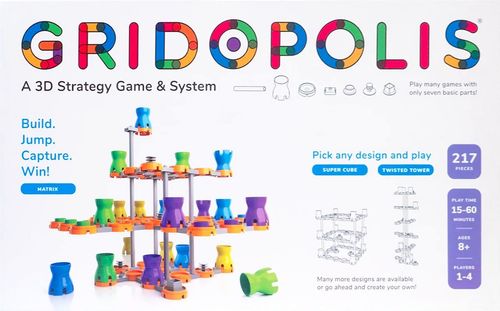
Gridopolis
Gridopolis Rulebook
Table of Contents
Table of Contents
Game Parts and Definitions
Building parts
- Pad: the landing spot for player markers.
- Post: connects to a link to build vertically.
- Link: connects to any pad or post.
Gridopolis is built with three basic parts that connect together. The pad and link connect horizontally, and the post connects vertically.
Node parts
All nodes go on the pads and modify how the pads work.
- Kingerizer: marks your starting home-row. Opponents land here to get "kinged."
- Teleporter: turns the pad into a "wormhole" and teleports your marker to any other unoccupied teleporter.
- Blocker-box: play defense! Take a pad out of action for the rest of the game. Everyone must go around.
Grid-set
The three-dimensional playing arena where all of the gameplay happens is called the "grid-set." It is defined at the start of a game, but changes during play!
Markers
Each player begins with a set number of markers to move and jump. See details on pages 4 and 5 of the instructions.
- Pawn: all markers start out as pawns.
- King: markers turn into kings when they reach an opponent's home-row. Flip it over and you're a king!
Game Set-Up
This is a game system. To help you get started, the classic Matrix game design is included. Once you get comfortable with the system and rules, there are many other game designs available.
Different designs are called blueprints and are free to download at www.gridopolis.info.
You can also design your own game from scratch! Use the Game Design Guide at www.gridopolis.info.
In the box there are 217 parts:
- 16 Posts
- 63 Pads
- 88 Links
- 24 Markers
- 12 Kingerizers
- 6 Teleporters
- 8 Blocker-Boxes
Assembly tips
- Start by connecting the links to the pads. They're easier to connect if you attach them from the underside.
- If it's easier, try turning the parts upside down!
- When building a grid-set, it's easier to build a full horizontal "floor" first.
- When using a post, it always connects to a link, either at the top or bottom as shown.
- Posts never connect directly to pads.
Building the Matrix Grid-Set
Build your grid-set
- Build the horizontal sections of the grid-set. If you are playing with two players, build two sections. If you are playing with four players, build four of these sections. Connect these sections to the second (middle) level.
- Next, connect the posts to the underside of the links. Remember, posts only connect to the links. Each post fits on a link below.
- To make your grid-set three-dimensional, lower each floor and post assembly on to the floor level below.
2-player set-up
- Place teleporters as shown, five total.
- Place three kingerizers in a single back "home-row" for each player and match colors.
3- or 4-player set-up
- Add an extra set of six pads and markers for each player (see Gameplay below).
Ways to Play
Gameplay: Option 1
Win by being the last player standing! No time limit.
Gameplay: Option 2
Play to any time limit you choose. Win by having the most points. Make sure that each person has the same number of turns. When time runs out, continue until right before the person who started. So, everyone gets the same number of turns. Then count up all the markers you have left and the ones you have captured.
Point system
- Kings you captured: 4 points
- Pawns you captured: 3 points
- Kings you have left: 2 points
- Pawns you have left: 1 point
For the kamikaze move (explained later) give your sacrificed marker, including points, to the opponent you captured. Keep their marker and points.
Extra set (3- or 4-player option)
For the 3- or 4-player option, add an extra set of six pads and six markers for each player.
Moving Basics
The goal
Win by capturing your opponents until you are the last player standing. Or, play a timed game and win by having the most points when time runs out. "How to capture" starts on page 8 of the instructions.
When it's your turn, either move or jump or build. Build with the parts listed below.
Pass out parts
Each player gets the following ten parts before the game starts. Set them aside for later use.
- 2 Blocker-Boxes
- 2 Posts
- 3 Pads
- 3 Links
Editor's note: the printed page shows the numerals 2, 2 and 3 over the labels "Blocker-Boxes", "Posts" and "Pads and Links" with no separate count for links; the split of the 3 shown over "Pads and Links" into 3 pads and 3 links is inferred from the printed total of ten parts and from the printed build-or-add rules ("three pads + two posts", "two blocker-boxes").
Starting
Pawns can move one pad at a time in any direction. This includes diagonally, sideways, and from one level to another. But, they can never go backwards, which is towards their home-row.
Pawns may move one pad away, even vertically and diagonally.
Sideways moving is OK, except on the home-row. Markers must move forward for their first move.
All 6 moves shown in orange are legal.
Later
Pawns can also jump their own team to speed things up! All jumps must be in a straight line, so no turning corners. You may even jump multiple markers on the same move. Orange pads highlight legal moves.
Pawns can never go backwards, which is towards their starting home-row.
Moving or Building
... and as a king, flip it!
Land on any opponent's home-row (the color-keyed kingerizer) to get kinged! Flip over your pawn, and it's now a king. This is a major advantage.
Why? Kings can now move in any direction. They also get two separate moves on the same turn. The second move is always optional.
It's not turning. It's two moves!
Teleporter
Placed on the grid-set before play, a teleporter is a special "node." Any marker landing on it will teleport to any other open teleporter of your choosing. This does not count as an extra move.
When landing on a teleporter, you must teleport out, unless all other teleporters are occupied. In that case, stay put!
Pawns can teleport to any open teleporter, whether forward or backward. Teleporters are the exception to the movement rule for pawns.
Two "jumps" but it's only one move.
Blocker-box
A blocker-box will make a pad "inactive." Once placed, no one can land here, it cannot be moved, and all players must go around for the remainder of the game. Placing it counts as your turn.
Each player gets two blocker-boxes at the beginning of the game and can use them at any time. They can be placed on any open pad, which is not occupied by a kingerizer, teleporter, or player marker.
The pad is "out of order," so now no markers can land here.
Building and Capturing
Add-a-pad
The grid-set you start with is not the one you end with! A new pad can be connected anywhere it fits, either horizontally or vertically. Building it counts as your turn.
- New pad must be above another pad.
- Each player gets three pads + two posts at the beginning of the game and can use them at any time.
- When using a post, the new pad must be directly above another pad.
- When adding the pad horizontally, you can use a link.
- When adding the pad vertically, you can use both a link and a post.
Jumping basics
To capture a marker, you jump over them, in a straight line, into an empty pad. Both pawns and kings can capture each other, but pawns cannot go backwards at any time.
This straight-line rule is always the same, no matter which direction, angle, or levels.
Always remove captured markers from the grid-set. Set them aside if you are playing a timed game using points so you count them.
Diagram: diagonal move. Blue captures green! Green is removed from the grid-set.
Diagram: vertical move. Blue captures green! The jump is a straight line of the three pads.
Jumping advanced
The straight line can be at any angle or across multiple levels. A diagonal multi-level jump is challenging to visualize. It can help to first imagine the move on a single level.
Any jump-capture must always be made in a straight line, with no turns or changes in direction. This is tricky with different levels and diagonal angles.
Diagram: illegal jump, not straight and changes direction. Blue cannot capture green. The straight line shows there is no pad here for landing.
The straight-line capturing rule can be confusing for beginners. Here is the same illegal jump from two views to illustrate that green cannot be jumped.
- Top view: looks OK from this angle, but it's not.
- Side view.
Both illegal jumps: the planned jump-capture requires a turn, or landing where there is no pad.
Another common mistake is jumping but forgetting about the straight-line rule. Remember, the straight line is created by three pads: the starting pad, the marker and pad you're jumping over, and the pad you are landing on. Without the top pad, blue could not jump green legally.
Multi-jump
Jumping is not limited to capturing one marker. A multi-jump allows you to keep jumping and capture more!
Diagram: blue captures three greens in one move!
There is no limit to the amount of multi-jumps, as long as pawns do not go backwards.
You cannot combine jumping over your own markers and capturing an opponent.
Kamikaze
This "sacrifice" move occurs when a player captures an opponent's marker, but lands off the grid-set! Both markers are eliminated from play.
Diagram: kamikaze! Green and blue both removed.
The kamikaze can only be used to jump an opponent on the same level. There is no limit to when, or how often, this move can be used.
If playing a timed game, the markers and points are divided:
- Green captures, and keeps, blue.
- Green is given to blue opponent.
Wow! A last marker can jump another last marker, and the one jumping wins the game.
More on Moving and Jumping
Teleporters
Teleporters do not count as part of your "move." If you land on one, the next jump is free!
When you land on a teleporter, you must "teleport" to any other unoccupied teleporter. Pawns are not restricted by direction.
If you land on a teleporter when all other teleporters are blocked with markers, then you stay on that teleporter.
After you arrive at your destination teleporter, you will need to leave that teleporter and re-enter (or land on another teleporter) to "teleport" again.
Since kings have two moves, they can use move #1 to exit and then move #2 to re-enter and "teleport" out.
Diagram: by using a teleporter on the first move, a king can still take a second move after arriving at the destination teleporter. Move #1: take the teleporter, teleport! Move #2: capture green!
King jumping
With a king's ability to move in any direction, you may have more jumps than you think. Although rare, a king may be able to capture three, or even four, opponents in a single move. Impressive!
Diagram: triple capture jump [only one move]. Blue move #1 [a, b, c] captures 3 greens. All are removed. [Optional move #2 remaining.]
Quick Start Guide
Back-cover quick start guide, "A Tabletop 3D Strategy Game."
Objective
Start by building the 3D grid-set. Win by capturing your opponents until you are the last player standing. Or, play a timed game and win by having the most points when time runs out.
In Gridopolis, you capture others by jumping over them in any direction, or dimension! You can move horizontally, vertically, and diagonally, and across multiple levels. The grid-set (your 3D playing arena) is dynamic and changes during play.
Any marker that gets jumped over is captured and comes out of the game.
Diagrams: start, jump capture, land, other moves.
Pro-tip: use a multi-jump to capture more than one opponent on a single turn!
Jumping in 3D
A teleporter is a special pad. Land on one and get "teleported" to any other open teleporter. It's still one turn.
Any jump-capture move must follow the "straight-line" rule. Think of three points (or pads) in a row: your starting pad, the opponent you are jumping over, and your landing pad.
Diagram: side view, teleport, free ride!
The kamikaze is the only move that allows you to play outside the grid-set. If your marker is on the same level as your opponent, capture them by jumping off the grid-set, sacrificing both markers.
Diagrams: two illegal jumps. Both jumps require (a) turning a corner or (b) landing where there is no pad.
Move or build
At the beginning of a game, each player gets ten extra grid-set parts. These can be used to change the grid-set in the middle of a game!
- Add a pad wherever it fits, and that was your turn. Grow the grid-set with the add-a-pad move.
- You can also shrink the grid-set by placing a blocker-box on any empty pad. The pad is out of order for the rest of the game. No one can land here.