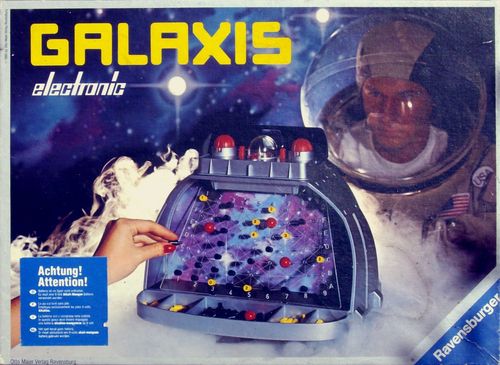
Galaxis
Galaxis Rulebook
Table of Contents
Table of Contents
- Components
- Assembly
- 1. Computer Console (Computergesteuerte Schaltzentrale)
- 2. Space Sector Scanner (Raumsektor-Bildschirm)
- 3. Marker Pegs (Markierungsstecker)
- Game Options
- Game Option 1
- Radio Answers of Space Buoys
- Evaluating Radio Messages
- Game Option 2
- Game Option 3
- First Practice Success: Spaceship Discovered
- Practice Rule: "Caution! Spaceship!"
- Time Limit: Sophisticated Game Variant for Quick Thinkers
- Battery and Mains Adapter
- Function Check
Components
The game contains:
- 1 computer-controlled console (Schaltzentrale)
- 2 space sector scanners (Raumsektor-Bildschirme)
- 2 marker trays (Schalen für Markierungsstecker)
- 1 mask (Sichtblende)
- 2 bearing pegs, red and white (Peilstecker), called "Peiler"
- 90 radio-answer pegs numbered 0-4, yellow, called "Orter" (locators)
- 100 information pegs, black (Informationsstecker), called "Infos"
- 8 ball pegs, red and white (Kugelstecker), called "Raumschiffe" (spaceships)
Assembly
Assemble in the following order and follow the steps carefully (the English text below is as printed in the rulebook):
- Slot space sector scanner into each side of the station.
- Insert battery into the computer console.
- Fit computer console into the appropriate space in the top of the station.
- Slot the trays for the markers into each side of the station.
- Divide markers, putting half into each tray.
- Clip mask into the appropriate holes on each side of the computer console.
1. Computer Console (Computergesteuerte Schaltzentrale)
The computer console (Schaltzentrale) is the control unit of the ground control station. Its parts are:
- Program switch (Programm-Schalter): used to set the chosen game option.
- On/off switch (Ein-Aus-Schalter): in position II it activates the time limit (see "Time Limit" below).
- Signal lamps (Signal-Lampen): convey the radio answer of the space buoy by light signals.
- Coordinate switch (Koordinaten-Schalter): scales A-G and 1-9 around the buoys, used to select the buoy to be queried.
- Search button (Suchtaste): pressed to establish radio contact with the buoys.
2. Space Sector Scanner (Raumsektor-Bildschirm)
Each point on the space sector scanner shows the position of a fixed space buoy and may at the same time be the position of a sought spaceship. Lines from a point are the search beams of that buoy (for example D5).
All radio answers from queried buoys are marked on the screen: the reported number of sighted spaceships, located spaceships, and the evaluations of radio messages.
3. Marker Pegs (Markierungsstecker)
- Bearing pegs (Peiler): a memory aid for entering coordinates, kept in place until the buoy's radio answer has been received.
- Ball pegs (Raumschiff): mark a buoy radio answer indicating that a missing spaceship has been discovered.
- Locators (Orter): buoy answer pegs numbered 0-4, showing how many spaceships were sighted by the queried buoy.
- Info pegs (Infos): mark points which, after the received buoy answers have been correctly evaluated, can be ruled out as positions of spaceships.
Game Options
The game has three options (Spielmöglichkeiten):
- For 2 players or 2 teams: the entire crew of the ground control station takes part in the search. Both space sector scanners are used, and the two teams work with their own system. Whichever team first finds the four missing spaceships wins.
- For 1 player: an emergency at the ground control station: one space sector scanner has failed. The on-duty space specialist must carry out the search alone.
- For 2 players or 2 teams (practice): practice for an emergency at the ground control station. Are the crew and equipment ready for an emergency? On each space sector scanner, four "secret" spaceship positions are marked that are not visible to the other side. Which screen team can solve the simulated emergency first?
Game Option 1
Two specialist teams work in the Galaxis ground control station. Each tries with its own "search system" to locate the four missing spaceships.
Program switch 1 – on/off switch position I: computer console ready for use. Four lamps flash.
Caution! A previously selected game option can only be changed when all four lamps are flashing. If necessary, switch the device off and on again.
Start of play: both players sit in front of their screens. Four lamps flash. One of the two players begins:
- Fold the mask toward the opposing player.
- Set the coordinates of the space buoy from which you want to take a bearing.
- Insert a bearing peg into the chosen point.
- Press the search button: the buoy's search signal sounds.
- Pay attention to the radio answer of the buoy. Replace the bearing peg with the corresponding locator on the screen (see the table of all possible radio answers, page 8).
- If a missing spaceship is discovered, the successful screen team may continue the search and take bearings from a new space buoy. The two lamps on that team's side keep flashing.
- Evaluate the radio message: mark it with info pegs on the screen (see "Evaluating Radio Messages" below).
- Do not forget to change the coordinate switch! (The other screen team must not learn the buoy that was queried.)
- Fold the mask over: the other screen team now begins its search. The two lamps on its side flash.
End of search: as soon as one screen team has discovered the fourth missing spaceship, the computer console reports success. The two lamps of the successful team flash. The other screen team stops its search. Four new emergency calls reach the ground control station, and the next search can begin.
"Perhaps you should try the tricky game variant with a time limit for super space specialists this time!" (see page 12)
Radio Answers of Space Buoys
Search signal (Suchsignal): UAH=UAH, sounded together with a lamp display.
When a buoy is queried, its sound and light answer identify the locator to place on the screen:
| Sound signal (Tonsignal) | Light signal (lamps) | Locator (Orter) | Example |
|---|---|---|---|
| BUUH | no lamp | 0 | C2 |
| PIEP | 1 lamp | 1 | C4 |
| PIEP=PIEP | 2 lamps | 2 | E7 |
| PIEP=PIEP=PIEP | 3 lamps | 3 | C6 |
| PIEP=PIEP=PIEP=PIEP | 4 lamps | 4 | D5 |
| BUHU=BUHU | two groups of lamps | ball peg (spaceship discovered) | F3 |
Attention! Full concentration! Marking radio answers and their evaluations correctly on the screen is important; otherwise the search may fail.
Evaluating Radio Messages
Several buoys have reported sighted spaceships, and all are registered exactly on the screen.
Conclusion: missing spaceships are to be expected at the intersections of the search beams of these buoys. These positions can now be queried in a targeted way.
A spaceship is discovered and its position is marked on the screen. Does this spaceship lie on search beams of buoys that have already been queried?
Conclusion: the buoy had sighted this one spaceship and is marked with a locator 1. Therefore no further spaceships can be located on all other search beams of this buoy. All points on these search beams are therefore marked with info pegs.
However: in the "radio shadow" of a discovered spaceship, i.e. on the same search beam, another spaceship may be located. Or: the buoy may not have been able to sight the discovered spaceship at all, because it flies in the "radio shadow" of another. Therefore: do not place info pegs on the search beam that connects the buoy and the spaceship!
Buoy answer: BUUH. No lamp lights up. The buoy has no spaceship in sight and is marked on the screen with a "Locator 0".
Conclusion: no spaceship can be located on any point of all of this buoy's search beams. Therefore all these points are marked with info pegs.
Game Option 2
Emergency service at the Galaxis ground control station: only one space sector scanner is in operation.
Program switch level 2 – on/off switch position I: computer console ready for use.
Caution! A previously selected game option can only be changed when all four lamps are flashing. If necessary, switch the device off and on again.
Start of play: one player sits in front of their scanner. Four lamps flash. Following the same rules as Game Option 1, the search begins:
- Set the coordinates of the space buoy from which you want to take a bearing.
- Insert a bearing peg into the chosen point.
- Press the search button: the buoy's search signal sounds.
- Pay attention to the radio answer of the buoy: replace the bearing peg with the corresponding locator on the screen.
- Evaluate the radio message: mark it with info pegs on the screen.
Game Option 3
Practice for an emergency at the Galaxis ground control station. Each screen team places a set of spaceship positions that are secret from the other team. Which team can locate the other team's spaceship positions first?
Program switch level 3 – on/off switch position I: computer console ready for use.
Caution! A previously selected game option can only be changed when all four lamps are flashing. If necessary, switch the device off and on again.
Start of play: both teams sit in front of their screens. Four lamps flash. A team may begin by storing four spaceship positions. After the first entry, only the two lamps on that team's side flash. After the fourth entry, the lamps on the opposing side flash, showing that the other team may now enter four positions.
1. How the positions of the four spaceships are stored:
- Place four spaceship pegs of the same colour on the screen as positions.
- Fold the mask toward the opposing team.
- Set the coordinates of the first spaceship and press the search button: a short storage signal ("düdü") sounds.
- Set the coordinates of the second spaceship and press the search button: "düdü" again, and so on. All four spaceships may be stored in any order.
- After entering the fourth spaceship position, change the coordinate switch. Do not forget!!!
- Fold the mask over: now the two lamps of the other team flash. That team stores its four spaceship positions in the same way, and also changes the coordinate switch afterwards. Do not forget!!!
2. The search can begin. The mask is removed. Two flashing lamps show which team starts.
- Set the coordinates of the space buoy from which you want to take a bearing, and announce them aloud to the other team. (Because the other team may no longer query this buoy itself, and must mark that point on its own screen with an "Info".)
- Insert a bearing peg into the chosen point.
- Press the search button: the buoy's search signal sounds.
- Pay attention to the radio answer of the buoy: replace the bearing peg with the corresponding locator on the screen.
- Evaluate the radio message: mark it with info pegs on the screen.
First Practice Success: Spaceship Discovered
The successful screen team demands the spaceship peg from the other team, and marks with it the position just found on its own screen. In addition, it may continue the search and take bearings from another space buoy. The two lamps on its side keep flashing.
Practice Rule: "Caution! Spaceship!"
Positions where one has placed one's own spaceship may not be queried from the opponent. The computer console would immediately reveal the "own" spaceship position with a long, deep tone.
Only under the firm assumption that the opponent has also placed a spaceship position on the same point does the exception apply. By announcing "Caution! Spaceship!" to the opponent, these coordinates may be entered.
This exception question decides the game when the fourth spaceship is searched for and at the same time the fourth spaceship would be revealed. If the querying player actually discovers the fourth spaceship in doing so, he has successfully completed the practice. Otherwise he has helped the opponent to success.
Time Limit: Sophisticated Game Variant for Quick Thinkers
Game options 1 and 3, on/off switch position II.
Caution! The time limit only takes effect if all four lamps flash when the option is set. If not, switch the device off and on again.
The space buoys have only a limited radio frequency. After 60 seconds, their transmitter becomes too weak to be received by the ground control station. The players have only 60 seconds per turn to consider. Which buoys should they take bearings from? Which point could be the position of a spaceship?
After about 54 seconds, the computer console begins the warning signal: the two lamps no longer flash simultaneously but alternately. Quickly press the search button, or the 60 seconds will run out and the turn passes to the opponent.
Battery and Mains Adapter
The game "Galaxis" can be operated either with a battery or with a mains adapter. When the adapter is connected, the battery does not need to be removed. The device is switched off automatically when the mains adapter is connected.
Battery: this game requires a 9-volt alkaline-manganese battery.
If the electronics give faulty answers after about 8 hours of play, the battery is too weak for this game. Please then use a new battery.
Mains adapter: any type with the following output rating may be used: 9 V, 250 mA.
Warning! Wrong polarity or excessive voltage can destroy the device.
The size of the connector plug and the polarity are shown in the following drawing: plug diameter 2.5 mm, with "+" at the centre contact. When using the mains adapter, the rules for handling mains power must be observed.
Function Check
If the computer console does not work to your complete satisfaction, the following may be responsible for the malfunction:
- Battery connection. Check the connection between the console and the battery. The battery must make firm contact.
- Battery too old. Please first renew the battery before checking the following points.
- Operating error. Please read the rules for the game option you have selected once more.
- Device defect. Device defects are, for example: a lamp defective, no sound, the device no longer plays at all, etc. In this case please send the console to the address named in the warranty conditions, to the service responsible for you.
Attention! Observe the warranty conditions! After the warranty has expired, we offer a repair service at the respective applicable repair costs.