Firefighters on Duty: Kickstarter Promos
Firefighters on Duty: Kickstarter Promos Rulebook
Source: the official English KS Promos rulebook (V1.0, 8 pages) published by Artipia Games, transcribed from the publisher's PDF. It covers the promo modules' own rules only and requires the base game, Firefighters on Duty.
Table of Contents
Table of Contents
Components
- 9 Event cards
- 8 Distress Call cards
- 2 City Tile Randomizer cards
- 3 Hazard cards
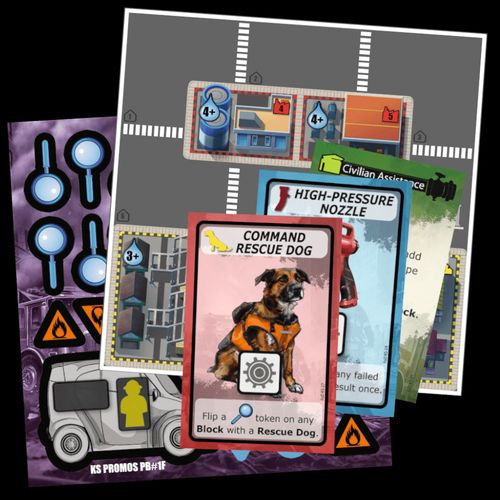
- 4 Command Rescue Dog cards
- 4 High-Pressure Nozzle cards
- 1 Rapid Responder miniature
- 1 Rapid Responder tile
- 1 Drone miniature
- 12 Search tokens
- 8 Scenario Point tokens
- 8 Debris tokens
- 2 Cat tokens
- 2 High-Pressure Nozzle tokens
- 2 Rescue Dog tokens
- 2 Extinguish Difficulty tokens
- 4 Flood tokens
- 2 Hose Extension tokens
- 1 Public Panic die
- 21 Double-sided Hazard tokens
- 2 Double-sided City Tiles
New Game Material
The KS Promos provide new material that you can use in your games to increase variety and replayability.
Much of this new material comes in the form of modules. Each module comes with its own set of rules, is independent from other modules and when added in your game will require an increase or decrease of your starting Scenario Points.
To avoid having to add and remove certain cards before each game based on the modules you are playing with, we suggest that you add all new Event, Hazard and Distress Call cards in their corresponding deck. If, during a game, you draw a card associated with a module which you are not currently using, discard that card and draw another.
Randomization Process
The game features a randomization process that will allow you to randomly select Spaces on the Game board. This will be required during the setup of various modules but also offers you the freedom to create custom Scenarios.
When you are required to select a random Space on the Game board, first determine the City Tile. Create a deck using only the City Tile Randomizer cards for the ones present in the Scenario and draw a random card to determine the City Tile.
Then determine the Space by rolling the Randomizer D12. If you are required to determine a Road or a Block or if the tile has less than 12 Spaces, reroll until you have a valid result.
Modules and Other Material
Below, you will find instructions on how to include various modules and other material in your game. You can add as many as you like, adjusting the Scenario Points accordingly.
Drone
Scenario Point adjustment: -1 when using this Module.
The Drone is a new type of Common Vehicle. During Game Setup, place the Drone on the Fire Station of your choice. During the Action Phase, the Drone can be moved by a player to any adjacent Space (Road or Block). The Drone may share a Road with another Vehicle.
When performing an Extinguish action, if the Drone is present on that Space, the Extinguish Difficulty is reduced by 1.
The Drone cannot get damaged by Fire.
Example: The Extinguish Difficulty on Block 5 is reduced to 2+.
Rapid Responder
Scenario Point adjustment: -1 when using this Module.
The Rapid Responder is a new type of Common Vehicle. During Game Setup, place the Rapid Responder miniature on the Fire Station of your choice and the Rapid Responder tile close to the Game board.
The Rapid Responder may share a Road with another Vehicle and can carry 1 Firefighter and 1 Equipment.
- Equipment slot (Capacity 1 Equipment)
- Firefighter slot (Capacity 1 Firefighter)
Floods
Scenario Point adjustment: +2 when using this Module.
After the Scenario Setup, add Flood tiles equal to the number of players on random Blocks on the Game board using the randomization process. Remove the rest from the game. Then, add 3 Water on the slots of each Flood tile and 1 High Voltage Hazard token on the same Block.
Note: Each City Tile may have at most one Flood tile. Repeat the randomization process until each Flood tile has been placed on Blocks of different City Tiles.
Blocks containing a Flood tile are considered Flooded Blocks. Flooded Blocks may also contain Fire as normal.
Action Phase/Dice Actions
Drain Water: To perform this action on a Flooded Block, the presence of a Firefighter as well as a Fire Hose is required on that Block. In addition, the player's Fire Engine must be present on a Road adjacent to that Block. The player must place one of their Action dice with a Gear symbol on the Action slot on their Fire Engine tile to start the Drain Water process:
- Take a Water from the Flood tile and roll it repeatedly until you get a result of 5 or higher.
- Return the Water to the general supply.
- If there is still Water on the Flood tile, the process may be repeated.
- If there is no Water left on the Flood tile, remove it from the game.
Fire Phase
At the end of the Fire Phase, add 2 Water on each Flood tile (to a maximum of 6). Then, players lose 1 Scenario Point for each Flood tile with 6 Water on it.
If, after losing a Scenario Point, you have no more remaining, the Scenario is a failure and players lose the game immediately.
Game End
Lose 1 Scenario Point for each Flood tile that is still on the Game board.
Rescue Dogs
Scenario Point adjustment: +1 when using this Module.
After the Scenario Setup, give a Command Rescue Dog card to each player and place 1 Rescue Dog token on each Fire Station. Take all Search tokens and shuffle them face-down. Then add 2 face-down tokens per player on random Blocks of the Game board using the randomization process. Remove the rest from the game.
Note: Each Block may contain only one Search token. Repeat the randomization process until all Search tokens have been placed on different Blocks.
Action Phase/Dice Actions
Move Rescue Dog: When a player rolls a Firefighter symbol, they may move any Rescue Dog on the Game board to an adjacent Space.
Note: a Rescue Dog may exit a Block or a Road that has one or more Debris on it.
Command Rescue Dog: To perform this action on a Block containing a Search token, the presence of a Rescue Dog is required on that Block and a Firefighter must be present on that City Tile. A player flips that Search token by placing one of their Action dice with a Gear symbol on their Command Rescue Dog's Action slot.
Action Phase/Free Actions
Players may freely load or unload Rescue Dogs on Vehicles capable of carrying Firefighters. They occupy Firefighter slots on those Vehicles. To be loaded on a Vehicle, the Rescue Dog must be on the same Road as the Vehicle.
After the end of the Action Phase, Rescue Dogs that are present on Blocks must be moved to the closest Road that contains no Fire.
Radio Reports/Distress Calls
During the Distress Calls resolution, for each Block containing a revealed Search token, replace that token with the tokens depicted on it and remove it from the game.
Game End
Lose 1 Scenario Point for each Search token that is still on the Game board.
Public Panic
Scenario Point adjustment: +1 when using this Module.
After you've checked for Injuries during Radio Reports, roll the Public Panic die for each Civilian on the Game board and apply its result. If the result cannot be applied, re-roll the die once more. If the result still cannot be applied, skip the process for the particular Civilian.
Die faces:
- Arrow: Move the Civilian to an adjacent Space indicated by the arrow.
- Civilian with a plus sign: Add another Civilian on this Space.
- Grey Civilian figure: Replace this Civilian with an Injured Person unless a Firefighter is on this Space.
- Blank: Nothing happens to this Civilian.
Important: Do not roll the Public Panic die for Civilians on Spaces with at least 1 Firefighter or for Civilians on a Road with a Gathering Point tile.
Cat on a Tree
Scenario Point adjustment: +1 when using this Module.
After the Scenario Setup, add 1 Cat token on a random Block on the Game board using the randomization process. Also make sure that the Distress Call cards depicting Cat tokens are included in the Distress Call deck.
Rescue a Cat: If, after the end of the Action Phase, there are at least 3 Firefighters present on a Block containing a Cat token, remove it from the game.
At game end, lose 2 Scenario Points for each Cat token that is still on the Game board.
New Hazards
To enrich your game with the following types of Hazards make sure that their Hazard cards and the Distress Call cards depicting them are included in the corresponding decks.
Underground Fire: When an Underground Fire token is added on a Block, add 1 inactive Fire to that Block as well. During Radio Reports/Trigger Hazards, add 1 inactive Fire on each Block containing an Underground Fire.
Toxic Materials: When a Toxic Materials token is added on a Block, place it on its inactive (green) side.
During Radio Reports/Trigger Hazards, if there is a Fire on a Block containing an inactive Toxic Materials token, that token gets flipped to its active (red) side.
During Radio Reports/Injuries, any Firefighter or Civilian on a Block containing an active Toxic Material token is Injured.
During the Radio Reports/Burned Blocks, if there is an active Toxic Materials token on a Block with 3 Fires, the block burns down immediately.
Extremely Flammable: During the Action Phase, Blocks containing an Extremely Flammable token require 2 Firefighters and 2 Fire Hoses for the Extinguish action to be performed.
Note: The new Hazards cannot be removed from a Block unless it burns down.
Hose Extension
The Hose Extension is a new type of Equipment. All the rules for Equipment apply for the Hose Extension as well.
After the Scenario Setup, place each Hose Extension token on the Fire Station of your choice.
After being moved/unloaded to a Space, a Hose Extension can be used in the following ways regardless of the presence of a Firefighter on the same Space:
- Can extend a chain through Roads or Blocks.
- Can be used to transfer Water from an adjacent Fire Hydrant to an adjacent Fire Engine.
- Can be connected to an adjacent Fire Hydrant to replace the presence of a Fire Engine when extinguishing Fire on Blocks. In this case, use the available Water from the Fire Hydrant instead.
A Hose Extension cannot be used to extinguish Fire on a Block as if it were a Fire Hose.
High-Pressure Nozzle
The High-Pressure Nozzle is a new type of Equipment. After the Scenario Setup, give a High-Pressure Nozzle card to each player and place each High-Pressure Nozzle token on the Fire Station of your choice. Then, remove a total of 4 Fire Hose tokens from the game.
Extinguish with High-Pressure Nozzle: To perform an Extinguish action on a Block, the presence of a Firefighter as well as a High-Pressure Nozzle is required on that Block. In addition, the player's Fire Engine must be present on a Road adjacent to that Block. Furthermore, a player must place one of their Action dice with a Gear symbol on the Action slot of their High-Pressure Nozzle card. Then, the player may initiate the extinguish process with the following change: They may re-roll once any Water with result lower than the Extinguish Difficulty before returning it to the general supply.
Note: During the round, as long as the die remains on their card, the High-Pressure Nozzle is considered activated for the player's extinguish processes.
A High-Pressure Nozzle counts as a Fire Hose as long as the player has not activated it through their card.