Final Act: Extra Forces Expansion
Official rulebook: Tyto Games · PDF
Final Act: Extra Forces Expansion Rulebook
Table of Contents
Table of Contents
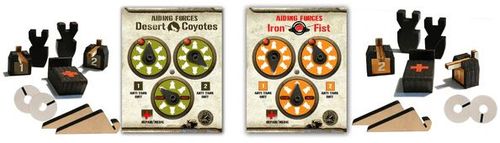
Contents
2 control panels, 2 repair/medic units, 4 anti tank units (2 colors), 4 shells (2 each player), 4 wood "turn" discs, 4 panel supports, sticker sheet.
Overview
The "Extra Forces" kit/addition to the game adds 3 more units to your tank company: 2 anti tank infantry units, and one repair/medic unit.
The objective of the game remains the same. You need to get any of your tanks, not any other unit, to the enemy's Last Line of Defense. These extra units are to aid your main tank force in achieving its goal.
Just before diving in, place the stickers on the game parts. 2 stickers on each shell (same as tanks' shells), and one red cross sticker on the repair/medic unit. Extra stickers are provided. (The sticker sentence is partly overprinted in the PDF; the wording here is recovered from the PDF's text layer.)
When playing with the extra units, game sequence remains the same with one small change. During the shooting phase, tanks shoot first. Once finished placing their tank shells commanders declare "Done", and only then place the shots of their anti tank units (this is important otherwise the enemy will know whether you move or shoot).
Anti Tank Units (AT)
During set up AT units can be located anywhere the player sees fit within the first three rows (similar to tanks set up). An AT unit can share a square with a tank, as explained below.
Anti tank infantry units can either move OR shoot at any specific turn (unlike your tanks that can do both). An AT unit cannot move and shoot at the same turn.
Anti tank units are out of the game after taking only one hit! (An AT unit hit is removed from the board). AT units can also be run over by enemy tanks, take damage, and be out of the game.
ATs can occupy the same square with any of your tanks, and both your units can occupy the same square (it is not allowed 2 ATs and a tank on the same square).
If a tank and an AT unit share a square that is targeted and hit by the enemy, the tank takes the hit, and the AT unit remains in the game (the tank offers cover for the infantry unit). If this is a tank's second hit, both are out of the game (tank exploding damaging the infantry units), thus sharing an area with a damaged tank is of higher risk.
When a tank and an AT unit share a square their line of fire is free, and the units do not interrupt one another.
If two AT units occupy the same square and are hit by the enemy with one shell, one of the units is out of the game (commander's choice).
An enemy tank can run over an anti tank unit, and take it out of the game. In any situation where a tank and a rival anti tank unit move to the same square, the tank has the upper hand and eliminates the anti tank unit.
Movement
Like tanks, ATs cannot cross the swamp, and are allowed to move through the minefield only in the designated area. ATs can move freely over berms.
Each turn anti tank units can move one square to any of their surrounding squares, or stay in place (marked in green). These are infantry units, with high maneuvering flexibility.
Commanders use their ATs' control panels in the same rationale used for their tanks. Each unit has one corresponding dial, and a "Turn" disc.
To order an AT unit to move, turn the dial to the desired unit's future location (similar to tank operation). For example, the movement order below would translate to such movement:
(Diagram: a dial set to a move arrow, and the matching one-square move on the board.)
Direction change: all combinations of movement and direction changes could be done in one move. Direction of the AT unit is crucial (similar to your tanks) and affects its cone of fire. To change the unit's direction use the wood disc, and place it on the dial's screw, to indicate the desired direction change. Set the black marker to indicate the desired new direction. AT units are free to rotate 90 or 180 degrees. For example, ordering the unit to move to the left and turn to the right:
(Diagram: a dial and board showing a move to the left with a turn to the right.)
To order an AT unit to stay in place and shoot, turn the dial to the red dot on the panel.
Shooting
AT units cause the same damage as tanks.
All line of fire (sight) rules apply to the AT unit, similar to tanks rules (berms and tanks are obstacles on the battlefield), with two exceptions:
- An AT unit's shooting range is fixed and does not change when shooting from top of a berm.
- An AT unit is not an obstacle on the battlefield, and does not interrupt other tanks or ATs line of fire (sight).
AT units' cone of fire is different, and smaller than your tanks' ranges. An AT unit's cone of fire is defined as 4 squares straight ahead (farthest range), and closing a diamond, as such:
(Diagram: the AT unit's shooting cone, a red diamond-shaped area of 4 squares straight ahead, closed at the sides.)
Anti tank units can shoot other enemy anti tank units.
Repair/Medic unit (R/M)
Your repair/medic unit is a valuable asset to your company, allowing damaged tanks to be repaired and rejoin the battle as undamaged.
During set up R/M units can be located anywhere the player sees fit within the first three rows (similar to tanks set up).
Unlike tanks and AT units the R/M unit cannot shoot. Its direction has no importance, only its location.
Like tanks, R/M units cannot cross the swamp, and are allowed to move through the minefield only in the designated area, and can move freely over berms.
Being an armored unit, your R/M unit moves exactly as your tanks. To order movement simply use the corresponding dial to order the unit's future position. Note that similar to tanks' movements, your R/M unit cannot move sideways.
Repair/Medic units are out of the game after taking only one hit!
Repair/Medic units are not allowed to share a square with a tank, with the exception of when exercising the "repair" act (R/M unit can share a square with one AT unit).
The Repair/Medic unit is considered an obstacle, thus interrupting the line of fire (sight) similar to tanks.
Repairing a damaged tank
Your R/M unit can repair up to 2 tanks during a game.
When a damaged tank (carrying a flame mark) is repaired, the flame mark is removed, and that tank returns to battle with no hit mark.
A tank destroyed and out of the game cannot be repaired.
Your R/M unit cannot move and repair a tank at the same turn.
To repair a damaged tank, the tank and the R/M unit need to occupy the same square at an end of a turn. Both the repaired tank and the R/M unit's dials should be set to "Stop" the following turn, and the commander declares "Tank X repaired". The repair action lasts one turn, meaning that the repaired tank and the R/M unit cannot move the next turn, and are idle. The repaired tank is not allowed to shoot during this turn (thus, a tank being repaired decreases your fire power for the turn).
If a tank and the R/M unit take a hit during repair, both are eliminated and out of the game (and remain on the board as wrecks).
THANK YOU FOR PLAYING FINAL ACT!
You're welcome to visit and contact us at www.tytogames.com