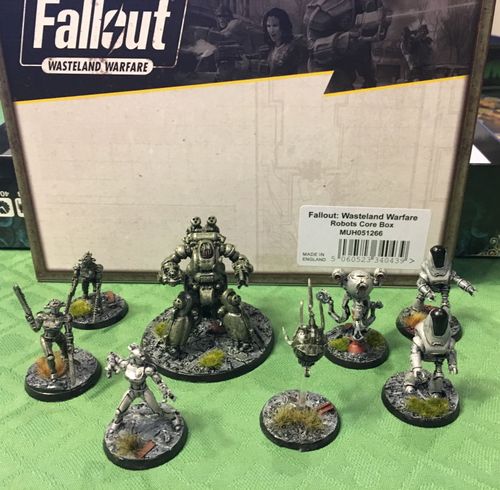
Fallout: Wasteland Warfare – Robots Core Box
Fallout: Wasteland Warfare – Robots Core Box Rulebook
Table of Contents
Table of Contents
Robots
The following rules apply to all Robots:
- Robots with no named faction count as the same faction as the player's Leader.
- Robots can only use cards which show the [robot icon], or specifically state can be used by Robots on the cards, or are equipped by the Unit's card.
- Robots are immune to Poison and Radiation damage.
- Damage can be removed from a Robot using a Robot Repair Kit.
- A Robot may equip a total of 2 robot weapons, 2 robot mods and 1 non-weapon robot item.
- If a Robot has weapons named on its Unit card, those are the only weapons it may equip.
The Automatron Deck includes a revised Robot Reference Card which replaces the original Reference Card. The rules on the revised Robot Reference Card apply to all Robots in Fallout: Wasteland Warfare.
In these rules, a card that shows the [robot icon] is a card for use by Robots. For example, weapons with the [robot icon] are referred to as Robot Weapons.
Robot Weapons and Items
Unless a card states otherwise, Robots can only use Robot Weapons, i.e. weapons with the [robot icon]. A Robot can only use Robot Weapons they are equipped with during set-up and cannot change Robot Weapons during a battle.
As with all Units, even if a Robot cannot use an Item itself, it may still pick up and drop Items, as well as share Limited Use Items using the Sharing rules.
Clunky
Clunky robots are poorly built and, therefore, not totally reliable; however, they cost fewer Caps. Used in the same way as a Heroic card, the Clunky card is a special card placed above the Unit's card and adds the effects listed on the card.
Clunky card text: Automatron [robot icon] only. When activated, roll [blue pentagon icon]: [star icon]: [yellow lightning icon]. [mushroom cloud icon]: [-2] and discard at start of this Robot's next activation. If a Clunky Robot has V.A.T.S., roll for V.A.T.S. and Clunky separately.
When activated, a Clunky Robot model rolls [blue pentagon icon]. If the result is a [star icon], add a [yellow lightning icon] or if result is a [mushroom cloud icon] add [-2] to the Robot. The [-2] from being Clunky is discarded at the start of the Robot's next activation. The [-2] from being Clunky is separate from any other [-2] a Robot may gain. If a Clunky Robot has V.A.T.S., roll V.A.T.S. and Clunky separately.
A Clunky Robot's Caps cost is the cost of the entire Robot (including any cards equipped such as Mods, Weapons, Items, etc.) and then reduced by 20%.
Settlement Mode
Two new structures for Robots can be built – Robot Workbench and Robot Market – as shown in the table below.
Robotics Expert Perk
If using a Settlement, Robot Mods may only be attached to Robots if a player has the Robotics Expert Perk.
Whilst using their Settlement, a player with the Robotics Expert Perk may swap any single, or combination of, [steaming cup icon] and [capsule icon] cards worth 50 caps or more for 1 Robot Repair Kit. They receive no change if the combined value is greater than 50 caps.
Robot Structures
| Structure Name | Cost | Details |
|---|---|---|
| Robot Workbench | 100 | For each Robot Workbench, draw and keep 1 Robot Mod from the Items Deck. Requires: Robotics Expert Perk. |
| Robot Market | 250 | Draw 4 Robot Mods and purchase any number of these (or purchase none of them). Purchase decision must be made immediately before any other settlement activity. Discard any cards not bought. Maximum: A Settlement may have only one of these Structures. |
The Robot Workbench and Robot Market structures are also listed in the FWW Errata FAQ Card Versions v10.0 under Crafting Structures, with the same cost and details.
Robot Faction
Robot Faction reference card text (Automatron Deck rules sheet): 1. Leader must be Robot Controller. 2. Apart from Leader, force may contain Robots only. (Robot units with a faction on their cards not matching the faction on the Leader's unit card may not be included.) 3. Leader may be equipped with Robot Perks.
The Robot Controller Leader card allows you to create a Robot faction where one non-robot model leads a group of robots. The Robot Controller allows a player to add Robot Perks (see below) which can give their robots extra abilities. The Robot Controller Leader card itself gives nearby robots two abilities automatically: Hold and Observer.
To create a Robot faction, the Leader must be the Robot Controller (which cannot be a Dog, Creature, Robot, or Synth). Apart from the Leader, the force may only contain Robots. (Robot units with a faction on their cards not matching the faction on the Leader's unit card may not be included.) The Robot Controller Leader may equip Robot Faction Perks.
Robot Controller card text: The Leader is not considered a Robot but their faction is 'Robot'. Leader may equip Robot Perks. Robot Controller may not be equipped by [paw icon] / [claws icon] / [robot icon]. HOLD [burst icon]: [robot icon] gain [eye icon]. OBSERVER [burst icon]: Friendly [robot icon] can use Controller's LoS and Awareness when assessing requirements for a Charge and/or Triggers.
The card's equip restriction shows three icons, while the paragraph above names four unit types (Dog, Creature, Robot, Synth). Both are transcribed as printed.
Robot Perks
Robot Perks are perks which can only be equipped by a model with the Robot Controller Leader card. (Robots never equip Robot Perks themselves.)
Most Robot Perks are extra programs the Robot Controller has installed in their robots' systems to increase performance and extra abilities from their robots, such as telling them to activate immediately, use an Action Point to attack, or increase their efficiency at searching.
When a model with the Robot Controller Leader card is removed from the battlefield, their Robot Perks have no further effect.
Automatrons
Parts of different robots can be combined to create custom robots called Automatrons. Unlike most Units, an Automatron's Unit card consists of 3 cards: Head, Torso and Legs cards which are placed side-by-side to give the Automatron's total attributes, skills and abilities just like a single Unit card. An Automatron can be equipped with Items, as well as fitted with Mods using the Robotics Expert Perk (see above). Automatrons are Robots so follow the same rules and restrictions as Robots.
To build an Automatron, place a Head card, then a Legs card, and then a Torso card going left-to-right so the S.P.E.C.I.A.L. attributes are aligned. The combination of the numbers and skills along each attribute row gives the Automatron's attributes and skill values. Note that:
- Automatrons have no self-destruct capability unless specifically equipped.
- Automatrons may only equip non-Robot weapons when cards specifically allow it.
- Robot weapons which state they can be used only by a specific Robot, may be used by Automatrons with the matching Head.
Cost
The caps cost of an Automatron is the total of all the cards used to construct and equip it including weapons.
Automatron AI
The AI for an Automatron uses the AI card that matches the Automatron's Head.
When using an AI Automatron, if the Method is Ranged Combat and the model has no Ranged weapon, use Close Combat Method instead.
Note on this transcription
This file is a partial transcription, disclosed at the top. The Robot rules above come from the Automatron Deck's official Player Rules sheet (FOWW APR-001-111, v1.0, 2019), which is a sibling product's rules sheet, not this box's own card. The sheet names the Robot Reference Card as the card that governs all Robots. The Robots Core Box's own 2018 Robot faction card (titled "Faction: Robots" in the errata, retitled "Robots" in the v10.0 errata) was not reachable and its text is not transcribed here. Icons are described in brackets where the rules sheet and errata text do not name them. The Robot Perk cards themselves are not included.