Epic Solitaire Notebook Adventures
Epic Solitaire Notebook Adventures Rulebook
Table of Contents
Table of Contents
- What You Need
- A Quick Word
- Another Quick Word
- Quick Overview of the Event Cards
- To Get Started
- Being Knocked Out (and the Ways the Game Can End)
- On a Turn
- Move
- Check for a New Dungeon
- Check for an Event
- Improve a Settlement
- Settlement Displeasure
- Creature Creation
- Settlement Actions
- Fun Stuff About Quests
- Deal With Unhappy Kingdoms
- Entering Dungeons
- Choosing to Not Enter a Dungeon
- Creating a Kingdom
- Performing a Battle
- Detailed Battle Sequence
- Collecting Loot
- Creating Magical Items
- Build Your Keep
- Retire
- Battle Action Details
- Turn and Phase Order
- Battle Sequence (Summary)
- Creature Types
What You Need
- A pencil
- A notepad, or a few sheet of paper
- This rule guide
- The deck of ESNA cards
- A penny or some other small token to mark your current location
A Quick Word
In the case you find yourself cutting some numbers in half which result in a number that is not an integer, feel free to round the number to the closest integer in your favor.
Another Quick Word
Just because it's sort of designed to be played with a notepad, doesn't mean that has to be so! Feel free to create your own deluxe modular board game version, post them up on the boardgamegeek.com, and earn yourself "valuable" geek gold! It's that easy. Sort of.
Quick Overview of the Event Cards
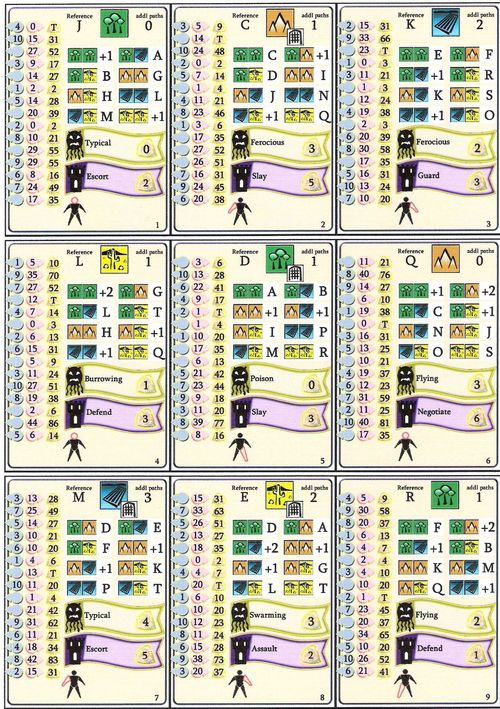
Before you start, you should familiarize yourself with the Event Cards. There's a lot of information on them, and they are used for determining many things. At this point, a lot of the way the game handles things won't make much sense until you read the rules, but this is a generalized overview of each part of the card, so when you do get to the rules, you'll have a good idea where to look.
- Letter Reference Code: used to determine references to names for Kingdoms on your map and for Creatures that you battle.
- Terrain Type: used to determine the types of terrain in a given Kingdom when creating a Kingdom. The Terrain Type Icon can also include a subset Dungeon Icon which will indicate when a new Dungeon appears on the map.
- Additional Paths Amount: used to determine how many paths extend out to other Kingdoms when creating a new Kingdom.
- Event Data: used to determine what type of Events happen, based on the types of Terrain the Kingdom has in which you currently are in.
The data in the Creature Banner is used for creating new Creatures.
The data in the Quest Banner is used for creating new Quest.
The Body Damage Indicator will display what part of your body has been severely damaged when you area Knocked Out during a battle.
The Level Indictors are used to determine values for yourself and your opponents in Battle by using them in conjunction with the Battle Strength Indicators.
Additionally, the Level Indictors are used to determine values for collecting Loot when defeating Creatures in Battle and completing Quest, by using them in conjunction with the Loot Indicators.
To Get Started
Shuffle the Event cards and place them face down as a draw pile. Cards drawn from this deck are placed face up in a neighboring discard pile. Much like any other card game, when the draw deck runs out of cards, shuffle the discard stack and place face down to create a new draw deck.
Your Character
You will need one sheet of paper for your character. On your Character Sheet, you will need to record these elements, so provide space for them:
- Level
- Maximum Hit Points
- Hit Points
- Gold
- A rough drawing of a body that matches the Body Damage Indicator on the Event cards, to track damaged limbs.
- Item worn on HEAD
- Item in RIGHT HAND
- Item in LEFT HAND
- Item on BODY
- Item on BELT
- Inventory (things otherwise not being worn or carried, but that you have collected)
- A place to keep track of acquired Battle Actions
- An area for keeping track of Quests (which may be on a separate piece of paper)
Your character starts at Level 2. Yes, at level 2. Maximum HP and HP both start at 60. Gold is 0. You start with a single Battle Action: Run Away! (see Performing a Battle and Battle Action Details), so fill that in on the Battle Actions section. And the rest of the fill-in-the-blanks are left blank.
Your Creature List
On one sheet of paper, create a vertical list of letters, A through T. These will be the Creatures that you will battle throughout the game. Each Creature will be referenced by its letter on this chart. Aside from the column of letters, you will need these additional columns: Type, Name, +1 Terrain, -1 Terrain, Base Level, Loot, and Horde Size. Or use the handy-dandy Creature List found in the Player Aids document at the same website where this rules sheet was found.
Your Map
The entirety of the map is called the World. Your World will be made of various Kingdoms that are created as you need them. You can have up to 20 Kingdoms in a World, each starting with a unique letter of the alphabet, A through T.
The first thing you will need to do is draw your starting Kingdom.
Creating a starting Kingdom is very similar to Creating a Kingdom described later (which you may want to look at first).
Draw the border of a single Kingdom. The border can be of any shape and size, just remember that you may be having up to 20 of them on your map, so plan accordingly.
Name the Kingdom and write down its name within its border. As you explore the World and discover new Kingdoms, each new Kingdom will have to be given a name. The only restriction to this is that each name can only start with a particular letter once, A through T. So, if you decide to name this starting Kingdom with the name of "Alyndale," you cannot name any other Kingdom with a name starting with the letter A.
As with the Creature List, the letters A-T are used as a reference guide. So, in general, it is best to create Kingdoms in alphabetical order as you need them. But there will be events that break this rules as you will see later.
Draw 4 PATHS (dotted lines) that extend out to the Kingdom's border.
Draw an Event card and look at the LAND ICON at the top of the card. Draw 2 of these icons in your Kingdom. Place this card face up on the discard pile. In the starting Kingdom example below, the Event card drawn had a Land Icon of "Forests."
(Generally, each Event card drawn will be used for one particular action, and then discarded.)
Draw a VILLAGE (looks a like a little house) with the number 1 on it. This indicates that Village is a Level 1 village. See Settlement Actions for more details about types of Settlements.
So now, the map of your World should look something like the example to the left.
Finally, place your token on your starting Kingdom. You are all set to wander, explore, and beat up random semi-helpless Creatures.
Being Knocked Out (and the Ways the Game Can End)
I will start with this concept first. There are two ways from the game to end. You can decide to retire (see Retire below), at which point your score is based on the value of your Keep.
Or you could die.
Death can be hard to come by. First, if at any point in the game your Hit Points drop below zero, you are considered to be Knocked Out. When you are Knocked Out, draw and Event card and look at the Body Damage Indicator. If the Head is marked as red, then yes, you are dead. Game Over, man!
However, if an arm or leg is marked things can get a little tricky. Mark the corresponding body part on your player sheet as being damaged. Move to the closest Temple or Village Kingdom to where you are. (in case of a tie, you choose). You are resuscitated there by the kind locals (regardless of their displeasure), you can bring your Hit Points back up to half of your current Maximum Hit Points. Also, in the case of an arm, any magical item that the damaged arm was holding is destroyed.
Damaged arms cannot carry any Magical Items. If you have 2 damaged limbs (MetalManced limbs do not count as being damaged, see below), you are forced to retire.
However, if the Village or Temple has an Anvil icon next to it, welcome to the world of becoming a human/magical armor hybrid! The MetalMancer in that Village/Temple will attempt to replace your damaged limb with a limb composed of magical armor. To determine how the surgery went, draw a new Event card for every MetalManced limb you currently have. If any of these cards show a damaged head as the Body Damage Indicator, you did not survive the surgery, and you are dead.
Otherwise, good news, you survived the surgery! The MetalMancer has successfully replaced your limb a magical armored limb, with a level strength equal to the value of the Anvil. Your MetalManced limb is now treated as an overreaching magical item, in that its level is added to all Battle Strengths for you. Your MetalManced limb cannot be cursed, however, it also cannot carry a magical item.
MetalManced limbs do not count as a damaged limbs. They can still be destroyed by the Knocked Out body part check, and thereby replaced with a new MetalManced limb.
On a Turn
A turn consists of a few actions, which are done in the order as shown below, most of which are optional:
- Optional - Move to a new Kingdom along a connecting path. See MOVE.
- ALWAYS! - Draw an Event card, and check for Dungeon updates. See CHECK FOR A NEW DUNGEON.
- ALWAYS! - Using the same Event card, now check for an Event. See CHECK FOR AN EVENT.
- ALWAYS! - Deal with Unhappy Kingdoms and choose to Enter Dungeons (if available). See DEAL WITH UNHAPPY KINGDOMS and ENTERING DUNGEONS.
- Depending... - Perform actions based of active Quests. See FUN STUFF ABOUT QUESTS.
- Optional - Perform actions based on Settlements in current Kingdom. See SETTLEMENT ACTIONS.
- Optional - Retire. See RETIRE.
- Optional - Build your Keep. See BUILD YOUR KEEP.
Move
Moving is simply moving on a path from your current Kingdom to a neighboring Kingdom. You do not have to move if you wish to stay in your current location.
If the path leads to a Kingdom that has not been created yet, you will need to make one before you finish your move. See Create A Kingdom.
Check for a New Dungeon
Draw the top card from the top of the Event deck. This card will be used to check for the appearance of anew dungeon in the world, and for possible events.
In the case of a Dungeon check, look at the Land Icon at the top of the card. If there is a subset icon of a grey Dungeon Icon, then check the Kingdom you are currently in. If at least one of the land types of the Kingdom you are in matches the Land Icon on the card, then a Dungeon has appeared in this Kingdom. Draw a Dungeon Icon in your current Kingdom, and give it a value equal to your current level plus 1.
Additionally, add +1 to the value of up to 3 other Dungeons that currently exist in your world. If you have less than three Dungeons, than just add +1 to any others that you have (do not add any to the newly created Dungeon).
Kingdoms may have multiple Dungeons.
Check for an Event
Draw the top card from the deck and look at the "Event Grid" on the right side of the card. Compare the two land types of the Kingdom where you are currently at with the two land types in each box in the Event grid. If BOTH land types match, then the listed event that is directly to the right of those land types on the card occurs in that box. The "listed event" can be:
- A Letter: If the event is a letter, you are having a Creature encounter, which means you are having a Battle (as described later). If the Creature that is being referenced by this letter has not been defined yet in your Creature List, you will need to create it (See Creature Creation below).
- +1 Or +2: If the event shows a +1 or a +2, then you can Improve a Settlement (as described below).
If the Event Grid does not have a set of Land Types that match your current location, then no event happens.
Improve a Settlement
To improve a Settlement, you can do either of the following:
- Increment the level value of any Settlement in the World by 1. Or Increment the level value of any MetalMancer by 1. The MetalMancer can have a larger level than the Temple or Village he lives in.
- Build a new Level 1 Settlement in any Kingdom that does not currently have a Settlement or your Keep. See Settlement Actions for more details on the types of Settlements.
- Build a new MetalMancer lab in any Kingdom with either a Village or Temple. Draw the lab as an Anvil, with a starting value of 1. MetalMancers are magicians who work in the questionably dark art of combining magic metals with flesh. They are more than happy to attempt their experiments for free on unsuspecting heroes who are knocked unconscious and therefore have no ability to have a say in the matter.
If you have a +2 improvement, you may do any of the actions described above twice, or divide your actions up any way you see fit across the different actions.
When drawing a new Settlement, keep in mind that you will also need some space to keep track of the Settlement's displeasure (two additional icons) with you.
Settlement Displeasure
All settlements will have a "displeasure" rating of how they feel about you. All settlements will be indifferent to you to begin with. Their displeasure with you is based on how many unhappy faces are drawn in their kingdom. (See Deal With Unhappy Kingdoms later on).
Generally, Settlements can get displeased with you by failing Quests (or making certain decisions during Quests), or by letting Dungeons in their Kingdom grow and fester. You are, after all, a hero and you are expected to do public service kind of things.
Conversely, you can remove displeasure from Settlements by completing Quests, defeating creatures during creature encounters, and valiantly entering Dungeons. That's the spirit!
Creature Creation
It takes only a few actions to create a new Creature for your World. When creating a Creature you are filling-in-the-blanks of the row of a selected letter reference that has not been filled in yet.
Draw an Event card and look for the Type listed the Yellow Monster Banner. This indicates the Type of the Creature you are creating. Write this Creature Type in the appropriate space on your Creature List. Types determine different rules modifications that the Creature makes to the basic rules. At the end of the rules is a page that describes all of the details about Creature Types; what they are and what rules modifications you will need to make for each type. In fact, it might be a good idea to get familiar with them now.
Next, give your Creature a Name, and place it under the Creature Name heading. "Dragon," "Dwarf," or "Foaming Pig" could all work, but you may have to be mindful of the Creature Type that is already assigned to that letter.
Next you will have to determine the Creature's Terrain Bonuses and Negatives. Draw an Event card for each, and write down the type of Terrain shown on each card.
The Creature's Base Level is determined by your current Level minus 1. So, as long as you are currently at Level 2, then any new Creatures are created at Level 1.
To determine the Loot value of the Creature, draw an Event card and look at the number "gold rock" icon in the Yellow Monster Banner. Fill this number in on the Creature List under the Loot heading.
Since this is the first time you are encountering this Creature, put a single tic mark in the Horde Size column. The Horde Size determines how many Creatures are in the party that you are battling with during a Battle. This number increases with every encounter of a particular Creature.
Settlement Actions
If you are in a Kingdom with a Settlement, you can perform one Settlement Action per turn based on that Settlement type, if the Settlement has less than 2 unhappy faces associated with it (see Settlement Displeasure above, Fun Stuff About Quests below).
Settlements come in three types, Villages, Castles, and Temples. There can only be one Settlement per Kingdom.
Settlements have their own Level ratings which can be improved throughout the game when drawing a +1 or +2 Event during the Event phase.
Village
If you are in a Kingdom with a Village, you may REST to reclaim Hit Points back up to your maximum HP amount, this is accomplished by spending a certain amount of gold from your inventory (deducting it from your current Gold amount).
The cost to do this is based on the formula below:
Paid X Gold * Level of Village = HP Gain.
You may do this as many times as you wish during a single turn. You cannot exceed your Max HP value.
Example: You may pay 10 Gold at a level 2 Village to gain 20 HP.
You may also SELL a Magical Item at a Village (See Magical Items later). Remove the item from your Inventory (or your body) when you sell it. You gain gold based on the formula below:
Gold = 10 * (the +X value of magic of item) * (Level of Village)
The "+X value of magic of item" is essentially the level of the magic item.
Example: Selling a +3 Hammer of Undead at a level 2 Village gains you 60 gold. (60 = 10 * 3 *2).
Temple
If you are in a Kingdom with a Temple, you may STUDY, which increases your Level by 1. There are some restrictions to this:
You can only advance your Level by +1 per turn.
Advancing to a new Level increases your Maximum Hit Points by 10 times your new Level.
A Temple can only advance your Level as high as the Temple's Level. The cost to do this deducting an amount of gold from your character that is equal to 10 time your target Level (the target Level being the desired new Level you are studying towards).
Example: To increase your Level from 2 to 3, you must be in a Kingdom with a Temple that has a Level of at least 3, and pay 30 gold (10 * level 3).
By doing a STUDY action you also "refresh" your Battle Actions. Battle Actions, when used, cannot be used again until your "level up." So, all of your acquired Battle Actions are refreshed and ready for use again. Battle Actions are special abilities you can play during a Battle. Generally, once used, they become inactive and you cannot use them again until you STUDY UP to the next Level (See Battle Actions in the Battle section later on).
As a further reward for studying, you gain a new Battle Action. Each Battle Action has a list of numbers known as "Study Numbers." You can add a new Battle Action to your arsenal of actions by selecting one of these Study Numbers, and referencing that as your new Battle Action.
Example: At the beginning of the game, you start with the Battle Action known as Run Away! Run Away has Study Numbers of 2 and 8. The first time you advance to a new level, you can add either Battle Action 2 (Stand Your Ground) or Battle Action 8 (Time Twister) to your list of actions.
The next time you advance a level, you can now use the Study Numbers on both Run Away! And the action you selected.
Castle
If you are in a Kingdom with a Castle, Quests may or may not be thrust upon you, or you may request a Quest, depending on how displeased the King in that Kingdom is with you. These are some basic requirements about the interaction of Quests and Castles (also see Fun Stuff About Quests below).
Kings in their Castles will have a "displeasure" rating of how they feel about you. Like all Settlements, Castles with be indifferent to begin with. However, they can also be "mildly displeased" or "severely displeased" with you. This is done by drawing "Unhappy Faces" near the Castle. A King who is mildly displeased with you will only have 1 unhappy face near his Castle, and severely displeased King will have 2. (Kings are never, ever "pleased").
Displeasure with Kings is determined through various results of Quests, how they are offered to you (if you should accept them), and how you completed them. Types of Quests below describe in detail how unhappy faces are earned.
The first rule of Quests is this: You can only be on 1 Quest at a time for any particular Castle. If you have not fulfilled your duties for a Quest for a particular Castle, you cannot get a second one to start. Other than that, the rules below apply based on the displeasure of the King in your current Kingdom.
-
If the King is indifferent (no unhappy faces), you may request a Quest, if you wish. If so, follow the directions as described in the section below titled Gaining a Quests.
-
If the King is mildly displeased, he will demand you go on a Quest to regain his indifference with you. See Gaining a Quest for details.
-
If the King is severely displeased, he will have no interactions with you whatsoever, and instead have his Royal Guardsmen out and about searching for you. See A Failed Quest for details.
As a side note, you can ask for another Quest on the same turn that you have completed a Quest for a particular Castle; finishing a Quest is a "Perform Quest Action," which occurs before "Perform Settlement Action."
Fun Stuff About Quests
Throughout the game, you will hopefully be performing mighty Wanderer duties by going on Quests, which are obtained at Castle Settlements. These are things such as escorting a princess to another Kingdom (preferably, without her getting killed), slaying a particular Creature in a particular Kingdom, or negotiating a contract between two Kingdoms.
Gaining a Quest
A Quest has a bunch of data that needs to be written down. Or use the handy dandy Quest Tracking Sheet as provided at the same website where you downloaded this set of rules. You may want to review the Quest Types as described later on at this point, because each Quest type is slightly different and may require a different amount of information. But in general, this is the overall list of things you need to do when setting up a Quest. Quest data on the Event cards are shown in the Castle Banner.
- A Quest has a HOME, which is the Kingdom that you are currently in. Most Quests require you to go off, do something, and then return to it's home. So write down the Kingdom you are in.
- A Quest has a LEVEL, which is the level rating of the Castle. Write that down.
- Draw an Event card, and look at the Quest type next to the Castle Icon. Each different type has different actions to do. Write this down.
- Draw another Event card. Look at the Letter Reference to determine what Region you must travel to (if any, as described by the Quest type drawn). Write this down as your destination. If this destination Kingdom has not been created yet, you must create it anywhere in the World, as long as it conforms to the standard Kingdom Creation rules as if you were moving to a new Kingdom (see Create a Kingdom).
- When adding a new Kingdom to the World for the purposes of a Quest, you may build a free Level 1 Castle or Village in it (no Temples).
Depending on the Quest, you may have to draw another card to determine an Alternate Destination.
- Finally, draw another card to determine how much Loot the king will give you if you succeed on your daunting task. Look at the number in the Castle Banner. Multiply this number by the Quest Level, and write down the resulting number as the Quest Loot value.
- If you draw a T, then the King is going to grant you some useful magical item upon Quest Completion. Write down T as your Quest Loot.
Finishing a Quest
When you have finished the required goals of a Quest, you need to get paid of by the King which sent you on your daunting mission. Getting paid off is not an action, and it occurs automatically when you are in the Kingdom with the Castle that triggered the Quest, as long as you have completed it.
Basically, you collect Loot equal to the Loot number for the given Quest, and multiply that number by level number of the Quest. See Collecting Loot (later in this document).
If the Quest's Loot is T type, then you can create a magical item at the level of the Quest. See Creating Magical Items (somewhere below).
Finishing a Quest successfully for a King is a good thing, and erases all unhappy faces associated with that Castle. The King is now just indifferent to you.
A Failed Quest
In some cases, you may put off doing the Quest as long as you like. In these cases, the only detriment to not performing the Quest is that you've locked out a Castle for future Quests.
However, in some cases, refusing to perform the Quest, or not finishing it in time will result in a Failed Quest. The Quest is considered to be finished, but you do not receive any Loot. In fact, the King is pretty mad at you!
If you have failed a Quest, draw an unhappy face near the Castle.
Specific Quest Types
This describes the various differences between the different Quest types, and what you need to do to perform them.
Note that in the cases of Quests that involve battling Creatures, the term "Creature" does not indicate a single "unit" of the Creature, but instead the amount derived from its Horde Size value, as if it were a normal Battle.
DEFEND - The castle is under attack! The King wishes your help in defense from the attacking Creature. Draw a new Event card, and look up the Letter Reference code for the Creature that is attacking. If this Creature doesn't exist yet you must create it now (See Creature Creation). You do not draw a card for a destination. You still draw for Loot amount for this Quest.
You may refuse to defend the Castle, but the Castle immediately gets 1 Unhappy Face, and you immediately move to a neighboring Kingdom along any connecting path of your choice. Also, the Castle loses a Level. If the Castle is reduced to 0, the Castle is erased from the World.
If you decide to honor the King's request, perform a Battle as normal against the Creature.
If you successfully kill the Creature (or horde of Creatures), you still gain the Loot from the Creature as if it was a regular Creature encounter, plus the King's Loot amount for the Defend Quest. Also, successfully defending the Castle erases a single Unhappy Face from that Castle.
SLAY - A terrible Creature is blocking trade routes in the World, and you have been requested to stop it. After drawing the Destination for the Quest, draw a new card, and use the Reference Letter to determine which Creature that you have been appointed to slay in that destination. Make a note of this. If the Creature has not been defined yet create the Creature (see Creature Creation).
If you accept this Quest and the Destination does not have a Settlement, add one of your choosing, with a Level of your current Level minus 1.
You may refuse this Quest for a single unhappy face. Also, the Creature damages the any Settlement in the Destination Kingdom, and reduces the Settlement's Level by 1. Again, if this reduces the Settlement to 0, erase the Settlement from the World.
The goal of this Quest is to go to the Destination Kingdom, and after performing the standard Event check and actions, you then Battle the Creature as listed in the Quest. The rules for battling a Quest Creature are the same as if it was a regular Event Creature Encounter (see Battle).
Defeating the Creature in the destination Kingdom removes all unhappy faces on the Settlement in that Kingdom, if any.
After defeating the Creature, return to the home of the Quest and claim your Loot as your reward.
ESCORT - You have been asked to escort the King's daughter to another Kingdom to be married. Quite the honor!
You may refuse this Quest without penalty.
In this case, you will need to draw 2 Destination locations instead of one. The first Destination is the Kingdom that the King would like you to take the Princess. The second Destination is the Kingdom of the King's Arch-Enemy, who would like nothing else than to get their hands on the King's daughter!
If one or both of these Kingdoms don't exist yet on your map, please create them (see Creating a Kingdom). Each Destination also needs a Settlement for the Princess to be taken to; if a Destination does not have a Settlement in it, you may choose to add either a level 1 Castle or level 1 Village to the destination Kingdom.
The princess who you are escorting can take damage. She starts off with half of your current Hit Point total.
If you take any damage during the Escort, you may apply it to her instead. Sweet Princess Shield! Every time you do this lowers the value of the Quest's Loot by one. However, if she dies, the Home Castle gets two Unhappy Faces, and the Destination Settlement gets one Unhappy Face.
You may move through each of the Destination Kingdoms without "delivering the package". In the case of an Escort, you get paid off at the Destination of your choosing. Feel free to erase all unhappy faces at the Settlement you delivered the Princess to.
If you hand over the Princess at the King's desired Destination, your Quest is complete. See Collecting Loot. In this case, you may also remove an unhappy face at both the Home and Destination Castles.
If you hand over the Princess to the Enemy Destination, draw a new Event card, and multiply the number in the Castle banner by the Loot value of the Quest (In this case, a T counts as "10" for the multiplication.). See Collecting Loot. Remove all Unhappy Faces from the Enemy Destination. The enemy King is most pleased.
However, the King at the Home Kingdom is not! This Castle gets 2 Unhappy Faces.
RETURN - A relative of a member of the King's Court is dying. Unfortunately, that court member is off on important King's business. You must go and send word, and bring him back to the Kingdom.
You may refuse this Quest and gain one Unhappy Face at the Castle.
Once you get to the Destination, you "pick up" the court member, who has Hit Point equal to half your current amount. You may apply damage to the Court Member instead of your self. Every time you apply damage to the Court Member, reduce the value of the Quest's Loot by one.
Picking up the court member removes one Unhappy Face from the Destination Settlement.
A dead Court Member gains one Unhappy Face at the Home Castle. A living delivered Court Member erases one Unhappy Face.
NEGOTIATE - You have been asked to negotiate a treaty between this King and the ruler of another Kingdom.
You may refuse this Quest without penalty.
When you arrive at the Destination, draw an Event card and determine your Negotiation skill as if it were a Battle based on your Level. Then do the same for the Settlement's Level you are negotiating with. If your battle/negotiation value is equal to or higher than the Settlement's, congratulations, you have struck a deal. Go back to the Home of the Quest and collect your Loot (see Collecting Loot).
If you failed the negotiation check, the Destination has counter-offered. Go back to the Quest's Home, and perform the same negotiation check against the Home Castle's Level.
Again, if your value is equal to or higher than the Castle's, you have completed your Quest. Otherwise, it's back on the road again to the Destination for another Negotiation.
Completing a Negotiation removes all Unhappy Faces from both Settlements.
GUARD - You have been assigned to escort a dangerous villain to the World Prison.
You may refuse this Quest without penalty.
If the Kingdom where the Prison has not been defined yet, draw an Event Card and use the Reference Letter to draw a Prison Icon in that Kingdom. If the Kingdom does not exist yet, you will have to create it.
The Prison is not a Settlement. You may build a Settlement, or your Keep in the Kingdom with the Prison.
You will have to create a Villain! Give him a name, and a level that is one less than your current level. The villain is not a Creature, in the sense that he is listed on your Creature sheet! Keep track of him on the Quest sheet.
On every turn that you are escorting the Villain, you will need to perform a single Battle Sequence with him. The Villain does not die, but he can damage you. So if your BS is greater than his, nothing happens; otherwise, subtract you BS from his BS and deduct this amount from your HP.
Deliver the Villain to the Prison to collect the Quest's Loot at the Prison's Kingdom. Add a tic mark near the Prison to indicate how many Villains you have delivered to the Prison. Not that this has any bearing on the game, it's just interesting to see how many prisoner's fill up the Prison.
However, you may let the Villain go. If you choose to let him go, he will offer you Loot equal to the Quest's Loot amount times the Villain's Desperation. To determine the Villain's Desperation, subtract the amount of Kingdoms away you are from the Prison's Kingdom from the Villain's Level. The number of Kingdoms away from the prison is determined by the shortest path you can take. If the Villain's desperation is 0 or less, he does not offer you any money.
However, releasing a Villain to the wild will also add an unhappy face to the Home Castle.
Low level Villains will not be offering much loot, if any, to let them go.
Example: You are 3 Kingdoms away from the Kingdom that the Prison is in. The Villain's level is 4. So his Desperation is 1 (4 - 3).
ASSAULT - The King has had enough with another Kingdom!! Go forth and destroy a Settlement that the King decides.
Refusal of the request adds one unhappy face to this Castle. There is no time limit penalty.
If the Destination Kingdom does not include a Settlement, create one, at a level of your current level minus 1 in the Destination Kingdom.
When arriving at the Destination, Assaulting the Settlement follows similar rules as if you are battling a Creature during a Creature Encounter (see Performing a Battle).
When Assaulting a Settlement, consider the Settlement to be a Creature with a Level and Horde Size equal to the Settlement's Level.
Unlike a Creature, Settlements are not simply beaten in one fell swoop. After each Battle Phase, whether you have taken damage or not, reduce the Settlement's Level and Horde Size by one.
Once Settlement has been reduced to 0, erase it from the board.
Feel free to pillage the Settlement's remains, using the Settlement's starting Level value as its Loot value.
Check for Settlements in neighboring Kingdoms. All Settlements in neighboring Kingdoms that are of the same type as the one you just Assaulted gain one unhappy face.
Upon returning to the Kingdom that sent you on this dire Quest, collect your Loot.
Deal With Unhappy Kingdoms
Kingdoms will have various levels of displeasure with you, as denoted with unhappy faces. Depending on the type of settlement there, different things can happen based on their displeasure level.
First of all, if you decide to enter a Dungeon in any Kingdom with any amount of unhappy faces, feel free to erase all unhappy faces from that Kingdom. Dungeons are a pain to the locals, and getting rid of the creatures that they spawn is very helpful to their causes (see Entering Dungeons below).
If there is no Dungeon in this Kingdom, then one of the following things may happen:
Castle Kingdoms
If it is a Castle Kingdom, and you have only 1 unhappy face there, the king will AUTOMATICALLY give you a new Quest to regain your honor (see Gain a New Quest). Successfully completing this Quest will erase one unhappy face from this Castle, but you do not gain any loot from it.
Failing this new Quest, once again, adds an unhappy face to this Kingdom.
If you are in a Castle Kingdom with 2 or more unhappy faces, you must battle 3 Royal Guardsmen, each with the same level that you are currently at (see Battle below).
If you are victorious against the Royal Guard, you may then request a quest to restore your honor and remove a single unhappy face. Royal Guardsmen have no Loot.
Village Kingdoms
If you are in a Village, you must battle the Village Militia. The amount of Village Militia you must fight is equal to the amount of unhappy faces the Village has. The level of the Militia is 1 less your current level (see Battle below).
Regardless, you cannot do any special Village actions at an unhappy Village.
Temple Kingdoms
If you are an unhappy Temple, you may attempt to defeat a Master to regain your honor, and erase all unhappy faces from the Temple Kingdom.
The Master's level is equal to your current level plus the amount of Unhappy Faces the Kingdom currently has. Defeating the Master removes all unhappy faces from the Temple.
You cannot perform any special Temple actions at an unhappy Temple.
Entering Dungeons
If you are in a Kingdom with a Dungeon, you may enter it, in the hopes of defeating all the creatures within.
When you first enter the Dungeon, erase all unhappy faces that may, or may not be in that Kingdom.
Entering a Dungeon is simply completing a series of Battles. The series of Battles that you must complete (before dying) is the value of the Dungeon. For Each Battle, you will need to draw a new card to determine what creature you are encountering. Use the reference letter to determine that creature. You may need to create a Creature (see Creature Creation), with a Horde Size of 1, if the reference letter has drawn an empty letter.
Unlike a normal creature encounter, you DO NOT add to the creature's Horde Size when encountering it in the dungeon. Additionally, all Loot earned in the Dungeon is multiplied by 2. If you are awarded a Magical Item, add +2 to its level.
If you "run the gauntlet" and defeat all of the creatures, erase the Dungeon. If you are Knocked Out (see Knocked Out above) in the Dungeon, you may subtract from the Dungeon level the amount of Creatures you defeated.
Choosing to Not Enter a Dungeon
If you choose to NOT enter a Dungeon in your current Kingdom, and there is a Setttlement in the Kingdom. Add one unhappy face for every dungeon that exists in the Kingdom.
Monks, villagers, and kings don't like it when heroes pass through without getting rid of the frequent bands of creatures that bother them, who are based in the dungeons.
Creating a Kingdom
Especially at the start of the game, you will be creating Kingdoms "on the fly" as you need them as the game progresses. This is the process on how to do it!
When you need to create a new Kingdom, you need to draw a new border area. You need to draw it in such a way that it can be built off an existing path from a previously existing Kingdom. Finally, continue the path into that Kingdom.
First, give the new Kingdom a name. Remember, each Kingdom name needs to start with a unique letter, A through T. Once you have used up all of those letters, you are not allowed to create any new Kingdoms. All unused paths simple fade into the sea. Or something.
Next, draw an Event card and look at the "additional paths" area in the upper right of the card. This tells you how many additional paths out of the new Kingdom you can draw. Go ahead and draw those paths now.
Finally, draw two more Event cards to get the Land Types of this new Kingdom, and draw those on the Kingdom.
In some cases, when getting information about additional paths, you will find that previously drawn paths will "dead end". These will need to be crossed out.
EXAMPLE: In the example to the left here, after drawing the Kingdom for Caldwilly, the player drew an additional path amount of 0. The path from Alyndale that would naturally lead to Caldwilly is now forever blocked.
Performing a Battle
A battle is typically how a conflict or encounter is resolved. The term "opponent" is used generically, and can be used to cover a single Creature, multiple Creatures, or attacking a Settlement, or whatever. A battle consists of a short sequence of events where you will be comparing the Battle Strength (BS) of your character versus the Battle Strength of your opponent. Additionally, there are a few other optional phases where you can perform a Battle Action.
However, you may only perform 1 Early Battle Action and 1 Late Battle Action once per an entire Battle.
A typical Battle sequence is as follows:
- Perform an Early Battle Action (optional)
- Obtain your BS
- Obtain the BS of your opponent
- Perform a Late Battle Action (optional)
- Compare and resolve your BS and your opponent's BS
- Repeat the Battle Sequence if the Battle is not over
A Battle is over when:
- You have a greater or equal BS than your opponents.
- When you have reduced the amount of Creatures in the opponent's party down to zero.
- Your Hit Points drop to 0 or below, in which case, you are dead.
Determining Battle Strength
The action to determine the base BS or either yourself, or your opponent, is fairly straight forward. It involves drawing a new card and placing it face up on top of the discard pile slightly askew in such a way that the blue arrows on the top card visibly point to a value in a pink arrow on the bottom card.
Based on the Level of the participant that you are trying to obtain the base BS for, find the Level number in the blue arrow, and reference the number in the pink arrow that the blue arrow is pointing to.
So, in the example image above, you are at Level 4. To determine your base BS, you draw a card, and place it on the discard pile. Looking for the blue arrow with the 4 in it, you see what the number in the pink arrow is. In this case, your base BS is 16.
Most of the time, you will be obtaining a base BS of your opponent immediately followed by your BS; so you can stack multiple cards on top of each other with enough of an offset to see both numbers.
In the case of being in Battles with Creatures (which will be most of the time), You will need to adjust the Creature's Level based on the Terrain in your current Kingdom. If the Terrain exists in the current Kingdom that is listed as the Creatures +1 Terrain, then add one to the Creature's Base Level. Conversely, if the Terrain exists in the current Kingdom that is listed as the Creatures -1 Terrain, then subtract 1 from the Creatures Base Level.
Creature Terrain modifiers are cumulative, so if you are in a really woody Kingdom (where both Terrain icons are Forest), then a Creature who has a modifier based on Forest adds or subtracts 2 from its Base Level appropriately.
Creature Levels can never go below 1, and they can never go over 10.
In the case to the left, you quickly obtain the base BS of your Level 5 opponent, which turns out to be 24.
An opponent's base BS is then multiplied by the current size of remaining Creatures that is in its Horde Size. This will be explained better further down in the document.
BS value can be modified by various things. For example, various Battle Actions that you may decide to take will alter your (or your opponent's) BS. Additionally, the Creature's Type may adjust a BS value accordingly.
Early and Late Battle Actions
Battle Actions are special abilities that you "learn" as you increase in Levels. Unless otherwise noted, you can only use any single Battle Action once per character level. When you advance a level, the Battle Action is "recharged" and you can use it again. You will need to see the Battle Action Details section for details on how each Battle Action works.
While a Battle may incorporate may repeated rounds of the Battle Sequence, you may only trigger an Early Battle Action once per full Battle. Also, you may only trigger a Late Battle Action once per full Battle.
Detailed Battle Sequence
Increase Horde Size
The VERY FIRST THING YOU DO even before a Battle starts is increase the Horde Size of the Creature you are battling by +1 on the Creature List. The first time you encounter the Creature, there is only one; the second time you run into it, there are two of them, and so on.
So, during this Battle you will be fighting XX amount of the given Creature, based on it's Horde Size. As you Battle, you will be reducing the Horde size of the Creatures in Battle. However, this does not mean you are reducing the numbers on the Creature List, you are reducing the size of the "party" that is currently attacking you. As the game progresses, Creatures that were created early on will attack in larger groups as you keep encountering them throughout the game. While their basic stats do not change (individually, they do not grow more powerful), they grow in the number that they attack.
Early Battle Action
You may activate an Early Battle Action at this time, following the rules of that Battle Action. If you do this, you cannot activate another Early Battle Action for the remainder of this Battle.
Determine Your Battle Strength
Based on your Level, determine your base BS at this time as described above. Your base BS may be modified by an Early Battle Action, by a Creature Type modification, by a Magical Item you are currently carrying or wearing, or by MetalManced limbs (see Creating Magical Items below).
Determine Your Opponent's Battle Strength
Based on the Level of the Creature you are fighting, determine your opponent's base BS at this time as described above. Multiply your opponent's base BS by its' current Horde Size. This value may be adjusted due to a Creature Type modification or to an Early Battle Action.
Late Battle Action
You may activate a Late Battle Action at this time, following the rules of that Battle Action. If you do this, you cannot activate another Late Battle Action for the remainder of this Battle. All required BS adjustments that are required by the Battle Action are performed at this time.
Resolve Battle Strengths
Once the BS values are figured out, you simply compare the two numbers. If your BS is equal to or greater than the BS of the Creatures attacking you, you have won the battle! See Collecting Loot below.
If your BS is lower than the BS of the attacking party, subtract the DIFFERENCE between the two Battle Strengths from your HP. Now subtract 1 Creature from the attacking party. If you have beaten the attacking party down to zero members, then you have won the battle. See Collecting Loot below.
If Creatures remain in the attacking party, repeat the Battle sequence as described above.
Fee free to "corner up" the discard pile after every round of a Battle sequence.
Collecting Loot
Throughout your adventure, you will be collecting loot by being victorious in battles, and performing valiant quests for kings of your realm. In both cases, each has a Loot value.
Determining the base loot value is pretty similar to determining a Battle Strength. Simply draw another card, and line up this card with the top card on the discard pile in such a way that the blue "level" arrows line up next to the column of gold nuggets. Cross reference the Gold Value with the Level Number of the Creature Level or Quest Level to get the Base Gold Value.
Now, multiply this number with the Creature's Loot value to get the total amount of Gold pillaged from the dead Creatures(s).
In the case of winning a Creature Battle, take the total amount of Gold collected from the cards, and multiply that amount by the Horde Size of defeated Creatures.
If a T comes up, you have won a Magical Treasure, equal in Level to the Creature's Level (see Creating Magical Items).
In the case of gaining loot from completing a Quest, no further modifiers are done.
If a T comes up, you have won a Magical Treasure, equal in Level to the Quest's Level (see Creating Magical Items).
Creating Magical Items
Creating Magical items is pretty straightforward. A Magical item is defined something like this:
"+2 Hat of the Undead"
The +2 is typically defined by the level of the Quest. So if the Quest is a Level 2, the magical item will have the power of +2.
You will need to draw an Event card to determine the type of Magic the item is. Use the Creature Type directly below the Yellow Creature Banner. So, if you are wearing the Hat of the Undead, and you are battling an Undead Creature, your level is increased by 2 when doing Battle Strength checks.
The type of the item is defined by the player. However, careful note should be taken as to the kind of items you create. Things like Hats and Helmets can only be worn on the head, and you can only wear one thing at a time on your head. Each hand can only hold one thing, as can your body and belt.
Items that aren't being currently worn are kept in your inventory for selling later, but you do not gain the bonuses afforded to you by those items.
Build Your Keep
You may spend Gold in order to build your keep, making it more luxurious and impressive to the Kingdoms around you.
If you don't have a Keep yet, you must select a Kingdom with no Settlements on it, and Draw a Shield there. This is free to do, and put a 0 in the middle of it. So, your Keep currently has an Impressiveness rating of 0; that's ok, it's just a plot of land right now.
To add to the Impressiveness of your Keep, add up the Levels of all Castles in your World. The sum total of this amount is the amount of Gold you need to spend to increase your Keep's value by 1 (castles are competing for the same quarries and resources as your Keep supplies). Feel free to build on to you Keep as much as you can pay for.
Retire
You may quit your game and retire to your Keep when you are in the Region with your Keep. The total score for your game is the Impressiveness value of your Keep.
Battle Action Details
| # | Name | Type | Study Numbers | Rules |
|---|---|---|---|---|
| 1 | Run Away! | Early | 2, 8 | Opponent BS is reduced to half. The Battle is over after this Battle Sequence. Do not collect any treasure. |
| 2 | Stand Your Ground | Early | 3, 4, 6 | Ignore this Battle Sequence. Reduce your HP by half. Divide Horde Size by half. |
| 3 | Feint | Late | 4, 6 | You may recalculate the base BS for yourself or your Opponent by drawing a new card. |
| 4 | Dodge | Early | 5, 7 | Your base BS is 0. Opponent base BS is 1. |
| 5 | Sweeping Strike |
Turn and Phase Order
- Optional - Move to a new Kingdom along a connecting path. See MOVE.
- ALWAYS! - Draw an Event card, and check for Dungeon updates. See CHECK FOR A NEW DUNGEON.
- ALWAYS! - Using the same Event card, now check for an Event. See CHECK FOR AN EVENT.
- ALWAYS! - Deal with Unhappy Kingdoms and choose to Enter Dungeons (if available). See DEAL WITH UNHAPPY KINGDOMS and ENTERING DUNGEONS.
- Depending... - Perform actions based of active Quests. See FUN STUFF ABOUT QUESTS.
- Optional - Perform actions based on Settlements in current Kingdom. See SETTLEMENT ACTIONS.
- Optional - Retire. See RETIRE.
- Optional - Build your Keep. See BUILD YOUR KEEP.
Battle Sequence (Summary)
- Optional, once per Battle - Perform an Early Battle Action.
- ALWAYS! - Obtain your base Battle Strength.
- ALWAYS! - Obtain your opponent's base Battle Strength.
- Optional, once per Battle - Perform a Late Battle Action.
- ALWAYS! - Modify base Battle Stengths appropriately (based on Battle Action modifiers, opponent abilities, or magical items).
- ALWAYS! - Compare and resolve the Battle Strengths.
- Repeat Battle Sequence is Battle is not finished.
Creature Types
This is the list of various Creature Types, and how they affect the basic rules.
-
Undead - You are not allowed to use any Battle Actions against the Undead.
-
Flying - If the Opponent's Horde Size is greater than your level, you cannot use any Battle Actions in the first Battle Sequence, and you have a Base BS of 0 in the first Battle Sequence.
-
Burrowing - If you "defeat the Horde" (as if your BS is greater than the Opponent's BS, or you perform a Battle Action ends the Battle buy reducing more than 1 Creature from the Horde Size), you cut the Horde size down to half instead.
-
Ferocious - If the Opponent damages you in a Battle Sequence, you get additional damage equal to your Opponent's base BS.
Example: You have a BS of 12, your Opponent has a base BS of 5, but with a Horde Size of 4. Normally, the Opponent would do damage of 20-12, for 8. A Ferocious Opponent does an additional 5, for 13 damage.
-
Swarming - At the end of a Battle Sequence, deduct an addition 1 from the Horde Size of the Battle.
At the end of the complete Battle, add an additional tick mark to that Creature's Horde Size on the Creature List.
-
Poison - If Opponent does damage, multiply the damage by 2. The Battle then ends. No treasure is awarded.
-
Armored - Armored Creatures can never have a Horde Size greater than your current Level. Do not add a tick mark to the Creature List if the Creature's Horde Size is equal to your Level.
During the first Battle Sequence, an Armored Opponent deals no damage. You will still have to determine its' BS, however, to see if it has lost the battle.