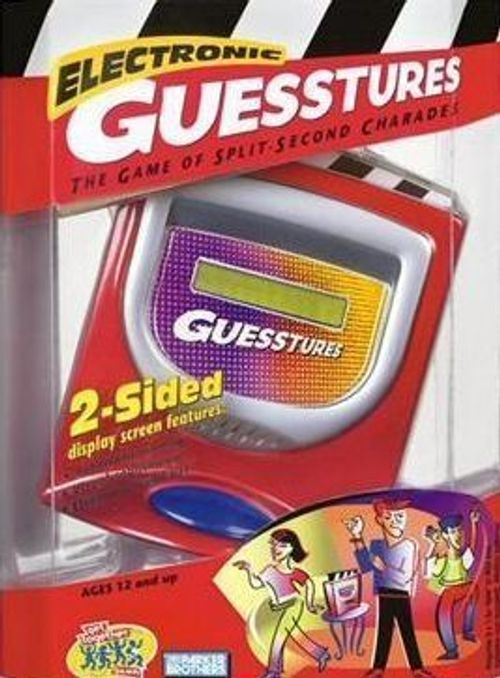
Electronic Guesstures
Electronic Guesstures Rulebook
Table of Contents
Table of Contents
A Look at Your Game
Your Electronic Guesstures game has a 2-sided game screen: one side is for the Acting player, and the other side is for the Guessing players.
Acting side
- Clapboard arm: The Actor presses the arm to start his or her turn; to see the score and the time remaining when a word is guessed; and to advance to the next word.
- Game screen: Shows each word to be acted out, the current score, and the time remaining.
- On/Off button: Press to turn the game on or off.
- Reset: Push in if the game malfunctions, and after changing the batteries.
Guessing side
- Game screen: Shows the score, the time remaining, and each word after it's guessed.
- Challenge button: Press at the end of the opposing team's turn to challenge a clue or word.
Inserting the Batteries
Requires 3 x 1.5V "AA" or LR6 size batteries. Alkaline batteries recommended. Phillips/cross head screwdriver (not included) needed to insert batteries.
To insert the batteries, loosen the screw on the battery compartment, located on the bottom of the game, and remove the door. Insert 3 "AA" size batteries, making sure to align the + and - symbols with the markings in the plastic. See Figure 1. Then replace the door, tighten the screw, and push in RESET.
CAUTION: TO AVOID BATTERY LEAKAGE
- Be sure to insert the batteries correctly and always follow the game and battery manufacturers' instructions; 2) Do not mix old and new batteries, or alkaline, standard (carbon-zinc), or rechargeable (nickel-cadmium) batteries; 3) Always remove weak or dead batteries from the product.
IMPORTANT BATTERY INFORMATION: Please retain this information for future reference. Batteries should be replaced by an adult.
CAUTION:
- Always follow the instructions carefully. Use only batteries specified and be sure to insert them correctly by matching the + and - polarity markings. 2) Do not mix old batteries and new batteries, or standard (carbon-zinc) with alkaline batteries. 3) Remove exhausted or dead batteries from the product. 4) Remove batteries if product is not to be played with for a long time. 5) Do not short-circuit the supply terminals. 6) Should this product cause, or be affected by, local electrical interference, move it away from other electrical equipment. Reset (pushing Reset, switching off and back on again or removing and re-inserting batteries) if necessary. 7) RECHARGEABLE BATTERIES: Do not mix these with any other types of battery. Always remove the product before recharging. Recharge batteries under adult supervision. DO NOT RECHARGE OTHER TYPES OF BATTERY.
Actors and Guessers, Get Ready to Play!
- Place the game on a flat surface. All players sit nearby, facing the Guessing side (the side with the large Challenge button).
- Divide yourselves into two teams: Team A and Team B. It's okay if the teams are uneven.
- Turn the game on by pressing the ON/OFF button. The game will welcome you and wait for you to begin playing. Team A takes the first turn.
On Your Team's Turn
Choose someone on your team to be the Actor. (The role of the actor alternates with each turn.) This player gets up and takes a seat facing the Acting side of the game (the game screen will say, THIS SIDE TO ACT CLUES). All other players remain on the Guessing side (the game screen will say, THIS SIDE TO GUESS). The players on the Actor's team will be the Guessers; the players on the opposing team will keep an eye and ear open for anything they may want to challenge (see Challenging on the next page.)
If you're the Actor, your goal is to get your teammates to guess as many words as possible before the 30-second timer runs out. Decide before you play whether or not word forms will be acceptable (for example, if "knitting" is an acceptable guess for the word "knit").
To start your turn, press the clapboard arm. Your team's current score and the time (30 seconds) will show on your screen. Then the clock will start ticking as the countdown (from 30 seconds to 0) begins.
The display shows SCORE 00 and TIME 30.
When a word appears on your screen, quickly act it out while your teammates shout out their guesses. (While you're acting, the Guessers' screen shows only the current score and the countdown.)
The display shows the word to act out, for example "YO-YO": HOW WOULD YOU ACT OUT "YO-YO"?
Rules for Giving Clues: Always follow these rules when acting out a word for your teammates:
- No talking or other sounds are allowed.
- Props or other "visual aids" are allowed. You may point to parts of the body, other people in the room, objects in the room, etc.
- Mouthing words is permissible only if the word is not the word being acted out. For example, you may mouth "help" while acting out "drowning."
- Feel free to use classic charades techniques (such as pulling your ear to indicate "sounds like . . ."). But remember, these techniques are time-consuming and may work against you!
As you act out the word, your teammates may shout out as many answers as they want. Listen closely! If you hear the word that you're acting out, quickly press the clapboard arm to score 1 point. Your current score and your time remaining will appear on your screen; the guessed word will appear on the Guessers' screen. The countdown continues!
Now you may decide either to let your time run out, or to press the clapboard arm again and act out another word. (See THE LAST WORD, in the box below.) If you decide to act out another word, quickly press the clapboard arm again, and begin acting out the next word that appears on the screen. You cannot skip words: your teammates must guess each word before you advance to the next one. Keep going acting out words until you decide to stop, or the buzzer sounds.
THE LAST WORD
Each time your teammates guess a word, you score 1 point. But here's the catch, and it's a really important one: if you're acting out a word when time runs out, you lose all of the points that you've scored for that turn! In order for you to keep your point(s), your screen must show your score and the time, not a word.
Whenever your teammates guess a word and you press the clapboard arm, check out the seconds remaining on the clock; then decide if you want to risk pressing the arm again to act out another word—or if you want to stop, keep the points you have, and let your time run out. Don't get greedy, or you may get nothing!
Ending Your Team's Turn
When the buzzer sounds, your time is up. The game screen will show the total score for each team.
- If you scored any points on your turn, the screen will say, CHALLENGE? The other team may now either challenge (see Challenging), or press the clapboard arm to begin their turn.
- If you didn't score any points on your turn, the screen will display the total score for each team, then prompt the other team to take their turn.
Challenging
When the buzzer sounds at the end of a turn, the opposing team has 15 seconds to press the Challenge button. The team may challenge if they think that the Actor broke an acting rule, or the Guessers did not guess a word correctly. If a challenge is successful, the challenged team loses all of their points for their turn. If not, neither team loses any points.
The display shows CHALLENGE?
After the Challenge button is pressed, both teams discuss and resolve the challenge. The display screen will say, DOES TEAM (A or B) LOSE THEIR POINTS? If the challenging team won the challenge, they press the Challenge button when the word YES appears. If the challenging team lost the challenge, they press the Challenge button when the word NO appears.
After a challenge, press the clapboard arm to begin the next team's turn.
How to Win
Keep playing until one of the teams reaches a total of 15 points or more when their turn is over and any challenges are resolved. That team is the winner! To play again, press the clapboard arm. Team B becomes Team A, and now gets to go first.
Done Playing for Now?
Press and hold the ON/OFF button to shut the game off; or just wait a couple of minutes, and the game will shut off automatically.