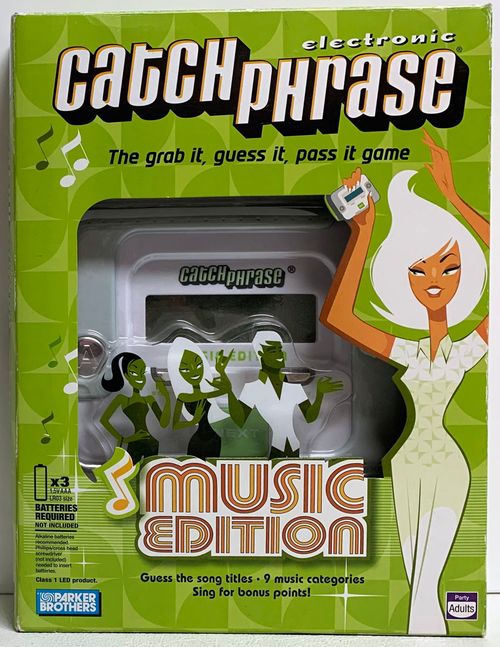
Electronic Catch Phrase: Music Edition
Electronic Catch Phrase: Music Edition Rulebook
Table of Contents
Table of Contents
Overview
Electronic Catch Phrase: Music Edition is for 4 or more adult players in teams.
Contents: Catch Phrase Music Edition Game Unit.
Game unit controls:
- Team A Score Button: press to enter a point for Team A.
- Team B Score Button: press to enter a point for Team B.
- Next Button: press to skip to the next song title.
- Start/Pause Button: press to power up the game, to start a new game, and to pause and resume a game. Press and hold to power down.
- Category Button: press to scroll through and select musical categories.
- Reset Button: located on the back of the unit.
Two Ways to Play
Before you start, decide which game you will play: the Classic game, which plays just like Catch Phrase, or the Singing game, which gives you bonus points for singing clues. (You can sing in the Classic game, but you don't earn bonus points for it.)
The Object
Be the first team to reach 7 points (in the Classic Game) or 15 points (in the Singing Game) by guessing song titles.
Getting Started
Insert the batteries (see Battery Information on back).
Players divide into two teams. It's best to alternate players so that each player sits next to a member of the other team.
Choose a team to start (that will be Team A), then choose a player on that team to go first. The first player takes the game unit.
To Start a New Game
-
Press START to power up the game.
-
Select the Classic or Singing game by pressing the A button or B button.
-
Choose a category (optional) by pressing the CATEGORY button to scroll through the options. Select from these categories:
- Pop Mix
- 70s
- 80s
- 90s
- 2000s
- Classic Rock
- Hip Hop/R&B
- Country
- Oldies
The default category is Pop Mix, which contains songs from all of the other categories. (These songs appear only in the Pop Mix category.)
A Round of Play
A game consists of several rounds of play. To begin a round, press START. The timer will start ticking and a song title and artist will appear on the screen. Now quickly try to get your teammates to guess the song title. See Clue-Giving Rules below.
Skipping: If you want to skip to another title, press NEXT.
As soon as your team guesses a song title, pass the game to the player on your left. This player presses NEXT to reveal the next song title, and quickly begins giving clues to their team. The round ends when time runs out and the buzzer sounds.
Stealing: If the last song title in the round was not guessed, the team not holding the game unit now gets a chance to steal. If they can guess the song title with no further clues, they'll earn 1 point.
Clue-Giving Rules
You can:
- Make gestures.
- Sing, hum, whistle, or recite song lyrics.
- Clue for words in a song title: for example, for "Bad Moon Rising" you could say, "Naughty Lunar Going Up."
- Clue for the artist if it will help your team guess the song title.
You can't:
- Say any part of a word on the screen.
- Say that a word rhymes with any word on the screen.
- Give the first letter of a word on the screen.
If you're caught committing a no-no, press PAUSE, then pass the game to the player on your left. This player scores 1 point (see Scoring) for his or her team as your penalty, then presses PAUSE and NEXT to continue the round.
Scoring
If you're holding the game when the buzzer sounds, pass the game to the other team (after that team has had a chance to steal). Each team then scores as follows:
- Classic game. Score 1 point for the team that was not holding the game when the buzzer sounded.
- Singing game. Score 1 point for the team that was not holding the game when the buzzer sounded. Then, for each team, score 1 bonus point for every time a player sang at least part of a clue. The bonus point applies only if the song title was guessed.
To enter a score, just press your team's button (A or B) once for each point.
Changing Categories
Before every round, the category light will come on. Now you may change the category if you wish.
How to Win
Keep playing until one team reaches 7 points (in the Classic game) or 15 points (in the Singing game). That team wins the game!
Done Playing?
Press and hold START to shut off your game. The game will automatically shut off if no buttons are pressed for three minutes.
Battery Information
Batteries required: 3 x 1.5V AAA or LR03 size. NOT INCLUDED. Alkaline batteries recommended. Phillips/cross head screwdriver (not included) needed to insert batteries.
Inserting the batteries: To insert the batteries, loosen the screw on the battery compartment, located on the underside of the console, and remove the door. Insert 3 AAA-size batteries (we recommend alkaline), making sure to align the + and – symbols with the markings in the plastic. Replace the door and tighten the screw.
Caution: to avoid battery leakage
- As with all small batteries, the batteries used with this game should be kept away from small children who still put things in their mouths. If they are swallowed, promptly see a doctor and have the doctor phone (202) 625-3333 collect. In other countries, have the doctor call your local poison control center.
- Make sure the batteries are inserted correctly and follow the game and battery manufacturer's instructions.
- Do not mix old and new batteries, or alkaline, standard (carbon-zinc) or rechargeable (nickel-cadmium) batteries.
Important: battery information. Please retain this information for future reference. Batteries should be replaced by an adult.
Caution:
- Always follow the instructions carefully. Use only batteries specified and be sure to insert them correctly by matching the + and – polarity markings.
- Do not mix old batteries and new batteries, or standard (carbon-zinc) with alkaline batteries.
- Remove exhausted or dead batteries from the product.
- Remove batteries if product is not to be played with for a long time.
- Do not short-circuit the supply terminals.
- Should this product cause, or be affected by, local electrical interference, move it away from other electrical equipment. Reset (switching off and back on again or removing and re-inserting batteries) if necessary.
- Rechargeable batteries: do not mix these with any other types of battery. Always remove from the product before recharging. Recharge batteries under adult supervision. Do not recharge other types of battery.
- As with all small items, these batteries should be kept away from children. If swallowed, seek medical attention immediately.
FCC Statement
This equipment has been tested and found to comply with the limits for a Class B digital device, pursuant to part 15 of the FCC Rules. These limits are designed to provide reasonable protection against harmful interference in a residential installation. This equipment generates, uses, and can radiate radio frequency energy and, if not installed and used in accordance with the instructions, may cause harmful interference to radio communications. However, there is no guarantee that interference will not occur in a particular installation. If this equipment does cause harmful interference to radio or television reception, which can be determined by turning the equipment off and on, the user is encouraged to try to correct the interference by one or more of the following measures:
- Reorient or relocate the receiving antenna.
- Increase the separation between the equipment and receiver.
- Consult the dealer or an experienced radio/TV technician for help.