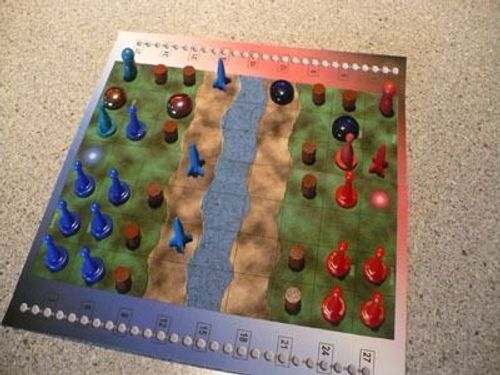
Castle Danger
Castle Danger Rulebook
Table of Contents
Table of Contents
Contents
- 1 Game Board
- 20 Wall Pieces to share (black "sticks")
- 2 Sets of Player Pieces (each in red & blue):
- 1 King Pawn
- 8 Wizard Tokens
- 3 Builder Tokens
- 5 Cannon Tokens
- 5 Cannon "Fired" Tokens
- 5 glass stone Fire Markers
- 1 Moves Tracker (red or blue "stick")
One-Time Token Setup: When the game first arrives, the stickers for the tokens will be on separate sticker sheets. (They might be hiding under the tray.) Put each sticker onto a token of the matching color.
Overview & Objective
Castle Danger is a classic-style abstract strategy game, with one player playing as blue and the other as red, each setup on his own side of the board. Players take turns back-and-forth until one player's King is eliminated.
Getting Ready to Play
Prepare for battle in Castle Danger, as follows:
1. Set the Board in the Middle of the Table
Orient the board so that if you are playing as blue, you are sitting on the side with the blue star. If you are playing as red, you are on the side with the red star.
Notice that the board is a grid of 7 columns and 9 rows. The middle row is an impassable river, leaving a 4-by-7 area on each side of the board. The rows adjacent to the river are sand, with the other 3 rows on each half of the board being grass.
(Any of the holes in the map are simply there for artistic effect and do not impact game play. They can be ignored.)
2. Take All Pieces of Your Color
You may wish to sort your pieces by type to make using them during the game easier:
- King (the tall pawn): You have a single King, which should be protected throughout the game. If your King is eliminated, you lose the game.
- Wizards: More Wizards on the board will allow you to make more moves each turn.
- Builders: Builders add and remove Walls, which are the primary protection for your pieces on the board.
- Cannons: Cannons shoot across the river to remove your opponent's Walls and other pieces from the board. You place a Cannon "Fired" token on top of a normal Cannon token whenever you shoot it.
- Fire: Glass stones are used to represent Fire, which is temporarily left behind in the square that a Cannon has targeted.
3. Pile Wall Pieces Alongside the Board
You and your opponent will share the Wall pieces. They are taken from the pile to be added to the board, and returned to the pile whenever they are removed from the board.
4. Place Starting Pieces & Moves Tracker
Place your King pawn, 1 Wizard token, and 2 Walls on your side of the board in the spaces indicated.
Place your Move Tracker stick on the right side of the board at the bottom of the number gauge. These will be used during your turns to track the number of moves you have remaining.
5. Start the Game
The blue player takes the first turn.
Taking a Turn
Take the following steps on your turn. (Reminder text for the steps in a turn is given along your edge of the board.)
1. Reset Cannons & Remove Fire
Remove all Cannon "Fired" tokens from the top of your Cannons on the board.
Remove all glass Fire markers of your own color from the board.
2. Count Moves
Count the number of moves you are allowed this turn:
- Start with 3 moves …
- Add 3 additional moves for each Wizard you have on the board
Example: If you have 3 Wizards on the board, you have 12 moves … the first 3 moves, plus 9 more for the 3 Wizards.
Place your Moves Tracker stick on the gauge to show your number of moves. As you use moves on your turn, slide the Tracker down the gauge to show the number remaining.
3. Add a Piece onto the Portal (optional)
The square that contains the blue or red star on your side of the board is called the "Portal."
If your Portal is empty, you may add a single Wizard or Builder or Cannon to the board on the Portal. Adding a piece is optional.
- Material Advantage Cost: If you have fewer pieces on the board than your opponent, the act of adding a new piece costs nothing. Otherwise, adding a piece costs 2 moves. (Only count Wizards, Builders and Cannons as the number of pieces on the board.)
Example: At the start of each game, when both players have the same number of pieces on the board, the blue player will have a cost of 2 moves to add a new piece to the board. On the red player's turn, since blue has 1 more piece, there will be no cost to add a new piece.
4. Take Moves
In the turn, you may take any number (including none) of each of the following actions, in any order you choose, as long as you still have moves remaining:
- Move Pieces: You may move any of your King, Wizards, Builders and Cannons to an empty adjacent square. It costs 1 move each time a piece moves one square. Each piece may move any number of squares in a turn.
- Only horizontal and vertical movement is allowed – no diagonal movement.
- Pieces are not allowed to move onto or across the river.
- Add or Remove Walls: Builders can be used to add new Walls to the board and remove existing Walls from the board. Each Wall added or removed costs 1 move. A Builder may add/remove any number of Walls in a turn.
- A new Wall may be added to any empty grass square adjacent to a Builder. Walls may not be built on the sand or the river.
- An existing Wall may be removed if it is adjacent to a Builder.
- Walls may only be added/removed from squares that are horizontally or vertically adjacent – no adding/removing from diagonal squares.
- Shoot a Cannon: A Cannon may target any square that lies in the same column, between the Cannon and the opponent's edge of the board. When shooting a Cannon, each square between the Cannon and the target square costs 1 move. Remove any existing piece from the target square and return it to its owner. Place a glass Fire marker onto the target square. Place a Cannon "Fired" token on top of the Cannon to indicate that it has already been fired and may not fire again during the turn.
- Cannons cannot shoot past Walls. If one or more Walls are in the Cannon's line-of-fire, the first Wall in the path is the furthest target square that may be chosen.
- A Cannon may only shoot as far as your remaining points will allow. For example: If you only have 4 moves left in the turn, your Cannon cannot hit a target square that is more than 4 squares away.
- Spaces in the row with the river are treated like any other square when counting the cost to shoot the cannon.
5. End Your Turn
When you have used up all of your moves, or if you choose to end your turn with moves remaining, it becomes the other player's turn. Any remaining moves from this turn are forfeit, and do not carry over to the next turn.
Ending the Game
The game ends when one player is able to shoot a Cannon that targets the opponent's King. The player firing the Cannon is the winner.
Of course, if you ever conclude that the game cannot be won, it is honorable to gracefully concede defeat.
Tournament / Formal Play Suggestions
The following suggestions are given for playing Castle Danger in tournaments or any other format that uses ranking or win/loss scoring:
- The game should be played in sets of 2 games, with each player playing 1 game as blue.
- Any game that lasts a pre-determined number of turns should be scored as a draw. The recommended maximum game length is 30 turns by each player.
Play Castle Danger Online
Castle Danger may be played online, against human opponents, at the following sites: