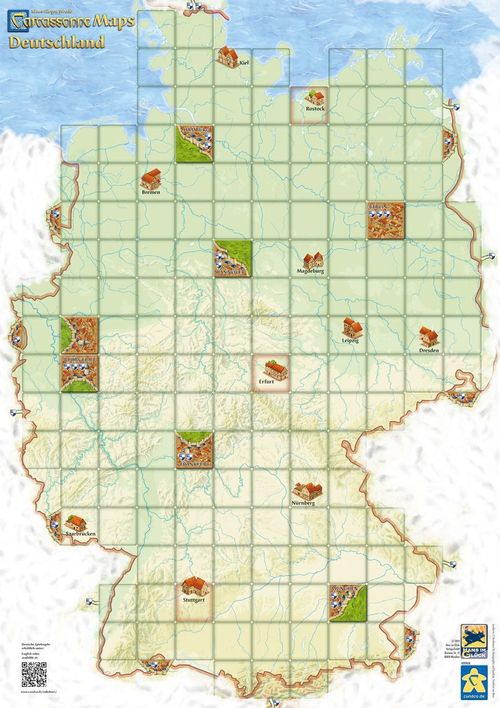
Carcassonne Maps: Deutschland
Carcassonne Maps: Deutschland Rulebook
Table of Contents
Table of Contents
Components
- 1 Carcassonne Map. In addition, you need:
- Tiles: We recommend playing with the base game tiles and the first and second expansion. Of course, you can combine everything you want to try. For each map there is a recommendation of a number of tiles you could use. It is better to play without the additional rules and meeples of the expansions and to use only the tiles.
- Meeples: If possible, every player should use 9 instead of 7 meeples (+1 meeple on the scoring board).*
* If you need additional meeples, you'll find everything you need in our webshop cundco.de.
Overview
There are several start-squares on each map. On each square there is a small town and they are with a red edging. You should start with at least 2 start-squares. Take the starting tile (with the darker backside) and one or 2 random tiles and place all of them on 2 to 3 start-squares. You start your game by placing your first tile next to these tiles.
If you play after the base game rules and without the Maps-Chips expansion rules, you simply ignore the additional prints on the maps (e.g. the wine bottles on the France Map, the colored lines on the Ibérica Map, Islands on the Benelux Map, etc.). The general rules stay the same, and some new rules are added.
(Note: to make it easier to read we will be using the words large city and town even if those words do not always represent reality.)
General Rules
1. Placing a Land tile
You're only allowed to place a tile on a preprinted square. As usual, you have to place a tile next to an already placed one. You place a compatible tile next to the starting tile (in Rostock).
Large Cities
On squares with printed large city tiles (Berlin, London, Paris, Amsterdam or Barcelona) you cannot place tiles. As soon as you place a tile next to a city tile it is connected. From now on, everybody can place a tile next to the city tile. Example: You have connected Berlin in the West with a compatible tile. From now on, everybody is allowed to place a tile on the adjacent squares.
Towns
Squares with towns (with a small house, for example Bremen, Bordeaux, Oxford, Strasbourg, Utrecht, Salamanca,...) count as normal squares. You are allowed to place tiles according to the general rules. On some Maps the rules for these tiles differ. You find some variants on page 3. Example: On this square you are allowed to place tiles according to the general rules.
Border squares with adjacent city or road
Wherever there are cities or roads printed on the "border" of the map you have to place a compatible tile. Examples: Here a city on the border was connected with a compatible tile. Here a road on the border was connected with a compatible tile.
Border squares without connection
The "border" of the map is neutral which means that you are allowed to place your tile the way you want if there are no preprinted cities or roads. Example: In this case, it doesn't matter how you place your tiles (with regard to the border).
Ferry routes
If you have connected a ferry route with a road, everybody is allowed to continue this connection on the other end of the road. Example: The ferry has been connected and now each player is allowed to place a compatible tile on the other end of the road.
2. Placing a Meeple
After having placed a tile you are allowed to place a meeple according to the general rules.
3. Scoring a feature
A coat of arms gives you 2 additional points in each scoring no matter if it is part of a road or a city.
1| Large Cities
If you complete a large city you score according to the general rules. Preprinted large city tiles are scored in the same way as a normal city tile. Coats of arms give bonus points. Example: Berlin is completed. As the owner, you get 20 points (6 tiles + 4 coats of arms [2 points per coat of arms]).
2a| Border squares with adjacent city or road
Roads which end on the border are automatically completed there. Preprinted roads or cities are scored as normal tiles. Coats of arms give bonus points. Examples: Your road is completed (it ends in Denmark). You get 8 points (4 for the road and 4 for the coats of arms). Your city is completed. You get 10 points (3 tiles + 2 coats of arms [2 points per coat of arms]).
2b| Border squares without a connection
A city, road or field placed on the border (next to clouds or the sea) is seen as completed. You score them according to the normal rules. Example: Your (half) city is completed because of the border. You get 2 points.
3| Ferry Routes
A ferry route gives you 1 point for the road plus the coats of arms on this connection. They are scored when the road is completed. Example: The road with the ferry route is completed. You get 7 points (3 points for the road and 4 points for 2 coats of arms).
4| Monastery on the border
To complete and score a monastery on the border it isn't necessary to place 8 adjacent. Only the surrounding squares (also the diagonal ones) have to be filled with tiles. However, only "real" tiles as well as preprinted large cities are scored. Example: You score your monastery on the border. You get 6 points (1 point for the monastery and 1 point each for the adjacent tiles).
Final scoring
As usual, city tiles and coats of arms of cities or roads which haven't been completed score only 1 point each. Coats of arms of uncompleted roads which end in neighboring countries also score 1 point. Example: You get 4 points for the uncompleted road (3 for the tiles and 1 for the coat of arms).
Variants
Towns
You can try to use the following additional rules for the town squares:
a) Placing a tile on top of a town grants you one instant extra tile which has to be placed immediately. This can only be done once within one draw.
b) Placing a tile on top of a town costs two points.
c) When scoring a road, you get 2 bonus points for each town which is still visible and touches your road (horizontally or vertically).
Carcassonne Maps Deutschland
With this mini-expansion you can upgrade your Meeples to have a majority during scoring.
Components
- 30 Map-Chips (10 each in purple, light blue and orange). The Map-Chips are available in our webshop (see: mini-expansions).
- We recommend playing with 110–120 tiles (e.g. base game + 1st + 2nd expansion).
Setup
Use 2 of the 3 available starting-squares (Rostock, Erfurt and Stuttgart).
Shuffle all 30 Chips face down. Place them evenly distributed on the squares of the map and stick to the following rules:
- place them face down
- only 1 chip per square
- no chips on the large city squares or town squares
- no chips next to each other vertically or horizontally (only diagonally)
- no chips vertically or horizontally adjacent to a used starting square or an open side of a large city
This is an example of how the chips could be placed.
Gameplay
1. Placing a Land tile
Collecting Chips
If you place a tile on a square with a chip you take the chip and get 1 or 2 points immediately. Then you place the chip face up in front of you. Example: You place a tile on a square with a chip and you take it. Now you get 2 points.
2. Placing a Meeple
After having placed a tile you are allowed to place a Meeple according to the general rules.
Upgrading a Meeple
If you have collected Chips with an exact value of 4 (4x 1-value | 2x 2-value | 2x 1-value + 1x 2-value), you can use them in this or in another round to upgrade one of your Meeples: You take one of your Chips (the value doesn't matter) and you place it under one of your Meeples. This can be a Meeple which has been placed in another round or the one you've just placed (the other Chips you used to pay for the upgrade are taken out of the game). You may upgrade a Meeple only once.
Example: With these Chips you can upgrade a Meeple. One Chip is placed under your Meeple. The other Chips are taken out of the game.
3. Scoring a feature
During a scoring an upgraded Meeple counts as 2 Meeples in the respective area (like the big Meeple of the 1st expansion). After scoring the Meeple returns to your stash as usual and the Chip is taken out of the game. This Meeple isn't upgraded anymore and counts again as a normal one (you may upgrade it the same way you did before).
Example: The road is completed. Because of your upgraded Meeple you have the majority and you get 4 points. Blue doesn't get any points. The upgrade-Chip is taken out of the game.
End of game
Upgraded Meeples count as two even at the end of the game (also farmers).