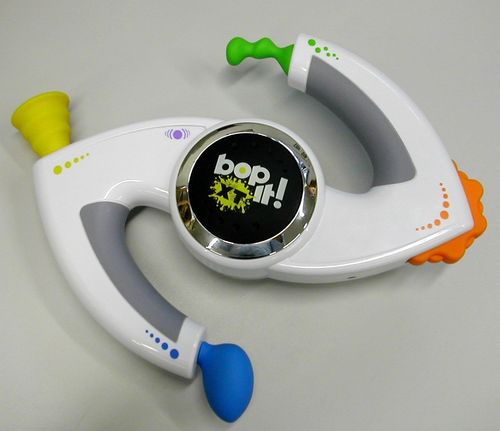
Bop It! XT
Bop It! XT Rulebook
Table of Contents
Table of Contents
Object
Keep up with BOP IT XT to score 100 points! Then unlock more challenging levels for even more fun!
How to Play
BOP IT XT will command you to do 6 actions in random order!
Respond as quickly as you can. If you respond correctly, BOP IT XT will answer with a sound and another command. But if you're not quick enough, or you respond incorrectly – you're out!
The six commands are:
- Bop It! – Hit either black button!
- Twist It! – Twist the yellow knob!
- Pull It! – Pull the blue knob!
- Spin It! – Spin the orange wheel!
- Flick It! – Flick the green lever!
- Shake It!* – Shake the game unit quickly!
* SHAKE IT can be turned on or off to make the game easier OR more challenging.
Game Unit Controls
- Level – Choose between NOVICE, EXPERT, MASTER and PRO level by repeatedly flicking the FLICK IT lever. The EXPERT, MASTER and PRO levels remain locked until you complete enough commands through SOLO play.
- Volume – Adjust the volume by spinning the SPIN IT wheel repeatedly to select: QUIET, LOUD or BLASTING.
- Shake It – Wanna shake it? Push the purple button to reveal the hidden cowbell and the game will include SHAKE IT. Push the cowbell down so that it is hidden and the SHAKE IT command is disabled.
- Headphone Jack – (labelled on the unit diagram; no further text printed)
- Begin – To begin the game you have selected, hit the BOP IT button on either side of the game unit.
- Game – Select a game by pulling the PULL IT knob repeatedly until you hear the name of the game you want to play: SOLO, PASS IT, PARTY or ONE-on-ONE.
- To wake the game up – Pull It!
- Reset Button – (labelled on the unit diagram; see the Batteries section for when to use it)
Default and sleep:
- BOP IT XT will default to the SOLO game on the LOUD setting, or the last game played.
- If you leave BOP IT XT alone for a few moments without playing, it will "go to sleep." To turn the game back ON, pull the PULL IT knob.
Games
Solo Game
Players: For 1 player, or take turns in a multi-player game.
Object: Keep up with BOP IT XT, and rack up the highest score. Play alone and go for your personal best score, or take turns to see who can score highest.
Play: Hit the BOP IT button to start the game. Respond quickly to the commands you hear. If you don't respond in time, or you respond incorrectly, BOP IT XT will end the game! Listen carefully to hear the number of completed actions (your score) at the end of the game. The next time you play, try to beat your last score.
Winning: If you are taking turns and playing the SOLO game in a group, the winner is the player with the highest personal score. Note: Before each SOLO game you play, the High Score (if any) will be announced! Try to beat it!
Pass It Game
Players: For 2 or more players. Face each other or stand in a circle.
Object: Keep up with BOP IT XT, and be the last player "alive" to win.
Play: Choose a player to go first. Hit the BOP IT button to start the game. Respond quickly to the commands you hear. When you hear "Pass It", quickly hand BOP IT XT to the player on your left (and that player continues the game by following the commands). If you don't respond in time, or you respond incorrectly to the command, you're out of the game! Pass it to the next player, who hits BOP IT to continue. For a longer game, give everyone 2 or 3 chances to fail before eliminating them.
Winning: If you're the last player left, you win!
Party Game
Players: For 2 or more players who aren't afraid to get a little silly! Face each other or stand in a circle.
Object: Keep up with BOP IT XT, and use your WHOLE BODY to play. Be the last player "alive" to win.
Play: This game plays like the PASS IT Game, with the following exception: If you hear a body part called out, you must hit the BOP IT button with that part of your body. Players should keep an eye on each other to make sure the right body part was tapped. If not, the player who messed up must stop and is out of the game. For a longer game, give everyone 2 or 3 chances to fail before eliminating them.
Winning: If you're the last player left, you win!
One-on-One Game
Players: For 2 players.
Object: Keep up with BOP IT XT; don't mess up while you're in "control."
Play: Pick your color – green or yellow, then hold the game by that handle. The green player controls FLICK IT and SPIN IT; the yellow player controls PULL IT and TWIST IT. Either player can respond to SHAKE IT. But, if no one responds, you both lose! When you hear "BOP IT," hit the BOP IT button that has your color "XT" logo on it. The game will call out who hit the button first, and award that player one point!
To begin – either player can hit the BOP IT button.
Winning: There are two ways to win 1) be the first to score 5 points; OR 2) if at any time during the game your opponent misses or fails to react … you win!
Levels and Scoring
At each level, if you complete 100 commands in the SOLO game you unlock the next (more challenging) level. Once a level is unlocked, you may access it in the future simply by flicking the FLICK IT lever.
Novice Level
All actions are called out as voice commands.
Expert Level
This level will randomly mix voice commands with sound effects as follows:
- "Bass drum" sound means BOP IT.
- "Low-pitched ratchet" sound means TWIST IT.
- "Whistle" sound means PULL IT.
- "Whirl" sound means SPIN IT.
- "Boing" sound means FLICK IT.
- "Cowbell" sound means SHAKE IT.
Master Level
This level will randomly mix voice commands with the sound effects described in the EXPERT level, and color commands as follows:
- "Black" means BOP IT.
- "Yellow" means TWIST IT.
- "Blue" means PULL IT.
- "Green" means FLICK IT.
- "Orange" means SPIN IT.
- "Purple" means SHAKE IT.
Pro Level
The game will call out a set of three randomly mixed commands (voice prompts, sound effects and colors). It will then say, "Go!", initiating a period of time for the player to complete these three actions.
If you complete 100 sets at the PRO level – congratulations! YOU BEAT THE GAME!
PRO LEVEL is not accessible during the one-on-one game.
Note: When the batteries are replaced, any accumulated command points are returned to zero, and the Expert, Master and Pro levels are locked again. Any time you replace the batteries you should hit the RESET button.
Batteries
Batteries included: 3 x 1.5V AAA or R03 size. Replace with 3 x 1.5V "AAA" or R03 size batteries. Alkaline batteries recommended. Phillips/cross head screwdriver (not included) needed to replace batteries.
To replace batteries: Loosen the screw on the battery compartment and remove the door. Insert 3 AAA-size batteries (we recommend alkaline), making sure to align the + and – symbols with the markings in the plastic. Replace the door and tighten the screw, then push in the RESET BUTTON.
Important: Battery Information
Caution:
- As with all small batteries, the batteries used with this product should be kept away from small children who still put things in their mouths. If they are swallowed, promptly see a doctor and have the doctor phone (202) 625-3333 collect. If you reside outside the United States, have the doctor call your local poison control center.
- Always follow the instructions carefully. Use only batteries specified and be sure to insert them correctly by matching the + and – polarity markings.
- Do not mix old batteries and new batteries or standard (carbon-zinc) with alkaline batteries.
- Remove exhausted or dead batteries from the product.
- Remove batteries if product is not to be played with for a long time.
- Do not short-circuit the supply terminals.
- Should this product cause, or be affected by, local electrical interference, move it away from other electrical equipment. Reset (switching off and back on again or removing and re-inserting batteries) if necessary.
- RECHARGEABLE BATTERIES: Do not mix these with any other types of batteries. Always remove from the product before recharging. Recharge batteries under adult supervision. DO NOT RECHARGE OTHER TYPES OF BATTERIES.