Barrage: The Colorado Connection
Barrage: The Colorado Connection Rulebook
Table of Contents
Table of Contents
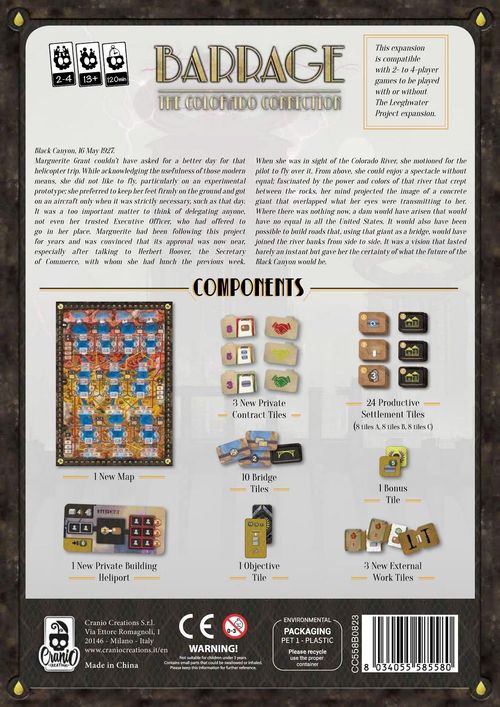
Components
- 1 New Map
- 24 Productive Settlement Tiles (8 tiles A, 8 tiles B, 8 tiles C)
- 10 Bridge Tiles
- 1 Bonus Tile
- 1 Objective Tile
- 3 New Private Contract Tiles
- 1 New Private Building: Heliport
- 3 New External Work Tiles
Setup
Use all the rules for setting up the base game with the following modifications.
- Use the new Colorado Map in place of the base standard map.
- Shuffle the three new Private Contracts in the corresponding pile.
- Add the new Bonus tile to those of the basic game and then randomly draw the 5 tiles you will use. Put the remaining tiles back in the box.
- Add the new Objective tile to those of the basic game before to randomly select the one to be used in the current game. Put the remaining tiles back in the box.
In addition to the base setup:
- Divide the Production Settlement tiles (sic, as printed) according to their type (A, B and C) and randomly place them on the designated spaces on the Map, face up. Put the remaining tiles back in the box.
- Randomly place the 10 Bridge tiles in the designated Construction Site spaces on the Map (4 Bridges in the Mountains area, 3 Bridges in the Hills area, 3 Bridges in the Plains area).
If you are playing with the Leeghwater Project:
- Add the new Private Building tile to those of the Leeghwater Project before to draw the 5 tiles to be used in the current game.
- Add the new External Work tiles to those of the Leeghwater Project. Divide the tiles according to their backs and shuffle the piles separately. Randomly draw one tile from each pile and put these tiles back in the box (this way you will have a different set up of External Work tiles in every game you play).
Additional Rules
The game flow is the same as the basic game with the following modifications.
Action Phase
New Action: Building a Bridge
The Map shows 3 new non-exclusive Construction Site action spaces (1 space for each Area). These action spaces allow you to perform the new action: Building a Bridge. To perform this action you need to follow these steps:
- Place 1 Engineer in the Construction Site action space of the area where you want to build (you can place an Engineer in this space even if there are already other Engineers, yours or other players').
- Pay a number of Credits equal to the basic cost indicated (1 Credit), plus any additional cost that may be revealed (2 Credits for each Bridge previously built in this Construction Site).
- Choose a Bridge tile from the Construction Site where you have placed your Engineer and place it over one of your own Dams in the same area (the Dam can be made of a Base alone or it can have any number of Elevations). It is not possible to build a Bridge:
- on a Neutral Dam or a Dam of an opponent;
- on a Dam where there is already a Bridge tile;
- in a basin where there is already a Bridge tile (there can only be one Bridge in each basin).
- Immediately take the bonus indicated on the Bridge tile (for a detailed description of bonuses, see the Bridge Tile Effects table below).
Example: Tommaso (green) decides to build a Bridge in the Mountains area, over a Base he had already built. He places 1 Engineer on the Construction Site action space and pays 3 Credits (the basic cost of 1 Credit + 2 Credits for the Bridge already built by the red player). He places the Bridge tile over his Base and gains 3 VPs. He won't be able to build Elevations over this Base.
You cannot build an Elevation over a Dam with a Bridge tile.
New Action: Activating a Productive Settlement
The Map shows 10 new exclusive Productive Settlement action spaces (4 in the Mountains area, 3 in the Hills area, and 3 in the Plains area). These action spaces allow you to perform the new action: Activating a Productive Settlement. To perform this action you need to follow these steps:
- Place the requested number of Engineers (1 or 2) in the action space of the Productive Settlement you want to activate.
- Pay a number of Credits for each basin you cross to reach the action space starting from the Construction Site of the same area (all the action spaces are connected by roads, from left to right in the Mountains and Plains area, from right to left in the Hills). The cost is calculated as follows:
- pay 3 Credits to the general supply for each basin you cross without a Bridge tile;
- pay 0 Credits for each basin you cross where you have a Dam with a Bridge tile;
- pay Credits to other players for each basin you cross where they have a Dam with a Bridge tile: pay 1 Credit if the Bridge is in the first basin you cross starting from the Construction Site, 2 Credits if it's in the second basin, 3 Credits if it's in the third basin, 4 Credits if it's in the fourth basin. That player also scores 1 VP.
- Get immediately the bonus shown on the Productive Settlement you have activated (for a detailed description of all the effects, see the Productive Settlement Tile Effects table below).
Example: Tommaso (green) decides to perform the action "Activating a Productive Settlement" in the Mountains area, on the third action space starting from the Construction Site and he places the 2 Engineers requested. He pays 0 Credits for the first basin because there is a Bridge tile on his own Dam, he pays 2 Credits to Simone (red) for the second basin because there is a Bridge tile on Simone's Dam, then he pays 3 Credits to the general supply for the third basin because there are no Bridge tiles. Tommaso gets the bonus of the Productive Settlement and Simone scores 1 Victory Point.
Bridge Tile Effects
The Bridge tile effects are explained in detail in the following table:
| Effect | Effect |
|---|---|
| Rotate your Construction Wheel by 2 segments. | Move your Energy marker on the Energy track by 5 steps. |
| Gain 5 Credits. | Place up to 3 Water Drops on one or more Headstream tiles of your choice. |
| Place up to 2 Water Drops on one or more Headstream tiles of your choice. These Water Drops flow immediately. | Take 2 available Private Contract tiles of your choice. |
| Receive 2 Excavators. | Score 3 Victory Points. |
| Receive 1 Concrete Mixer and gain 2 Credits. | Activate a production. |
Productive Settlement Tile Effects
The Productive Settlement tile effects are explained in detail in the following table:
| Type A tiles | Type B tiles | Type C tiles | |
|---|---|---|---|
| Rotate your Construction Wheel by 2 segments. | Receive 2 Machineries of your choice. | Score 1 Victory Point for every 2 Credits in your personal supply. | |
| Receive 2 Excavators. | Perform a Construction action without placing Engineers. | Receive 3 Machineries of your choice. | |
| Gain 5 Credits. | You can place 1 Water Drop in each of your Dams that can hold it. | Perform a production action with a bonus of +3. | |
| Move your Energy marker on the Energy Track by 5 steps. | Move your Energy marker on the Energy track by X steps. X is equal to the sum of the production value of all the Conduits you have built. (Ex. Tommaso has built 3 Conduits of value 2, 4, and 5 so he moves his marker by 11 steps.) | Build a Conduit with a production value of 4 (or less). You don't have to place Engineers or insert Technology tiles or Machineries in your Construction Wheel. | |
| Take 1 Machinery back from each segment of your Construction Wheel (put them back in your personal supply). |
New Tiles
New Private Contracts
There are 3 new Private Contract tiles (1 per level; the tiles are marked 3, 5 and 8 as printed):
- Marked 3: Build a Bridge for free.
- Marked 5: Get the effect of two different Bridge tiles built on your Dams.
- Marked 8: Get the bonus of a Productive Settlement of type C of your choice for free. You don't need to place Engineers or pay the Credits for the crossed basins.
New External Works
There are 3 new External Work tiles (1 per level):
- Build for free a Base and a Bridge over it. You don't have to place Engineers or insert Technology tiles or Machineries in your Construction Wheel.
- Gain 6 Credits and get the bonus of a Productive Site of type B of your choice. You don't need to place Engineers or pay the Credits for the crossed basins.
- Score 7 VPs and build an Elevation. You can build this Elevation in a Dam with a Bridge tile (move the Bridge tile above the Elevation). You don't have to place Engineers or insert Technology tiles or Machineries in your Construction Wheel.
New Private Building
Heliport: Pay 2 Credits to get the bonus of a Productive Site of type C of your choice. You don't need to place Engineers or pay the Credits for the crossed basins.
New Scoring Tile
All the Bases and Elevations that make up your Dams with a Bridge.
New Bonus Tile
Score 5 VPs for each Bridge you have built.