Backyard Chickens: Solo Expansion
Backyard Chickens: Solo Expansion Rulebook
Table of Contents
Table of Contents
New Components
- 1 Fox Token
- 15 Fox Cards
- 1 Reference Card (Fox Player Reference Card)
Setup
Follow the steps as outlined in the Backyard Chickens rule book with the following addition steps.
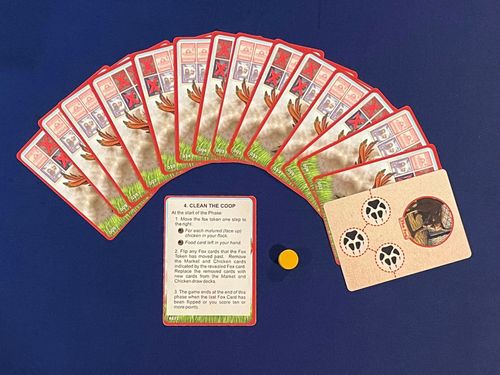
A. Shuffle Fox Cards: Shuffle the Fox Card deck face-down.
B. Place Fox Cards: Place twelve Fox Cards face-down in two rows of six above the offering. Return the un-used Fox Cards to the game box.
C. Place Fox Token: Place the Fox Token in the first paw space in the upper left Fox Card.
D. Place Player Reference Card: Place the Fox Player Reference card next to your player board for reference during the game.
Game Play Changes
Three new steps are performed at the start of the Clean the Coop phase before you play through the phase. All other game turn phases remain the same.
1. Move Fox Token
The Fox token is moved along the paw spaces from left to right on the Fox Cards. Move the Fox Token to the first paw space of the left-most Fox Card on the bottom row when the top row is completed.
Move the fox token one paw step to the right:
- For each matured (face-up) chicken in your flock. Chickens that have run away are not counted.
- Food each card left in your hand.
Example: You have two chickens in your flock and one food card left in your hand. The Fox Token is moved three paw spaces.
Editor's note: the draft's second bullet reads "Food each card left in your hand." The sense, confirmed by the FAQ below, is one paw step for each food card left in your hand. Transcribed as printed.
2. Flip Fox Cards
Flip any Fox cards that the Fox Token has moved past. Remove the Market and Chicken cards indicated by the revealed Fox card. Replace the removed cards with new cards from the Market and Chicken draw decks. Process one flipped Fox Card at a time if more than one is flipped during the phase.
Example: In the previous example the Fox Token moved past a Fox Card. The Fox Card is turned face up, revealing the table of Market and Chicken cards. The left-most Chicken and Market card are removed from the offering and replaced with new cards from the draw decks.
3. End Game Trigger
The game ends at the end of the Clean the Coop phase when the last Fox Card has been flipped or you score ten or more points.
Solo Rank
Consult the table below and find your end game condition in the End Game column. Your rank is listed in that row.
| End Game | Rank |
|---|---|
| You have fewer than ten points. | Beginner |
| No face-down Fox Cards remaining. | Hobbyist |
| One face-down Fox Card remaining. | Farm Hand |
| Two face-down Fox Cards remaining. | Egger |
| Three face-down Fox Cards remaining. | Bird Wrangler |
| Four face-down Fox Cards remaining. | Chicken Whisperer |
| Five or more face-down Fox Cards remaining. | Honorary Mother Hen |
Printed example: "For example, you score 11 points and there are two face-down Fox Cards remaining. Your rank is 'Bird Wrangler'."
Editor's note: the printed example says two face-down Fox Cards gives "Bird Wrangler", but the printed table lists two face-down Fox Cards as "Egger" and three as "Bird Wrangler". The example is transcribed as printed and the table is transcribed as printed; the discrepancy is unresolved in this draft and should be checked against the final published rules.
FAQ
Q. Can you overfeed a chicken to keep food cards out of your hand?
A. Yes, but only with using 1 food card. For example, you have three two food cards and your 2 starting chickens. You may use one two-food card on each of the chickens, overfeeding each by one. The remaining unused food card remains in your hand and moves the Fox one paw space forward at the start of the .Clean the Coop phase.
Q. Since treat cards can be used to feed my chickens, do unused treat cards count as food and advanced the fox token?
A. No, treats do not advance the fox.
Q. Can I use the advanced event rules with the solo mode?
A. Yes, absolutely. It adds a nice challenge.
Q. Do special cards that are used as food move the fox?
A. No. Only card with the food icon in the upper left hand corner moves the fox.
Example: CORN card shown in the printed FAQ with a food icon in its upper left corner.