Alhambra: Queenie 1 – The Magical Buildings
Alhambra: Queenie 1 – The Magical Buildings Rulebook
Table of Contents
Table of Contents
Components
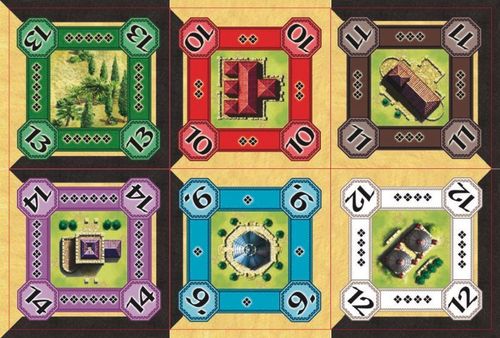
- 6 Magical buildings
- 6 Orientation tiles
Changes in Setup
Shuffle the 6 Magical Buildings in with the other tiles and place them in the tile dispenser tower.
The orientation tiles are placed next to the building market.
Changes in Game Play
When a magical building is drawn from the tower, it is placed on the building market and offered for sale as usual.
A player purchasing such a building may add it to their Alhambra according to the building rules, or store it in their reserve.
When adding a magical building to their Alhambra, the player may turn the tile in any direction; no matter if it was just purchased, taken from their reserve or if they are redesigning their Alhambra.
After a player has placed a magical building in their Alhambra they take the corresponding orientation tile and place it correctly on top.
Changes in Scoring
For each scoring the magical buildings are considered a normal building of their respective type.
Example
The player wants to augment their Alhambra by adding the magic pavilion to the left of their garden. Obeying the building rules, they may choose from two options when placing the magical building at this location.
The booklet's example shows the two placements as diagrams, labelled Option 1 and Option 2.